Solar System Scope
Zaktualizowano
Aktualna wersja
3.2.6
Sprzedawca

Przestań martwić się nadmiernymi opłatami podczas korzystania z Solar System Scope na telefonie komórkowym, uwolnij się od małego ekranu i ciesz się korzystaniem z aplikacji na znacznie większym wyświetlaczu. Od teraz korzystaj z aplikacji na pełnym ekranie za pomocą klawiatury i myszy. MEmu oferuje wszystkie zaskakujące funkcje, których się spodziewałeś: szybką instalację i łatwą konfigurację, intuicyjne sterowanie, koniec z ograniczeniami baterii, danych mobilnych i niepokojących połączeń. Zupełnie nowy MEmu 9 to najlepszy wybór do używania Solar System Scope na twoim komputerze. Zakodowany przez naszą absorpcję, menedżer wielu instancji umożliwia otwarcie 2 lub więcej kont w tym samym czasie. A co najważniejsze, nasz ekskluzywny emulator może uwolnić pełny potencjał twojego komputera, sprawić, że wszystko będzie płynne i przyjemne.
Pokaż więcej
Ciesz się wspaniałym doświadczeniem podczas grania w Solar System Scope na komputerze z aplikacją MEMU App Player. Jest to potężny darmowy emulator Androida pozwalający grać w tysiące gier na Androida. Solar System Scope is a fun way of Exploring, Discovering and Playing with the Solar System and Outer Space.
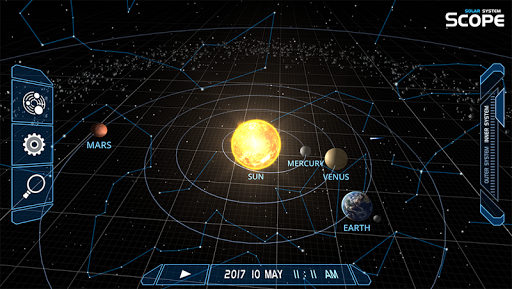
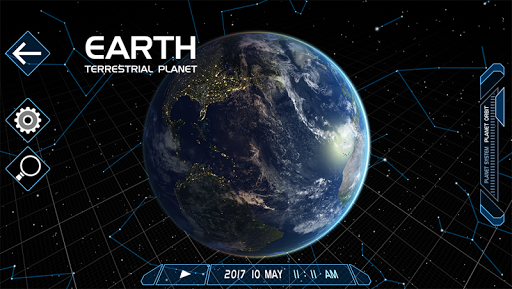
Solar System Scope is a fun way of Exploring, Discovering and Playing with the Solar System and Outer Space.
Welcome to the Space Playground
Solar System Scope (or just Solar) contains many views and celestial simulations, but most of all - it brings you closer to the furthest reaches of our world and lets you experience lots of fantastic space sceneries.
It aspires to be the most illustrative, easy to understand and simple to use space model.
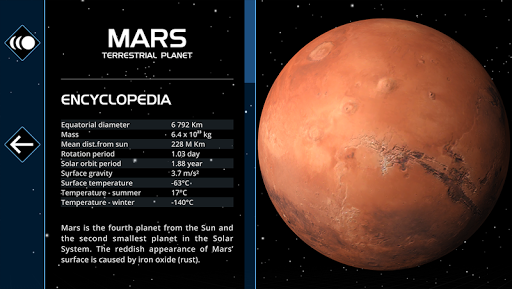
3D Encyclopedia
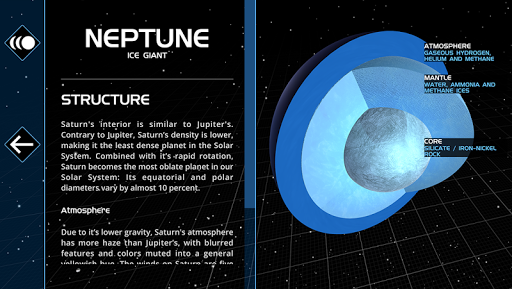
In Solar’s unique encyclopedia you will find the most interesting facts about every planet, dwarf planet, every major moon and more – and everything is accompanied by realistic 3D visualizations.
Solar’s encyclopedia is available in 19 languages: English, Arabic, Bulgarian, Chinese, Czech, French, German, Greek, Indonesian, Italian, Korean, Persian, Polish, Portuguese, Russian, Slovak, Spanish, Turkish and Vietnamese. More languages are coming soon!
Nightsky Observatory
Enjoy Stars and constellation of the night sky as viewed from any given location on Earth. You can point your device at the sky to see all objects in their proper place, but you can also simulate Night sky in the past or in the future.
Now with advanced options that let you simulate ecliptic, equatorial and azimuthal line, or grid (among other things).
Scientific Instrument
Solar System Scope calculations are based on up-to-date orbital parameters published by NASA and let you simulate celestial positions at any given time.
For Everyone
Solar System Scope is well suited for all audiences and ages: It is enjoyed by space enthusiasts, teachers, scientists, but Solar is successfully used even by children of 4+ years of age!
Unique Maps
We are proud to present a very unique set of planetary and moon maps, that let you experience a true-color space as never before.
These accurate maps are based on NASA elevation and imagery data. Colors and shades of the textures are tuned according to true-color photos made by Messenger, Viking, Cassini and New Horizon spacecrafts, and the Hubble Space Telescope.
Basic resolution of these maps is for free – but if you would like the best experience, you can check out the highest quality, which is available with In-App purchase.
Join our vision
Our vision is to build the ultimate space model and bring you the deepest space experience.
And you can help - try Solar System Scope and if you like it, spread the word!
And don’t forget to join the community and vote for new features on:
http://www.solarsystemscope.com
http://www.facebook.com/solarsystemscopemodels
Pokaż więcej

1. Pobierz instalator MEmu i zakończ instalację

2. Uruchom MEmu, a następnie otwórz Google Play na pulpicie

3. Wyszukaj Solar System Scope w Google Play
Install
4. Pobierz i zainstaluj Solar System Scope
5. Po zakończeniu instalacji kliknij ikonę, aby rozpocząć

6. Użyj MEmu, aby doświadczyć Solar System Scope na swoim komputerze
MEmu Play to najlepszy emulator Androida, z którego korzysta ponad 100 milionów użytkowników, ciesząc się wyjątkowym doświadczeniem aplikacji na Androida. Technologia wirtualizacji MEmu pozwala na płynne uruchamianie tysięcy aplikacji Androida na komputerze, nawet tych najbardziej wymagających.
Większy ekran z lepszą grafiką; Długi czas, bez ograniczeń baterii lub danych mobilnych.
Pełna obsługa mapowania klawiszy dla precyzyjnego sterowania klawiaturą i myszą lub gamepadem.
Wiele kont gier lub zadań na jednym komputerze jednocześnie z menedżerem wielu instancji.