Carb Curious電腦版

Carb Curious電腦版下載

Carb Curious電腦版
  • 更新日期

  • 目前版本

    1.0.9

  • 提供者

    Carb Curious電腦版

Carb Curious電腦版簡介

想體驗Carb Curious,可是手機熒幕太小,一載軟體就變燙,怎麼辦?透過逍遙模擬器,在電腦的大熒幕上暢快體驗!用鍵鼠操作更精準流暢,逍遙模擬器滿足您的所有期待。在電腦上下載安裝Carb Curious,不用擔心電池當掉,想體驗多久就多久,順暢跑一天~全新的逍遙模擬器9,絕對是您體驗Carb Curious電腦版的最佳選擇。完美的按鍵映射系統讓Carb Curious如PC軟體般順手;強大的多開功能可同時執行多個任務;獨家虛擬化技術更能徹底釋放電腦效能,保障長時間穩定運作。我們致力於不讓設備限制您的體驗,助您輕鬆高效,暢快無比!

更多

Carb Curious電腦版截圖&影片

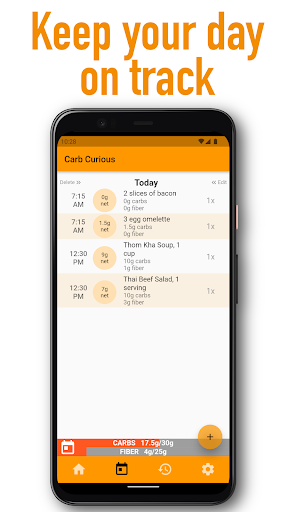
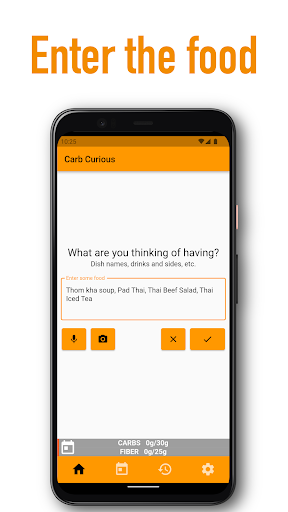
透過逍遙模擬器,在電腦上下載Carb Curious,享受大熒幕的暢快體驗。 Have you noticed your weight creeping up despite your best efforts?
應用訊息

Have you noticed your weight creeping up despite your best efforts? You’re not keeping up with your food diary or able to stay in ketosis?
Why does this happen?

I’ve bumped up against this delicate balance to lose weight and maintain the loss. It’s getting more sensitive as I get older. For me, the biggest factor is carbs. Sometimes a ton of them are hiding where you don’t expect them. Keep those in check and then managing my weight and physique become much easier.

You know this already. Sugar is the new smoking they say. Everyone seems to know someone on the Keto/South Beach/Low Carb/etc diet.

What if you gave it a try with a tool designed to take less time and give the most benefit?

Carb Curious is the orange to the standard food diary app apple. Simpler, more effective. It’s a different fruit.

Tracking all calories, fat, protein, carbs is like bringing your whole wardrobe for a beach trip. Most of it just isn’t useful and takes up space and takes extra effort.


FAQ:


What is the main purpose of this app?
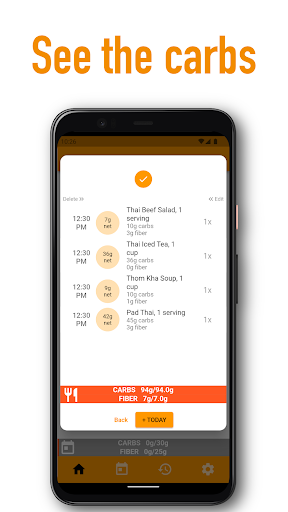
The main purpose of this app is to help users track their daily carb and fiber intake by estimating the content in their meals, making it easier for them to achieve their health goals and maintain a balanced diet.

Do I need to weigh my food or enter portion sizes?
Nope, it is not necessary. The app is designed to provide approximate carb and fiber values based on your meal descriptions, making it quick and convenient for everyday use.
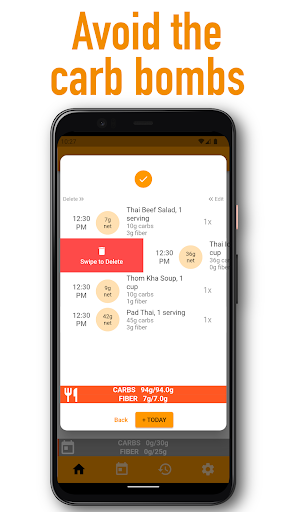
To fine tune results you can adjust the quantity by tapping or long-pressing the ‘1x’ area. And even finer tuning by editing the entry.

How accurate is Carb Curious?
Carb Curious provides an estimate based on a variety of recipes and possible ingredients. It’s impossible to be 100% accurate because of portion size, ingredient variations, etc. Carb Curious tries to make things as quick and simple to get the most benefit with the least effort.

Is there a subscription fee or any in-app purchases?
The app allows manual entry of food items. A subscription is required to use the smart entry estimator.

How does the app estimate carbs and fiber content?
The app uses natural language processing (NLP) to understand the meal descriptions entered by the user and then estimates the carbs and fiber content based on common recipes and portion sizes.

Can I set my daily net carb goal in the app?
Yes, you can set a personalized daily net carb goal in the app, allowing you to monitor your progress and make necessary adjustments to achieve your desired results.

Is the app suitable for specific diets, such as keto or low-carb?
The app is designed to help users track and manage their carb and fiber intake, making it useful for various diets, including keto, low-carb, and other nutrition plans that focus on carb intake.

Does the app support tracking other nutrients, such as protein and fat?
The app’s primary focus is on tracking carbs and fiber to simplify the process of maintaining a target diet.

更多

在電腦上下載Carb Curious

  • Carb Curious電腦版

    1. 下載逍遙安裝器並完成設置

  • Carb Curious電腦版

    2. 啟動逍遙後打開位於桌面上的谷歌商店

  • Carb Curious電腦版

    3. 在谷歌商店中搜尋Carb Curious

  • Carb Curious電腦版 Install

    4. 下載並安裝Carb Curious

  • Carb Curious電腦版

    5. 下載完成後點擊圖標來啟動

  • Carb Curious電腦版
    Carb Curious電腦版 Carb Curious電腦版

    6. 透過逍遙享受在電腦上體驗Carb Curious

為什麼用逍遙體驗Carb Curious

逍遙安卓是優秀的安卓模擬器,全球超過5000萬用戶的優先選擇。逍遙安卓以虛擬化技術為核心,為用户打造突破手機配備局限的應用平台!

  • 大屏精細展示;無限待機,超越電池和流量限制

  • 鍵鼠,手把操作全面支持,操作更精準

  • 用逍遙多開同時運行多個遊戲、應用。

準備體驗了嗎?

熱門話題

Carb Curious - FAQs

  • How to use Carb Curious on PC?

    Use Carb Curious on PC by following steps:

    • Download MEmu, then install and launch it
    • Login to Google Play Store, install the app
    • Enjoy using the app on PC with MEmu
  • What are the minimum system requirements to run Carb Curious on PC?
    • Intel or AMD Processor
    • Microsoft Windows 7 and above
    • 2GB of memory
    • 5GB of free disk space
    • Hardware Virtualization Technology