
ChefsLink
更新日期
目前版本
1.32
提供者

想體驗ChefsLink,可是手機熒幕太小,一載軟體就變燙,怎麼辦?透過逍遙模擬器,在電腦的大熒幕上暢快體驗!用鍵鼠操作更精準流暢,逍遙模擬器滿足您的所有期待。在電腦上下載安裝ChefsLink,不用擔心電池當掉,想體驗多久就多久,順暢跑一天~全新的逍遙模擬器9,絕對是您體驗ChefsLink電腦版的最佳選擇。完美的按鍵映射系統讓ChefsLink如PC軟體般順手;強大的多開功能可同時執行多個任務;獨家虛擬化技術更能徹底釋放電腦效能,保障長時間穩定運作。我們致力於不讓設備限制您的體驗,助您輕鬆高效,暢快無比!
更多
透過逍遙模擬器,在電腦上下載ChefsLink,享受大熒幕的暢快體驗。 CHEFSLINK is a community of chefs and restaurants, and the meeting point between their respective needs.
CHEFSLINK is a community of chefs and restaurants, and the meeting point between their respective needs. Are you looking for a chef to incorporate into your restaurant's team? Are you looking for a restaurant where you can pursue your passion? Chefs Link is your missing ingredient.
How do we work for chefs?
Chefs Link is a free service for all our Chefs looking for jobs. No risk and no payment is needed whatsoever. We have access to an extensive restaurant network with the best possible career opportunities available in the restaurant scene. Opportunities that promises to boost your career as a Chef, and will allow you to work alongside and be mentored by some of the best Chefs in the world. We are dedicated to helping you establish and manage your career as a Chef.
How do we work for restaurants?
We dedicate our time to finding the most talented Chefs for our Restaurants through our networks, marketing and good relationships with some of the best culinary schools in the world. It enables us to find the talent that will meet your specific needs. Our company is designed to eliminate the hassle and frustration usually associated with the recruitment process by making it as easy as possible for you and your business. We offer two recruitment plans Free Sign Up ( recruitment fee will apply) or Premium (once-off annual fee). For more information, please visit our website or email us at info@chefslink.com
All the tools you will need
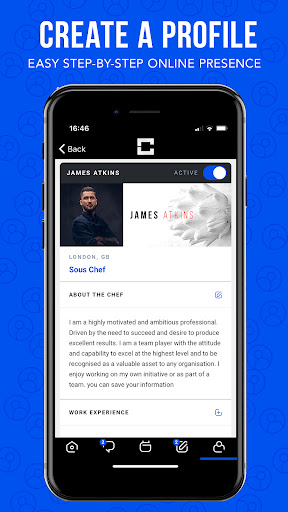
Create a Profile:
This information will provide our team with all the necessary information they need to help you find the best possible Job or Chef.
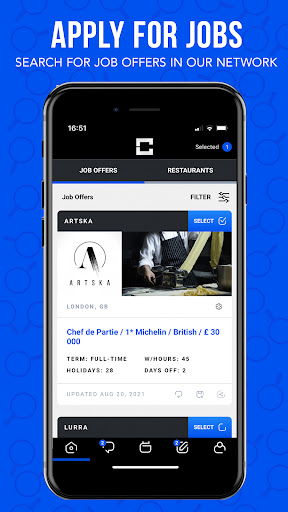
Apply for Jobs :
Chefs can apply to the Job Offer with a few simple clicks; the restaurant will be notified that the Chef is interested in that Job and receive a full Profile description and dates when the Chef is available for a trial or interview.
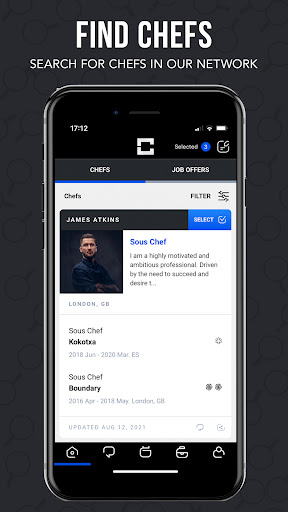
Find Chefs:
All the Chefs in our network have a summary of their curriculums with only the most relevant information about their careers as a Chef, posted on our website. Simply selecting the Chefs profiles that interest your requirements and send them a Job Offer.
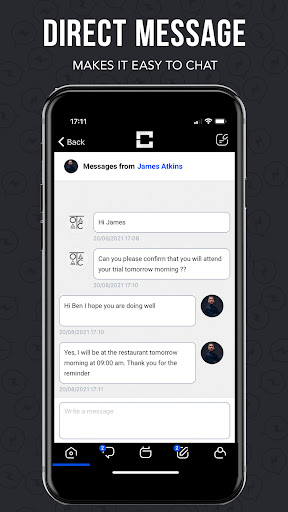
Direct Message:
Our Message system makes it easy to chat directly with Premium Restaurants and Chefs in case you need more information.
Calendar:
Our calendar will automatically put all the confirmed trials and interviews in one organised place so that you can keep track of your appointments.
Post Jobs:
Create as many Job offers on our website as you like and even store the ads in your profile for future recruitment use.
Link Technology:
Our website's smart-profiling will automatically link you with the Chefs and Restaurants that matter to you.
Latest Job Offer or Chef Alerts:
You will receive a weekly email alert with all the latest job offers and Chefs that were automatically linked to your profile according to the information you have provided.
Need help or have any questions? Please email us at info@chefslink.com
Like our App? Please leave a review!
更多

1. 下載逍遙安裝器並完成設置

2. 啟動逍遙後打開位於桌面上的谷歌商店

3. 在谷歌商店中搜尋ChefsLink
Install
4. 下載並安裝ChefsLink
5. 下載完成後點擊圖標來啟動

6. 透過逍遙享受在電腦上體驗ChefsLink
逍遙安卓是優秀的安卓模擬器,全球超過5000萬用戶的優先選擇。逍遙安卓以虛擬化技術為核心,為用户打造突破手機配備局限的應用平台!
大屏精細展示;無限待機,超越電池和流量限制
鍵鼠,手把操作全面支持,操作更精準
用逍遙多開同時運行多個遊戲、應用。
Use ChefsLink on PC by following steps: