
FalconCast: Tv IPTV Player
更新日期
目前版本
2.0.0
提供者

想體驗FalconCast: Tv IPTV Player,可是手機熒幕太小,一載軟體就變燙,怎麼辦?透過逍遙模擬器,在電腦的大熒幕上暢快體驗!用鍵鼠操作更精準流暢,逍遙模擬器滿足您的所有期待。在電腦上下載安裝FalconCast: Tv IPTV Player,不用擔心電池當掉,想體驗多久就多久,順暢跑一天~全新的逍遙模擬器9,絕對是您體驗FalconCast: Tv IPTV Player電腦版的最佳選擇。完美的按鍵映射系統讓FalconCast: Tv IPTV Player如PC軟體般順手;強大的多開功能可同時執行多個任務;獨家虛擬化技術更能徹底釋放電腦效能,保障長時間穩定運作。我們致力於不讓設備限制您的體驗,助您輕鬆高效,暢快無比!
更多
使用逍遙模擬器在電腦上享受FalconCast: Tv IPTV Player的卓越體驗。這是一款功能強大的免費安卓模擬器,為您提供數千款安卓應用程式的桌面版本。與好友互動,有效率完成工作,盡情享受! Welcome to FalconCast.

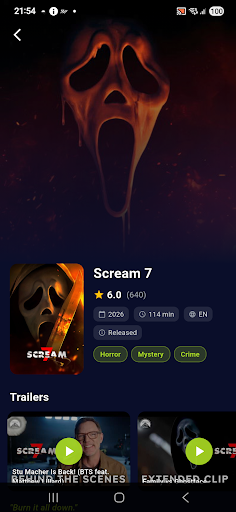
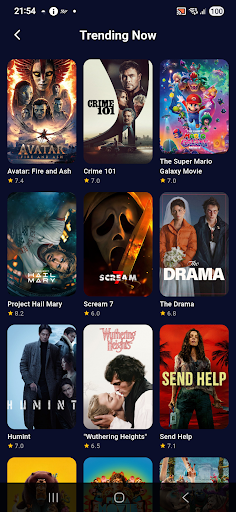
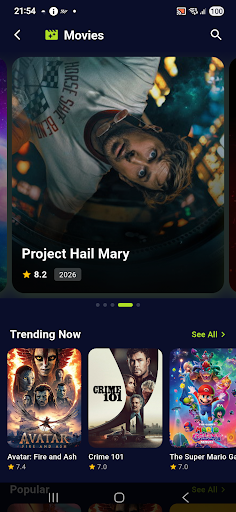
Welcome to FalconCast.
FalconCast is your all-in-one portal for digital entertainment and media management. Our application combines the thrill of exploring the latest cinematic releases with the power of an advanced IPTV player, providing an unmatched browsing and viewing experience in a single platform. Whether you want to discover trending blockbuster movies, read detailed theatrical information, watch official trailers, or use a reliable player for your personal IPTV playlists, FalconCast is the perfect choice.
Key Features
Advanced Movie Discovery: Browse constantly updated lists of trending and popular movies with details on ratings, release years, runtimes, and genres like horror, mystery, and action.
Trailers and Behind the Scenes: Watch the latest official trailers and exclusive behind-the-scenes clips to help you choose your next favorite film.
Professional IPTV Player: Stream your personal channels and playlists easily via the built-in IPTV player that offers high speed, stability, and support for various formats.
Smart QR Scanner: Use the integrated QR code scanner to quickly add playlist links or explore content without the hassle of manual typing.
Interactive Memory Game: Enjoy a built-in memory game designed to keep your mind active and pass the time enjoyably.
Modern User Interface: Navigate effortlessly through a sleek, dark-themed design that provides a visually pleasing and smooth browsing experience.
Important Disclaimer
FalconCast acts exclusively as a movie information discovery tool and a media player. The app does not contain any built-in media content, subscriptions, or free and paid live channels. Users must provide and add their own streaming playlists and content to use the player functionality. We do not endorse or encourage the streaming of any copyright-protected material without explicit permission from the respective rights holders.
更多

1. 下載逍遙安裝器並完成設置

2. 啟動逍遙後打開位於桌面上的谷歌商店

3. 在谷歌商店中搜尋FalconCast: Tv IPTV Player
Install
4. 下載並安裝FalconCast: Tv IPTV Player
5. 下載完成後點擊圖標來啟動

6. 透過逍遙享受在電腦上體驗FalconCast: Tv IPTV Player
逍遙安卓是優秀的安卓模擬器,全球超過5000萬用戶的優先選擇。逍遙安卓以虛擬化技術為核心,為用户打造突破手機配備局限的應用平台!
大屏精細展示;無限待機,超越電池和流量限制
鍵鼠,手把操作全面支持,操作更精準
用逍遙多開同時運行多個遊戲、應用。
Use FalconCast: Tv IPTV Player on PC by following steps: