
Fambase: Live & Group Chat
更新日期
目前版本
6.6.1
提供者

想體驗Fambase: Live & Group Chat,可是手機熒幕太小,一載軟體就變燙,怎麼辦?透過逍遙模擬器,在電腦的大熒幕上暢快體驗!用鍵鼠操作更精準流暢,逍遙模擬器滿足您的所有期待。在電腦上下載安裝Fambase: Live & Group Chat,不用擔心電池當掉,想體驗多久就多久,順暢跑一天~全新的逍遙模擬器9,絕對是您體驗Fambase: Live & Group Chat電腦版的最佳選擇。完美的按鍵映射系統讓Fambase: Live & Group Chat如PC軟體般順手;強大的多開功能可同時執行多個任務;獨家虛擬化技術更能徹底釋放電腦效能,保障長時間穩定運作。我們致力於不讓設備限制您的體驗,助您輕鬆高效,暢快無比!
更多
使用逍遙模擬器在電腦上享受Fambase: Live & Group Chat的卓越體驗。這是一款功能強大的免費安卓模擬器,為您提供數千款安卓應用程式的桌面版本。與好友互動,有效率完成工作,盡情享受! Choose Fambase, the best Group Chat application out there!
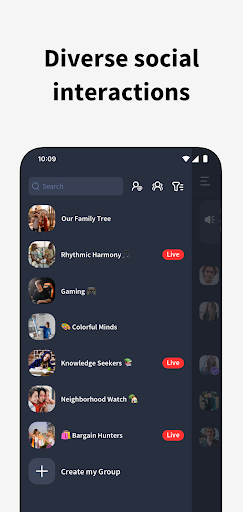

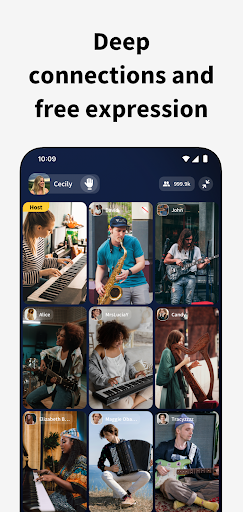
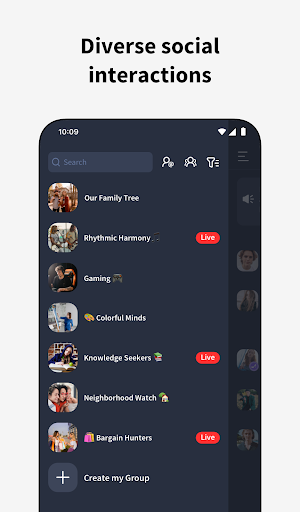
Choose Fambase, the best Group Chat application out there! Perfect for families keeping in touch, friends sharing the latest gossip, communities organizing events, interest groups exchanging ideas, or music bands coordinating rehearsals.
Build and join group chats, benefit from Live and Multicast features, assign various group management roles, and customize a wealth of group permission settings.
Fambase can be utilized as an effective tool for:
* Personal Branding - Face-to-face conversations with multiple hosts, providing a unified platform for all team members to stay connected and informed.
* Community Commerce - Create a members-only sales channel where your customers stay yours—sell through Live Auctions or Buy Now, and build trust through real-time, interactive product-making and demos.
* Fitness Groups - Make teaching classes more convenient for coaches, keeping your members ready and excited for upcoming fitness challenges.
* Music Bands - Conduct live jam sessions and band practices, providing an exclusive behind-the-scenes experience for fans, thus creating a thriving music community.
* Book Clubs - Kickstart seamless group discussions with smooth functioning, setting engaging topics to rapidly initiate enlightening debates.
* Fan Interactions - Engage in an intimate interaction with fans through video calls, keeping the fan culture alive and thriving.
* Community Bonds - Customize the exclusive group settings, ensuring friendly interaction with every community member.
Here's why you should pick us:
1. Tight-kint Community
Invite people to join your network's group directly using a unique QR code. The invitation expires within 24 hours, ensuring that only highly engaged individuals become a part of your community:
2. Safe and secure
Our app provides a private space for your community to share their thoughts and ideas without fear of spam.
3. All-in-one platform
Our app allows you to launch live groups, chat and send private messages, join streams, and send and receive gifts, all in one place.
4. Quality over quantity
Rather than flooding your chat with excessive group streaming, we prioritize content flow by inviting up to nine of the most active users to participate. This approach ensures that the community's attention remains focused.
5. A fresh start every day
Our app allows you to start a new topic each day and engage in open discussions without any reservations. If someone sends a regrettable message, don't worry – all messages will be cleared after 24 hours.
For any questions or inquiries, please feel free to contact us at contact@joinfambase.com.
更多

1. 下載逍遙安裝器並完成設置

2. 啟動逍遙後打開位於桌面上的谷歌商店

3. 在谷歌商店中搜尋Fambase: Live & Group Chat
Install
4. 下載並安裝Fambase: Live & Group Chat
5. 下載完成後點擊圖標來啟動

6. 透過逍遙享受在電腦上體驗Fambase: Live & Group Chat
逍遙安卓是優秀的安卓模擬器,全球超過5000萬用戶的優先選擇。逍遙安卓以虛擬化技術為核心,為用户打造突破手機配備局限的應用平台!
大屏精細展示;無限待機,超越電池和流量限制
鍵鼠,手把操作全面支持,操作更精準
用逍遙多開同時運行多個遊戲、應用。
Use Fambase: Live & Group Chat on PC by following steps: