Fluid Navigation Gestures
更新日期
目前版本
2.0-beta11
提供者

想體驗Fluid Navigation Gestures,可是手機熒幕太小,一載軟體就變燙,怎麼辦?透過逍遙模擬器,在電腦的大熒幕上暢快體驗!用鍵鼠操作更精準流暢,逍遙模擬器滿足您的所有期待。在電腦上下載安裝Fluid Navigation Gestures,不用擔心電池當掉,想體驗多久就多久,順暢跑一天~全新的逍遙模擬器9,絕對是您體驗Fluid Navigation Gestures電腦版的最佳選擇。完美的按鍵映射系統讓Fluid Navigation Gestures如PC軟體般順手;強大的多開功能可同時執行多個任務;獨家虛擬化技術更能徹底釋放電腦效能,保障長時間穩定運作。我們致力於不讓設備限制您的體驗,助您輕鬆高效,暢快無比!
更多
透過逍遙模擬器,在電腦上下載Fluid Navigation Gestures,享受大熒幕的暢快體驗。 *Requires ADB, root or supported device*.
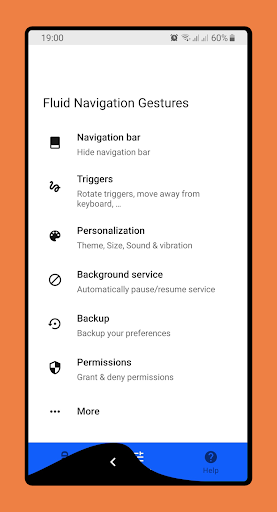
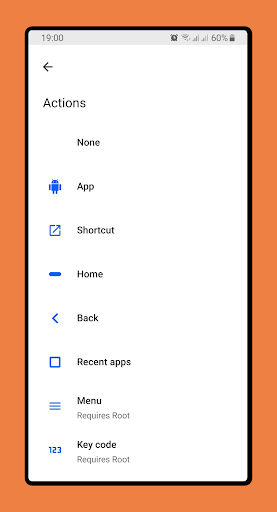
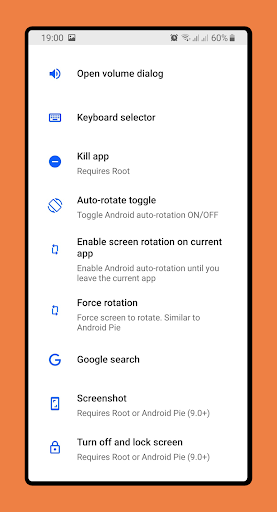
*Requires ADB, root or supported device*
*This app is no longer being maintained*
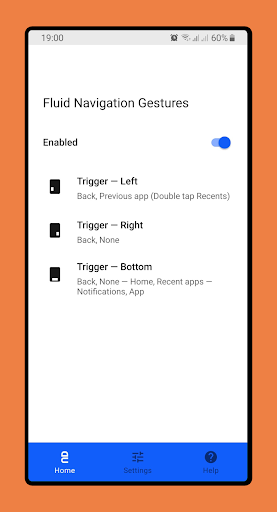
Give fresh new look to your phone with Fluid N.G, the navigation gestures app inspired by Breccia's concept.
Usage
There are two main gestures: 'Quick swipe' and 'Swipe & Hold' which can trigged from the bottom or side edges of the screen. The side triggers are only available on the bottom half of the screen, allowing you to still access other app side menus.
Actions
• Back
• Home
• Recent apps
• Toggle split screen
• Open notifications
• Open power dialog
• Open quick settings
• Launch Google search overlay
• Open keyboard selector
• Voice Search
• Launch assistant
• Launch app
• Launch shortcut
Setup
The app has a built-in option to hide the software navigation keys (if necessary) but it requires either root access or a pc to grant the app a permission.
Android ADB PC/Mac instructions:
1 - Enable Developer Mode in the Android settings.
2 - Enable USB Debugging
3 - Setup ADB on your PC
4 - Run the following adb command to grant the permission:
adb shell pm grant com.fb.fluid android.permission.WRITE_SECURE_SETTINGS
To restore the navigation keys just disable FNG or run the following ADB command:
adb shell wm overscan 0,0,0,0
FluidNGPermissionGranter
This is an open-source tool to easily grant FNG the necessary permissions on Windows. Get it here
How to setup Android ADB
xda-developers - How to install adb on Windows...
Lifehacker - The easiest way to install androids adb...
TilesOrganization - How to use adb to grant permissions
Translation
Help translate the FNG to your native language here
Feedback
Twitter
Telegram Group
Telegram Channel
更多

1. 下載逍遙安裝器並完成設置

2. 啟動逍遙後打開位於桌面上的谷歌商店

3. 在谷歌商店中搜尋Fluid Navigation Gestures
Install
4. 下載並安裝Fluid Navigation Gestures
5. 下載完成後點擊圖標來啟動

6. 透過逍遙享受在電腦上體驗Fluid Navigation Gestures
逍遙安卓是優秀的安卓模擬器,全球超過5000萬用戶的優先選擇。逍遙安卓以虛擬化技術為核心,為用户打造突破手機配備局限的應用平台!
大屏精細展示;無限待機,超越電池和流量限制
鍵鼠,手把操作全面支持,操作更精準
用逍遙多開同時運行多個遊戲、應用。
Use Fluid Navigation Gestures on PC by following steps: