KIRI Engine: 3D Scanner App
更新日期
目前版本
V3.12.5Release
提供者

想體驗KIRI Engine: 3D Scanner App,可是手機熒幕太小,一載軟體就變燙,怎麼辦?透過逍遙模擬器,在電腦的大熒幕上暢快體驗!用鍵鼠操作更精準流暢,逍遙模擬器滿足您的所有期待。在電腦上下載安裝KIRI Engine: 3D Scanner App,不用擔心電池當掉,想體驗多久就多久,順暢跑一天~全新的逍遙模擬器9,絕對是您體驗KIRI Engine: 3D Scanner App電腦版的最佳選擇。完美的按鍵映射系統讓KIRI Engine: 3D Scanner App如PC軟體般順手;強大的多開功能可同時執行多個任務;獨家虛擬化技術更能徹底釋放電腦效能,保障長時間穩定運作。我們致力於不讓設備限制您的體驗,助您輕鬆高效,暢快無比!
更多
透過逍遙模擬器,在電腦上下載KIRI Engine: 3D Scanner App,享受大熒幕的暢快體驗。 3D scanning has never been simpler with KIRI Engine: create high-quality 3D models on your phone within minutes.
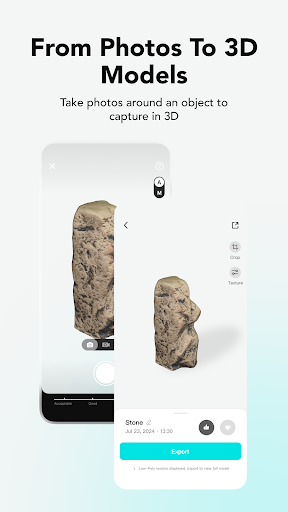
3D scanning has never been simpler with KIRI Engine: create high-quality 3D models on your phone within minutes. Dive into 3D scanning and modeling tailored for artists, designers, engineers, and 3D printing enthusiasts.
Unleash the Power of 3D Scanning:
• Photogrammetry: 3D scan with Photo Scan to transform your photos into high-quality 3D models.
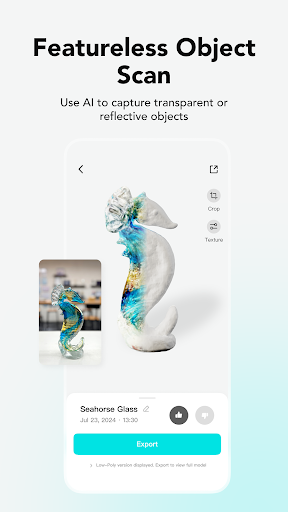
• NSR (Neural Surface Reconstruction): 3D Scan featureless/shiny objects with a video processed by Neural Radiance Fields (NeRF) integrated Featureless Object Scan.
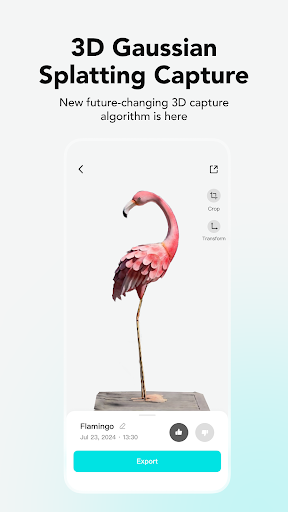
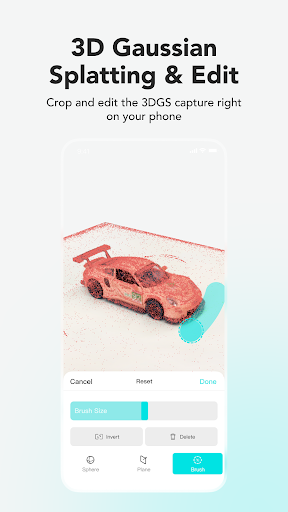
• 3D Gaussian Splatting: Obtain full 3D visualizations with a video, scan and capture all elements in your scene, including reflections.
Create Your Own 3D Model through a Delightful Experience:
• Capturing: Snapping photos replaces your 3D modeling process, obtain a detailed 3D mesh in just minutes from scanning to generating.
• Functional Free Version: Dive into the world of photogrammetry without paying a cent for subscriptions, a LiDAR sensor, or an expensive 3D Scanner. Upload unlimited 3D scans and export at least 3 times per week.
Edit, Refine, and Personalize Your Creations:
• Edit: Refine 3D models with editing tools; adjust your files in Photo Scan, Featureless Object Scan, and 3D gaussian splats.
• Precision: Choose specific photos for processing to ensure detailed, high-quality 3D models.
• Cleanup: Auto Object Masking for noise-free, clean models during capture by eliminating background elements. This feature also allows the object to be moved during the capture.
• Preview: Employ the 3D viewer and augmented reality panels to directly visualize and adjust your completed 3D model.
Share, Export, and Make Use of Your 3D Models:
• For Free: free registration and unlimited scanning, with at least 3 exports weekly.
• Share: On various platforms such as Sketchfab, Thingiverse, GeoScan, and more.
• Formats: Export in OBJ, STL, FBX, GLTF, GLB, USDZ, PLY, XYZ, compatible with Blender 3D, Unreal Engine, Autodesk Maya, etc.
• Wide usage: For game development, VFX, VR/AR 3D content creation, 3D printing, 3D visualization, and many more.
• Precision Without LiDAR: KIRI’s advanced algorithms provide scanning quality that is on par with LiDAR sensors.
KIRI Engine Pro – For Those Who Demand More:
• Upload: Pro users can leverage camera rolls, ensuring a flexible 3D scanning experience.
• Quad-Mesh Retopology: Refine scanned 3D models with automatic quad-mesh adjustment.
• AI PBR Material Generation: Attain lifelike textures with AI-generated PBR materials.
• Advanced Camera System: Perfect each shot with fine-tuned camera settings for impeccable 3D scans.
• Featureless Object Scan: Utilizes Neural Surface Reconstruction (NSR) for scanning shiny/reflective surfaces, a first in practical 3D scanning with KIRI Engine.
• 3D Gaussian Splatting: Experience the future of 3D scanning and capture accurate 3D scenes with a short video; edit using tools like sphere/plane cutters and brushes. Export in native format or OBJ.
• WEB Version Access: KIRI Engine WEB offers professional-grade model creation from DSLR photo sets or drone scans, enhancing accuracy in mappings and drone-based 3D surveys.
Engage with Our Caring Community:
Join our Discord community for sharing, feature voting, giveaways, and engaging with fellow enthusiasts.
Dive into 3D Scanning with KIRI Engine Today!
Download the KIRI Engine 3D Scanner app and embark on your 3D scanning journey with your device.
Available in these languages:
• English: KIRI Engine: 3D Scanner App
• Chinese (中文): 3D 扫描仪App
• Japanese (日本語): 3Dスキャナーアプリ
• French (Français): Application Scanner 3D
• Russian (Русский): Приложение 3D-сканера
Privacy Policy: https://www.kiriengine.app/privacy-policy
Terms Of Service:https://www.kiriengine.app/user-agreement
更多

1. 下載逍遙安裝器並完成設置

2. 啟動逍遙後打開位於桌面上的谷歌商店

3. 在谷歌商店中搜尋KIRI Engine: 3D Scanner App
Install
4. 下載並安裝KIRI Engine: 3D Scanner App
5. 下載完成後點擊圖標來啟動

6. 透過逍遙享受在電腦上體驗KIRI Engine: 3D Scanner App
逍遙安卓是優秀的安卓模擬器,全球超過5000萬用戶的優先選擇。逍遙安卓以虛擬化技術為核心,為用户打造突破手機配備局限的應用平台!
大屏精細展示;無限待機,超越電池和流量限制
鍵鼠,手把操作全面支持,操作更精準
用逍遙多開同時運行多個遊戲、應用。
Use KIRI Engine: 3D Scanner App on PC by following steps: