Lux: Lower Screen Brightness
更新日期
目前版本
1.5.1
提供者

想體驗Lux: Lower Screen Brightness,可是手機熒幕太小,一載軟體就變燙,怎麼辦?透過逍遙模擬器,在電腦的大熒幕上暢快體驗!用鍵鼠操作更精準流暢,逍遙模擬器滿足您的所有期待。在電腦上下載安裝Lux: Lower Screen Brightness,不用擔心電池當掉,想體驗多久就多久,順暢跑一天~全新的逍遙模擬器9,絕對是您體驗Lux: Lower Screen Brightness電腦版的最佳選擇。完美的按鍵映射系統讓Lux: Lower Screen Brightness如PC軟體般順手;強大的多開功能可同時執行多個任務;獨家虛擬化技術更能徹底釋放電腦效能,保障長時間穩定運作。我們致力於不讓設備限制您的體驗,助您輕鬆高效,暢快無比!
更多
使用逍遙模擬器在電腦上享受Lux: Lower Screen Brightness的卓越體驗。這是一款功能強大的免費安卓模擬器,為您提供數千款安卓應用程式的桌面版本。與好友互動,有效率完成工作,盡情享受! Your screen's minimum brightness is still too bright.
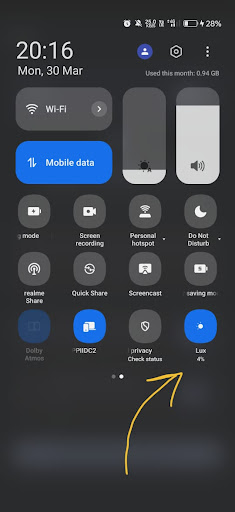
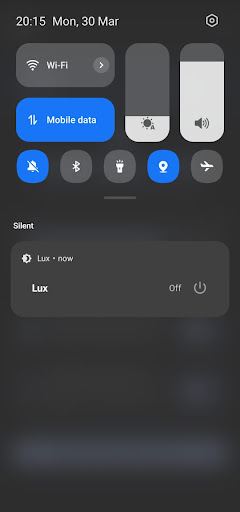
Your screen's minimum brightness is still too bright. Whether you're reading in bed, managing eye strain, or navigating light sensitivity and migraines, the system brightness slider just isn't enough. Lux solves this.
Lux is a screen dimmer that goes below your device's minimum brightness using a software overlay — giving you real control in dark environments. Built with Material You design for Android 14+, it's the modern night mode utility your phone has been missing.
CORE FEATURES
• Lower Brightness Beyond the Limit
Reduce screen brightness far below what Android allows natively. The system slider has a floor — Lux goes beneath it. Whether you need a subtle reduction or a deep dim for complete darkness, the overlay adapts to your preference. Perfect for late-night reading, eye care, and migraine relief.
• System-Wide Dimming
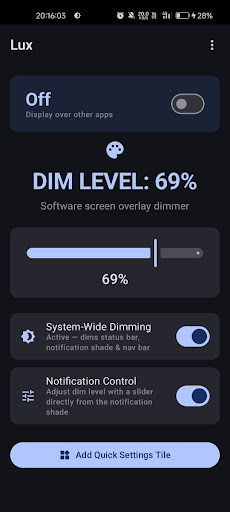
The overlay covers your entire display — status bar, navigation bar, notification shade, and all apps. No gaps, no bright edges. Every pixel on your screen is uniformly dimmed for a comfortable viewing experience across your entire device.
• Quick Settings Tile
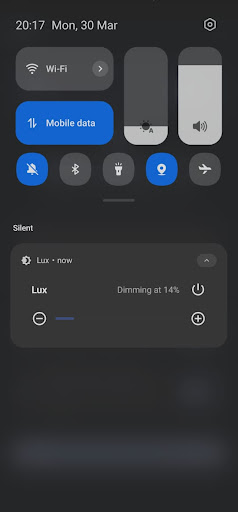
Toggle dimming on or off directly from your notification shade in one tap. No need to unlock, find the app, or navigate menus. Add the Lux tile to your Quick Settings panel and control brightness as easily as toggling Wi-Fi.
• Notification Controls
Adjust the dim level directly from a persistent notification — increase, decrease, or toggle dimming without leaving what you're doing. Full control stays at your fingertips while you browse, read, or work.
• Adjustable Intensity
Fine-tune exactly how dim you want your screen. From a light filter for slightly dim rooms to a deep overlay for pitch-black environments — you set the level, and Lux holds it consistently.
WHY CHOOSE LUX?
Unlike legacy screen dimmers that haven't been updated in years, Lux is purpose-built for modern Android.
→ Material You Dynamic Theming — adapts to your wallpaper colors and respects system dark mode. It looks native to your device, not like a utility from 2016.
→ No Ads. No Tracking. No Data Collection — your privacy is absolute. Lux does not connect to external servers or run analytics. Everything runs locally on your device.
→ Smooth Software Overlay — a clean, flicker-free layer for dimming. No visual artifacts. Gentle on your eyes even at the lowest levels — ideal for light sensitivity and headache-prone users.
→ Lightweight & Efficient — minimal battery impact with no background processing beyond the active overlay. No bloat, no resource drain.
ACCESSIBILITY PERMISSION TRANSPARENCY
Lux requests the Accessibility Service to extend the dimming overlay above all system UI elements. Without it, dimming only works inside apps — the status bar and navigation bar remain bright.
Places a dimming layer above system UI for full screen coverage.
Does not read or capture screen content.
Does not monitor keystrokes or input.
Does not collect, store, or transmit personal data.
A clear disclosure dialog explains this before you enable it. You can revoke the permission from Android Settings at any time.
IDEAL FOR
• Late-night reading and browsing in bed
• Eye strain and migraine relief in dark environments
• Light sensitivity and photophobia management
• Night shift workers checking their phone in low light
• Students studying late with uncomfortable screen brightness
• Anyone who finds their screen's lowest setting still too harsh
Lux is free, private, and built with care. No ads today, no ads ever. Lower your screen brightness the right way.
更多

1. 下載逍遙安裝器並完成設置

2. 啟動逍遙後打開位於桌面上的谷歌商店

3. 在谷歌商店中搜尋Lux: Lower Screen Brightness
Install
4. 下載並安裝Lux: Lower Screen Brightness
5. 下載完成後點擊圖標來啟動

6. 透過逍遙享受在電腦上體驗Lux: Lower Screen Brightness
逍遙安卓是優秀的安卓模擬器,全球超過5000萬用戶的優先選擇。逍遙安卓以虛擬化技術為核心,為用户打造突破手機配備局限的應用平台!
大屏精細展示;無限待機,超越電池和流量限制
鍵鼠,手把操作全面支持,操作更精準
用逍遙多開同時運行多個遊戲、應用。
Use Lux: Lower Screen Brightness on PC by following steps: