Milk-Tea VPN: Secure Net,NoFee
更新日期
目前版本
1.7.0
提供者

想體驗Milk-Tea VPN: Secure Net,NoFee,可是手機熒幕太小,一載軟體就變燙,怎麼辦?透過逍遙模擬器,在電腦的大熒幕上暢快體驗!用鍵鼠操作更精準流暢,逍遙模擬器滿足您的所有期待。在電腦上下載安裝Milk-Tea VPN: Secure Net,NoFee,不用擔心電池當掉,想體驗多久就多久,順暢跑一天~全新的逍遙模擬器9,絕對是您體驗Milk-Tea VPN: Secure Net,NoFee電腦版的最佳選擇。完美的按鍵映射系統讓Milk-Tea VPN: Secure Net,NoFee如PC軟體般順手;強大的多開功能可同時執行多個任務;獨家虛擬化技術更能徹底釋放電腦效能,保障長時間穩定運作。我們致力於不讓設備限制您的體驗,助您輕鬆高效,暢快無比!
更多
使用逍遙模擬器在電腦上享受Milk-Tea VPN: Secure Net,NoFee的卓越體驗。這是一款功能強大的免費安卓模擬器,為您提供數千款安卓應用程式的桌面版本。與好友互動,有效率完成工作,盡情享受! Milk-Tea VPN ensure Connectable since 2021.
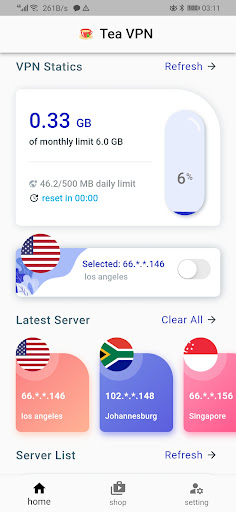
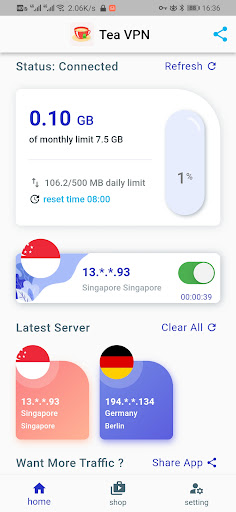
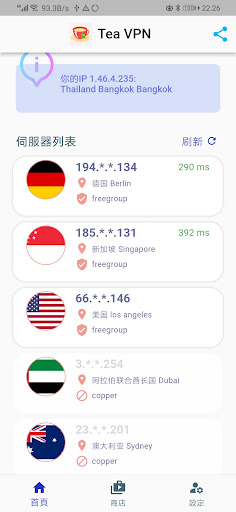
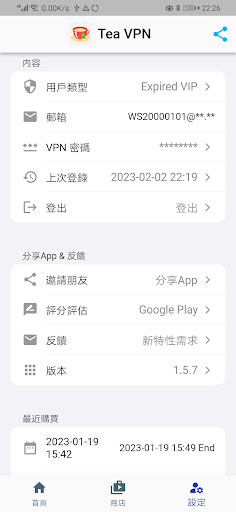
Milk-Tea VPN ensure Connectable since 2021. Free users can get up to 10GB traffic every month !
Driver by Flutter Engine, Support Mutli-Platform, Publishing in [Store] and [Play].
Milk-Tea VPN:
A Security Consultantm, IP Ninja, Privacy Guard, Network Accelerator. Support Google Sign In / Email Registration. No registration and no online log record.
Encrypt Internet traffic. Uses advanced military-grade encryption protocols (Ikev2 On IPsec / WireGuard) that are difficult to crack.
Tea VPN not only protects you with military-grade encryption, but also offers lightning-fast speeds. The UI is not good-looking, but it is useful and stable.
△ Ultimate, Stable, Good & Easy Use. Also offers lightning-fast speeds.
△ We ensure most of our server nodes is connectable.
To Be Our Free User:
Free user will get 1GB monthly vpn traffic, FOREVER.
Ads, Daily traff limit, Server choose limit.
More traffic? Share app and let new one input you refer code. Every One has an Affiliate Code. Usage: Share app and let new user input your code in menu "Setting -> Refer Code". Both referer & referee can reward extra 1GB traffic monthly FOREVER. Limit UP TO 10GB monthly.
An public refer code is 000300. Input it, then your monthly limit will raise up 1GB -> 2GB.
To Be Our In-App-Purchase User:
[[ NO Ads, NO daily limit, More nodes and 7x24 hours support ]]
Copper VIP (Monthly Pay US$1.99 ): 50GB monthly, most of node (50%) are copper node.
Silver VIP (Monthly Pay US$4.99 ): 200GB monthly, unlock copper & sliver nodes. almost all, just except a few gold node.
Gold VIP (Monthly Pay US$9.99 ): 600GB monthly, all node.
About VPN (Virtual Private Network):
◈ Change your IP address, browse the web anonymously, and chat securely.
◈ Avoid being sniffed by the network under public environment Wifi (cafe, library, restaurant, meeting room, etc.).
◈ Free access, bypass through website bans based on IP.
Free access to web servers around the world under restricted networks.
Social websites:
https://www.facebook.com/profile.php?id=100084047869732
https://twitter.com/work_efficient
https://www.youtube.com/channel/UCvh3fXvmm6G3LMtRJnBwvFw
https://vk.com/id804128486
https://discord.gg/wGVzqb6q
https://github.com/EfficientWork/teavpn
Best Wish!
Fom a small team which aim at Personal-Protection. Any Question, Email To WS20000101@outlook.com
tea vpn text logo:
_____ __ ______ _ _
|_ _|__ __ _ / / _ | | |
| |/ _ / _` | / /| |_) | | |
| | __/ (_| | V / | __/| | |
|_|\___|\__,_| \_/ |_| |_| \_|
更多

1. 下載逍遙安裝器並完成設置

2. 啟動逍遙後打開位於桌面上的谷歌商店

3. 在谷歌商店中搜尋Milk-Tea VPN: Secure Net,NoFee
Install
4. 下載並安裝Milk-Tea VPN: Secure Net,NoFee
5. 下載完成後點擊圖標來啟動

6. 透過逍遙享受在電腦上體驗Milk-Tea VPN: Secure Net,NoFee
逍遙安卓是優秀的安卓模擬器,全球超過5000萬用戶的優先選擇。逍遙安卓以虛擬化技術為核心,為用户打造突破手機配備局限的應用平台!
大屏精細展示;無限待機,超越電池和流量限制
鍵鼠,手把操作全面支持,操作更精準
用逍遙多開同時運行多個遊戲、應用。
Use Milk-Tea VPN: Secure Net,NoFee on PC by following steps: