Pixel Studio: pixel art editor
更新日期
目前版本
5.02
提供者

想體驗Pixel Studio: pixel art editor,可是手機熒幕太小,一載軟體就變燙,怎麼辦?透過逍遙模擬器,在電腦的大熒幕上暢快體驗!用鍵鼠操作更精準流暢,逍遙模擬器滿足您的所有期待。在電腦上下載安裝Pixel Studio: pixel art editor,不用擔心電池當掉,想體驗多久就多久,順暢跑一天~全新的逍遙模擬器9,絕對是您體驗Pixel Studio: pixel art editor電腦版的最佳選擇。完美的按鍵映射系統讓Pixel Studio: pixel art editor如PC軟體般順手;強大的多開功能可同時執行多個任務;獨家虛擬化技術更能徹底釋放電腦效能,保障長時間穩定運作。我們致力於不讓設備限制您的體驗,助您輕鬆高效,暢快無比!
更多
透過逍遙模擬器,在電腦上下載Pixel Studio: pixel art editor,享受大熒幕的暢快體驗。 Pixel Studio is a new pixel art editor for artists and game developers.
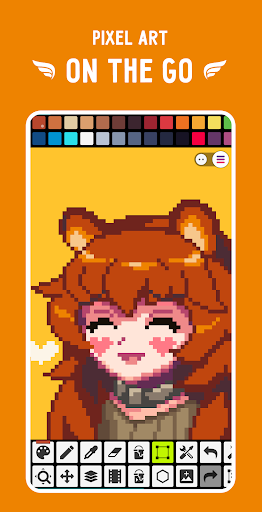
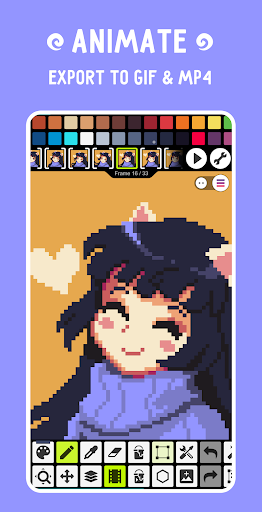
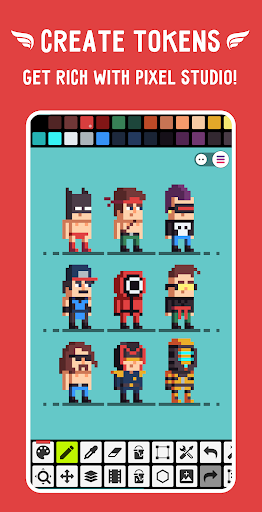
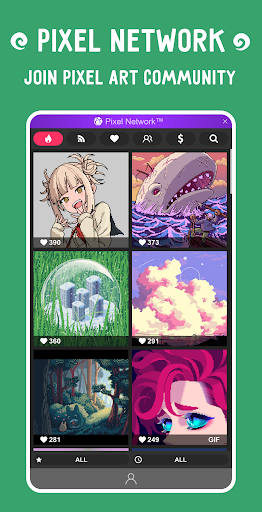
Pixel Studio is a new pixel art editor for artists and game developers. Simple, fast and portable. No matter whether you are a beginner or a professional. Create amazing pixel art anywhere and anytime! We support layers and animations and have a ton of useful tools - all you need to create cool projects. Add music to your animations and export videos to MP4. Use Google Drive to sync your work between different devices and even platforms. Join Pixel Network™ - our new pixel art community! Create NFT! Don't doubt, just try it and make sure you've chosen the best pixel art tool ever! Over 5.000.000 downloads around the world, translated to more than 25 languages!
Features:
• It's super simple, intuitive and user friendly
• It's cross-platform, use it on mobile and desktop with Google Drive sync
• Use layers for advanced pixel art
• Create frame-by-frame animations
• Save animations to GIF or sprite sheets
• Extend animations with music and export videos to MP4
• Share arts with friends and Pixel Network™ community
• Create custom palettes, use built-in or download palettes from Lospec
• Advanced color picker with RGBA and HSV modes
• Simple zoom and move with gestures and joysticks
• Use Portrait mode for mobile and Landscape for tablets and PC
• Customizable toolbar and a lot of other settings
• We support Samsung S-Pen, HUAWEI M-pencil and Xiaomi Smart Pen!
• We support all popular formats: PNG, JPG, GIF, BMP, TGA, PSP (Pixel Studio Project), PSD (Adobe Photoshop), EXR
• Autosave and backup - don't lose your work!
• Discover a ton of other useful tools and features!
More features:
• Shape Tool for primitives
• Gradient Tool
• Built-in and custom brushes
• Sprite Library for your image patterns
• Tile Mode for brushes
• Symmetry drawing (X, Y, X+Y)
• Dot Pen for precise drawing with a cursor
• Text Tool with different fonts
• Dithering Pen for shadows and flares
• Pixel art rotation with Fast RotSprite algorithm
• Pixel art scaler (Scale2x/AdvMAME2x, Scale3x/AdvMAME3x)
• Onion Skin for advanced animation
• Apply palettes to images
• Grab palettes from images
• Mini-map and Pixel Perfect preview
• Unlimited canvas size
• Canvas resizing and rotation
• Customizable background color
• Customizable grid
• Multithreaded image processing
• JASC Palette (PAL) format support
• Aseprite files support (import only)
You can support us by purchasing PRO (one-time purchase):
• No ads
• Google Drive sync (cross-platform)
• Dark Theme
• 256-color palettes
• Tile mode for making seamless textures
• Extended max project size
• Extra formats support: AI, EPS, HEIC, PDF, SVG, WEBP (cloud read only) and PSD (cloud read/write)
• Unlimited color adjustment (Hue, Saturation, Lightness)
• Unlimited export to MP4
• Extended storage in Pixel Network
System requirements:
• 2GB+ of RAM for large projects and animations
• Powerful CPU (AnTuTu score 100.000+)
Sample images made by lorddkno, Redshrike, Calciumtrice, Buch, Tomoe Mami are used under CC BY 3.0 license.
更多

1. 下載逍遙安裝器並完成設置

2. 啟動逍遙後打開位於桌面上的谷歌商店

3. 在谷歌商店中搜尋Pixel Studio: pixel art editor
Install
4. 下載並安裝Pixel Studio: pixel art editor
5. 下載完成後點擊圖標來啟動

6. 透過逍遙享受在電腦上體驗Pixel Studio: pixel art editor
逍遙安卓是優秀的安卓模擬器,全球超過5000萬用戶的優先選擇。逍遙安卓以虛擬化技術為核心,為用户打造突破手機配備局限的應用平台!
大屏精細展示;無限待機,超越電池和流量限制
鍵鼠,手把操作全面支持,操作更精準
用逍遙多開同時運行多個遊戲、應用。
Use Pixel Studio: pixel art editor on PC by following steps: