
PlanJoy
更新日期
目前版本
7.3.0
提供者

想體驗PlanJoy,可是手機熒幕太小,一載軟體就變燙,怎麼辦?透過逍遙模擬器,在電腦的大熒幕上暢快體驗!用鍵鼠操作更精準流暢,逍遙模擬器滿足您的所有期待。在電腦上下載安裝PlanJoy,不用擔心電池當掉,想體驗多久就多久,順暢跑一天~全新的逍遙模擬器9,絕對是您體驗PlanJoy電腦版的最佳選擇。完美的按鍵映射系統讓PlanJoy如PC軟體般順手;強大的多開功能可同時執行多個任務;獨家虛擬化技術更能徹底釋放電腦效能,保障長時間穩定運作。我們致力於不讓設備限制您的體驗,助您輕鬆高效,暢快無比!
更多
使用逍遙模擬器在電腦上享受PlanJoy的卓越體驗。這是一款功能強大的免費安卓模擬器,為您提供數千款安卓應用程式的桌面版本。與好友互動,有效率完成工作,盡情享受! With versatile planning templates for all scenarios, managing schedules and todos becomes effortless.

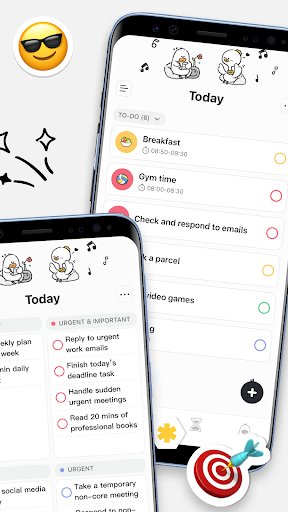


With versatile planning templates for all scenarios, managing schedules and todos becomes effortless. Your warm and comforting duck companion, JOY, is here to be your personal cheerleader, turning plans ineviable.
Make Plans
。
Achieve All Goals
Goal Breakdown: Weight loss, certification exams, self-improvement... All goals across various scenarios can be automatically broken down into stages, making it easier to achieve step by step.
Fun and Creative Methods
Customization: change themes, icons, stickers... freely
Widgets: Your Joy always here for you.
Comprehensive Features
Clear Priorities:
Task prioritization based on quadrants, with single-column lists tailored to your habits.
Costume Rewards:
Unlock exclusive costumes for completing tasks—your efforts deserve recognition.
Quick Input:
Support for text, voice, and other input methods for fast task creation.
Time Control:
Link individual tasks to the Focus Pomodoro timer, with customizable reminders, deadlines, and repeat options.
Visual View:
Track activities efficiently with weekly, monthly, and yearly views for easy reference.
Focus Timer:
A scientifically designed Pomodoro timer to help you maintain energy and focus.
Review Notes:
Capture daily reflections and insights in a quick and convenient way.
Progress Statistics:
Multi-dimensional data analysis to track progress and inform continuous improvement.
Widgets:
Countdowns, planners, and other widgets for home screen & lock screens.
Download Planjoy to discover more!
更多

1. 下載逍遙安裝器並完成設置

2. 啟動逍遙後打開位於桌面上的谷歌商店

3. 在谷歌商店中搜尋PlanJoy
Install
4. 下載並安裝PlanJoy
5. 下載完成後點擊圖標來啟動

6. 透過逍遙享受在電腦上體驗PlanJoy
逍遙安卓是優秀的安卓模擬器,全球超過5000萬用戶的優先選擇。逍遙安卓以虛擬化技術為核心,為用户打造突破手機配備局限的應用平台!
大屏精細展示;無限待機,超越電池和流量限制
鍵鼠,手把操作全面支持,操作更精準
用逍遙多開同時運行多個遊戲、應用。
Use PlanJoy on PC by following steps: