Resprite: pixel art studio
更新日期
目前版本
1.14.2
提供者

想體驗Resprite: pixel art studio,可是手機熒幕太小,一載軟體就變燙,怎麼辦?透過逍遙模擬器,在電腦的大熒幕上暢快體驗!用鍵鼠操作更精準流暢,逍遙模擬器滿足您的所有期待。在電腦上下載安裝Resprite: pixel art studio,不用擔心電池當掉,想體驗多久就多久,順暢跑一天~全新的逍遙模擬器9,絕對是您體驗Resprite: pixel art studio電腦版的最佳選擇。完美的按鍵映射系統讓Resprite: pixel art studio如PC軟體般順手;強大的多開功能可同時執行多個任務;獨家虛擬化技術更能徹底釋放電腦效能,保障長時間穩定運作。我們致力於不讓設備限制您的體驗,助您輕鬆高效,暢快無比!
更多
透過逍遙模擬器,在電腦上下載Resprite: pixel art studio,享受大熒幕的暢快體驗。 Resprite is a pixel art and sprite animation editor.
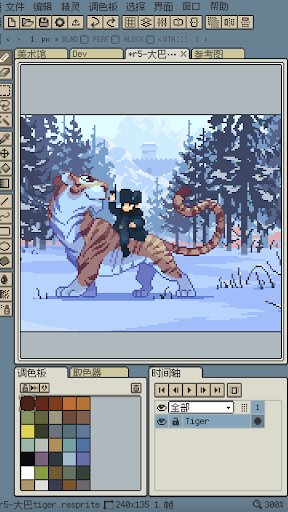
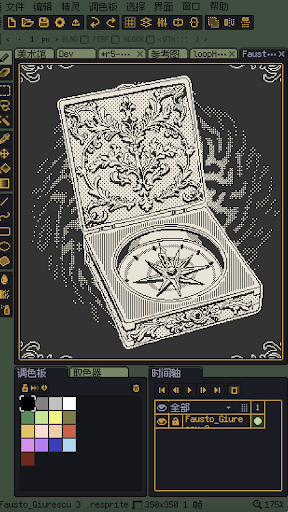
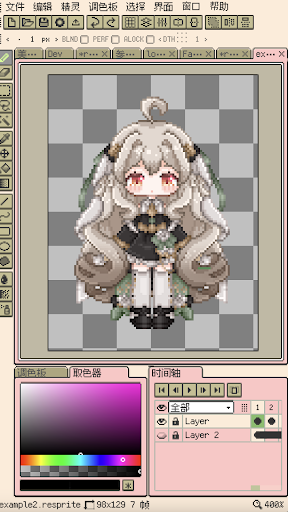
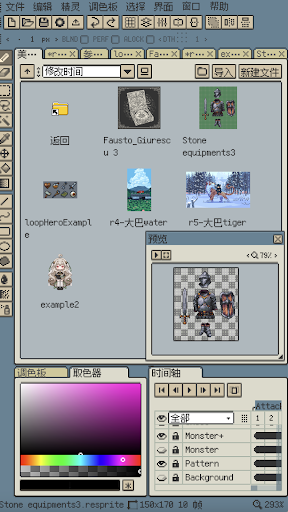
Resprite is a pixel art and sprite animation editor.
It is powerful and is committed to becoming a powerful tool for creating pixel sprite images in the game field on mobile terminals, which can meet the needs of professional creators. The powerful and complete feature set comparable to desktop applications, and the extreme optimization and innovation to adapt to the mobile environment and the pen, let you create as you like.
Resprite provides a complete pixel painting editing tool, a set of advanced layers and timeline systems, and a high-performance rendering engine based on Vulkan, which can help you create charming pixel art, exquisite spritesheets, charming GIF dynamic expressions and wonderful game art resources.
Whether lying on the sofa, in a camping tent, relaxing on the beach, or waiting at the airport, you can easily create. Resprite is a mobile pixel painting studio in your hands.
Resprite includes:
Features:
* High-performance drawing engine
* Low energy consumption, long-lasting creation
* Innovative and efficient palette and coloring tools
* Complete dithering pattern support
* Extremely flexible interface layout, one-touch access
* Unprecedentedly optimized gesture and pen control, handy
* Complete undo and redo mechanism
* Freely create colorful and personalized themes
Extremely flexible interface layout:
* Adjust the interface layout as you like
* Handy floating window
* Shorten the distance between the pen and the destination = improved efficiency
* Perfect pixel style software interface
All-round tool combination:
* Supports brushes, 3 different selection tools, color picker, paint bucket, 3 different shape tools, etc., and rich sub-options
* Supports Pixel perfect, Alpha lock, Dithering and other elements
* Make the toolbar instantly accessible wherever you want
* Support copy, paste (across files), horizontal and vertical flip, rotation, scaling
* Support scaling and transformation of canvas and image
Innovative palette:
* Free position arrangement
* Interpolation creates intermediate colors
* Import and export palettes
* Automatically collect palettes from artboards
Import and share:
* Support export of spritesheet files, GIFAPNG animations, and Resprite package
* When exporting, you can set the magnification, frame margins, spritesheet arrangement, etc.
* You can export by animation clips individually or in rows
* Support importing and exporting palette files, supporting GPL and RPL formats
Fully functional layers and timelines:
* Flexible creation through layers through complete features
* Support advanced operations such as copying, merging, flattening, and staticization
* Support setting multiple animation clips, and can select them
* Reliable performance, hundreds of frames of animation, still smooth
* Support color labels, support multi-level grouping, set transparency for layers
* Support clipping mask and blend modes
Quick gesture operation:
* Universal two-finger click, three-finger click undo and redo
* Single-finger gesture control, quick frame switching and playback
* Long press gesture
* Flexibly adjust the corresponding operation of gestures
The works in the screenshots are from the following artists:
史大巴,斯尔娜娜,Fruiii-,一根大米粉,川越,四季的饭,Fausto_Giurescu
Premium plan:
Your Resprite premium can unlock the export limit, and all functions of the software will become available.
Support:
Documentation: https://resprite.fengeon.com/
Email: support@fengeon.com
Agreement and Privacy Policy:
Your use of this application is subject to the following User Agreement https://resprite.fengeon.com/tos, and Privacy Policy https://resprite.fengeon.com/privacy and its subsequent versions.
更多

1. 下載逍遙安裝器並完成設置

2. 啟動逍遙後打開位於桌面上的谷歌商店

3. 在谷歌商店中搜尋Resprite: pixel art studio
Install
4. 下載並安裝Resprite: pixel art studio
5. 下載完成後點擊圖標來啟動

6. 透過逍遙享受在電腦上體驗Resprite: pixel art studio
逍遙安卓是優秀的安卓模擬器,全球超過5000萬用戶的優先選擇。逍遙安卓以虛擬化技術為核心,為用户打造突破手機配備局限的應用平台!
大屏精細展示;無限待機,超越電池和流量限制
鍵鼠,手把操作全面支持,操作更精準
用逍遙多開同時運行多個遊戲、應用。
Use Resprite: pixel art studio on PC by following steps: