Tailscale電腦版

Tailscale電腦版下載

Tailscale電腦版
  • 更新日期

  • 目前版本

    1.78.3-teb1bf5700-ga9c84cb0e

  • 提供者

    Tailscale電腦版

Tailscale電腦版簡介

想體驗Tailscale,可是手機熒幕太小,一載軟體就變燙,怎麼辦?透過逍遙模擬器,在電腦的大熒幕上暢快體驗!用鍵鼠操作更精準流暢,逍遙模擬器滿足您的所有期待。在電腦上下載安裝Tailscale,不用擔心電池當掉,想體驗多久就多久,順暢跑一天~全新的逍遙模擬器9,絕對是您體驗Tailscale電腦版的最佳選擇。完美的按鍵映射系統讓Tailscale如PC軟體般順手;強大的多開功能可同時執行多個任務;獨家虛擬化技術更能徹底釋放電腦效能,保障長時間穩定運作。我們致力於不讓設備限制您的體驗,助您輕鬆高效,暢快無比!

更多

Tailscale電腦版截圖&影片

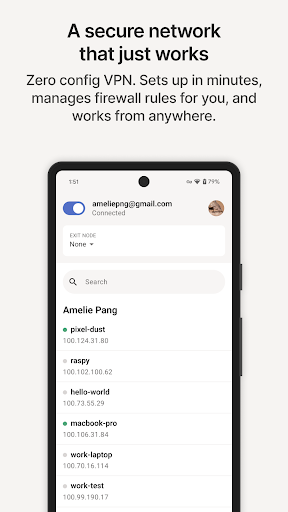
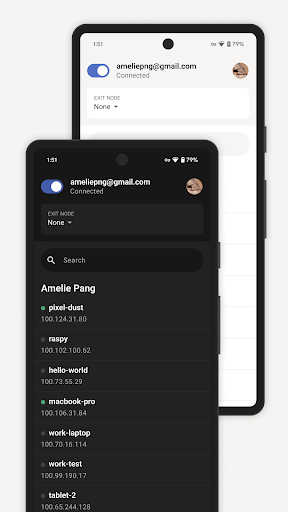
透過逍遙模擬器,在電腦上下載Tailscale,享受大熒幕的暢快體驗。 Securely connect to anything on the internet with Tailscale.

應用訊息

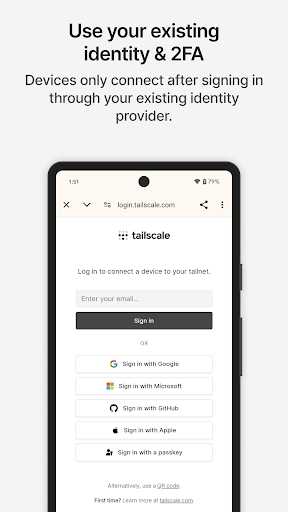
Securely connect to anything on the internet with Tailscale. Built on WireGuard®, Tailscale is networking technology that enables you to make finely configurable connections, secured end-to-end according to zero trust principles, between any resources on any infrastructure. Tailscale brings identity to the network layer, so that you can control access based on user identity, not only IP address. This gives you the power to intuitively and flexibly define which users should have access to which services based on existing user identities, as well as groups, services, and subnet ranges.

Tailscale transforms your existing network from a legacy hub and spoke model to a modern, lightweight, and responsive mesh networking architecture that eliminates single points of failure and delivers better performance, scalability, and security for your end users, devices, and remote resources.

Replace legacy VPNs, connect workloads across on-prem and cloud infrastructure providers, power Zero Trust initiatives, and make remote access secure by simplifying software-defined networking and security operations. Deploy a zero-config VPN, securely access resources on any infrastructure, unlock developer workflow networking, and modernize Enterprise networking at scale with Tailscale.

Tailscale is hardware-agnostic—so you can make decisions about your hardware independently from decisions about your network. Tailscale creates an overlay network, using your existing network, so you can incrementally deploy it without needing new network switches or to change your network architecture.

Tailscale works with 100+ technology integrations and dozens of identity providers, and is available on a wide range of operating system platforms, including Apple macOS, iOS, and tvOS, Windows, Linux, and Android.

更多

在電腦上下載Tailscale

  • Tailscale電腦版

    1. 下載逍遙安裝器並完成設置

  • Tailscale電腦版

    2. 啟動逍遙後打開位於桌面上的谷歌商店

  • Tailscale電腦版

    3. 在谷歌商店中搜尋Tailscale

  • Tailscale電腦版 Install

    4. 下載並安裝Tailscale

  • Tailscale電腦版

    5. 下載完成後點擊圖標來啟動

  • Tailscale電腦版
    Tailscale電腦版 Tailscale電腦版

    6. 透過逍遙享受在電腦上體驗Tailscale

為什麼用逍遙體驗Tailscale

逍遙安卓是優秀的安卓模擬器,全球超過5000萬用戶的優先選擇。逍遙安卓以虛擬化技術為核心,為用户打造突破手機配備局限的應用平台!

  • 大屏精細展示;無限待機,超越電池和流量限制

  • 鍵鼠,手把操作全面支持,操作更精準

  • 用逍遙多開同時運行多個遊戲、應用。

準備體驗了嗎?

熱門話題

Tailscale - FAQs

  • How to use Tailscale on PC?

    Use Tailscale on PC by following steps:

    • Download MEmu, then install and launch it
    • Login to Google Play Store, install the app
    • Enjoy using the app on PC with MEmu
  • What are the minimum system requirements to run Tailscale on PC?
    • Intel or AMD Processor
    • Microsoft Windows 7 and above
    • 2GB of memory
    • 5GB of free disk space
    • Hardware Virtualization Technology