TenantCloud Pro
更新日期
目前版本
59.0.4
提供者

想體驗TenantCloud Pro,可是手機熒幕太小,一載軟體就變燙,怎麼辦?透過逍遙模擬器,在電腦的大熒幕上暢快體驗!用鍵鼠操作更精準流暢,逍遙模擬器滿足您的所有期待。在電腦上下載安裝TenantCloud Pro,不用擔心電池當掉,想體驗多久就多久,順暢跑一天~全新的逍遙模擬器9,絕對是您體驗TenantCloud Pro電腦版的最佳選擇。完美的按鍵映射系統讓TenantCloud Pro如PC軟體般順手;強大的多開功能可同時執行多個任務;獨家虛擬化技術更能徹底釋放電腦效能,保障長時間穩定運作。我們致力於不讓設備限制您的體驗,助您輕鬆高效,暢快無比!
更多
透過逍遙模擬器,在電腦上下載TenantCloud Pro,享受大熒幕的暢快體驗。 TenantCloud is a comprehensive end-to-end property management system for landlords, property managers, tenants, and service providers to conveniently access and manage essential property-related information such as property details, units, leases, accounting, and maintenance requests on their phones and desktops.
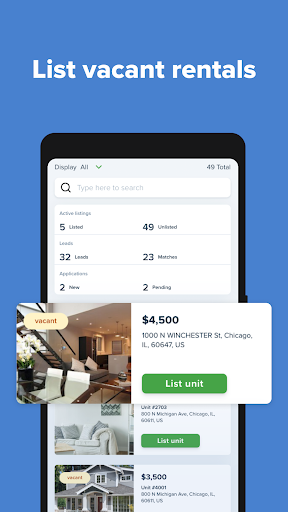
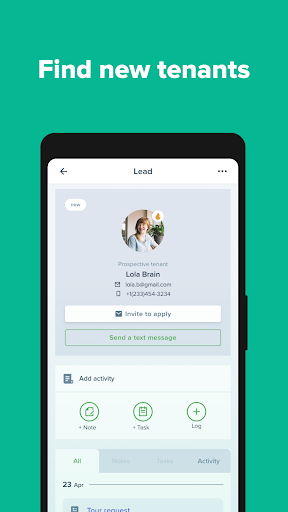
TenantCloud is a comprehensive end-to-end property management system for landlords, property managers, tenants, and service providers to conveniently access and manage essential property-related information such as property details, units, leases, accounting, and maintenance requests on their phones and desktops.
Landlord Account Features:
- Unlimited units, listings, and properties.
- Connect with tenants, owners, service professionals, and team members.
- Get a customizable marketing website for your vacancies.
- Get leads for your vacancies.
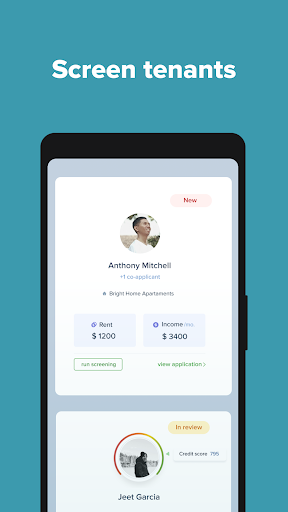
- Set up an application fee and receive rental applications from your prospects.
- Run background and credit checks right from an application.
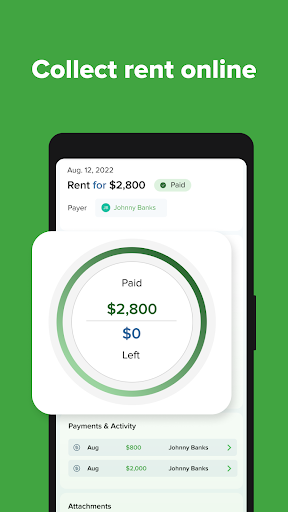
- Collect rent online.
- Set up leases with the built-in document builder.
- E-sign the lease and send it to your tenants to e-sign.
- Automatic rent invoices, late fees, and receipts are delivered to tenants.
- Store all transactions, receipts, and invoices in one place and categorize them according to your needs.
- Receive, manage, and send maintenance requests to your service pros.
- Build financial and rental reports in seconds and track your success.
- Generate a 1099 Tax Form and send digital copies to recipients.
- Sync with Google Calendar and QuickBooks.
- TC Messenger for communication with tenants, service professionals, and team members.
- Unlimited support.
Property Manager Account Features:
- Assign a team member to every specific property.
- Set their permissions for every part of the system, such as properties, listings, etc.
- Keep track of all the actions of a team member saved in chronological order with the Activity History.
- Connect with Owners and assign various properties to various owners under the same account.
- Send Owners maintenance requests to approve repair costs.
- Regulate your relationships with the agreements that can be generated within the system.
- Set all the management fees, which will be calculated automatically and shown in the Accounting section.
- Set up your own lease template with our Template Builder.
- Communicate via TC Messenger.
Tenant Account Features:
- Connect with your landlord and have a signed lease agreement ready in seconds.
- Process rent payments easily using ACH, credit, and debit cards.
- Enable Auto Pay to pay automatically on or before the due date.
- Report your rent payments to the credit bureaus to build your credit score.
- Maintain control over all your expenses, including rent, utilities, fees, and deposits.
- Submit maintenance requests to get them fixed immediately.
- Access your rental history by having all your current and past leases consolidated in one place.
- Track renters insurance expiration.
- Create a Renter Profile and apply online for listings.
- Receive invites from landlords to view their listings based on your matching search criteria.
- Keep in touch with your landlord 24/7 with the TC Messenger.
Service Pro Account Features:
- Create a Business Profile to attract new clients.
- Customize a marketing website to showcase your services.
- Get notifications about new maintenance requests that appear in your area.
- Make bids and get selected for the job.
- Connect with the landlord and receive maintenance requests.
- Manage all the maintenance requests in the app, set up your schedule, and keep track of all the work done.
- Change statuses, add the materials used, and create invoices.
- Manually add other maintenance requests to keep track of all orders in one place.
- Get paid with ACH debit and credit cards within your TenantCloud account.
- Store receipts and keep track of your payment activity all in one place.
- Sync with Google Calendar.
Owner Account Features:
- Connect with your property managers and keep track of your properties.
- Get the property reports.
- Fees and distribution tools to pay property managers online.
- Keep track of maintenance.
- Approve maintenance request bids.
- Use TC Messenger for communication.
更多

1. 下載逍遙安裝器並完成設置

2. 啟動逍遙後打開位於桌面上的谷歌商店

3. 在谷歌商店中搜尋TenantCloud Pro
Install
4. 下載並安裝TenantCloud Pro
5. 下載完成後點擊圖標來啟動

6. 透過逍遙享受在電腦上體驗TenantCloud Pro
逍遙安卓是優秀的安卓模擬器,全球超過5000萬用戶的優先選擇。逍遙安卓以虛擬化技術為核心,為用户打造突破手機配備局限的應用平台!
大屏精細展示;無限待機,超越電池和流量限制
鍵鼠,手把操作全面支持,操作更精準
用逍遙多開同時運行多個遊戲、應用。
Use TenantCloud Pro on PC by following steps: