Thor: App Manager & Freezer
更新日期
目前版本
1.97.1
提供者

想體驗Thor: App Manager & Freezer,可是手機熒幕太小,一載軟體就變燙,怎麼辦?透過逍遙模擬器,在電腦的大熒幕上暢快體驗!用鍵鼠操作更精準流暢,逍遙模擬器滿足您的所有期待。在電腦上下載安裝Thor: App Manager & Freezer,不用擔心電池當掉,想體驗多久就多久,順暢跑一天~全新的逍遙模擬器9,絕對是您體驗Thor: App Manager & Freezer電腦版的最佳選擇。完美的按鍵映射系統讓Thor: App Manager & Freezer如PC軟體般順手;強大的多開功能可同時執行多個任務;獨家虛擬化技術更能徹底釋放電腦效能,保障長時間穩定運作。我們致力於不讓設備限制您的體驗,助您輕鬆高效,暢快無比!
更多
使用逍遙模擬器在電腦上享受Thor: App Manager & Freezer的卓越體驗。這是一款功能強大的免費安卓模擬器,為您提供數千款安卓應用程式的桌面版本。與好友互動,有效率完成工作,盡情享受! Thor is a free, open-source Android app manager, app freezer, system app uninstaller and APK installer.
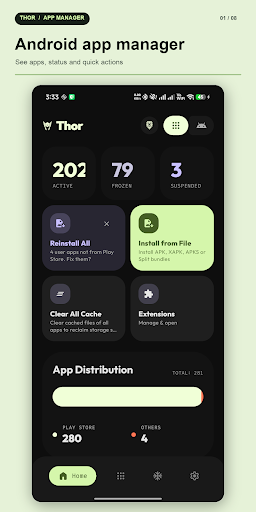
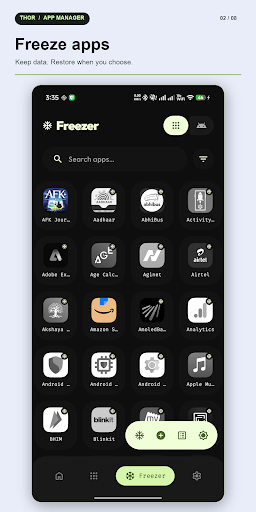
Thor is a free, open-source Android app manager, app freezer, system app uninstaller and APK installer. Search apps, freeze bloatware, debloat with guidance, install APK bundles and run batch actions. Root, Shizuku or Dhizuku unlocks privileged tools; browsing and searching apps needs none of them.
FREEZE APPS AND DEBLOAT
• Freeze or unfreeze apps to stop them running while keeping their data. Track them in the Freezer or group them into Freeze Profiles.
• Suspend or unsuspend apps, force stop them, and manage supported background restrictions. Methods vary by mode and device.
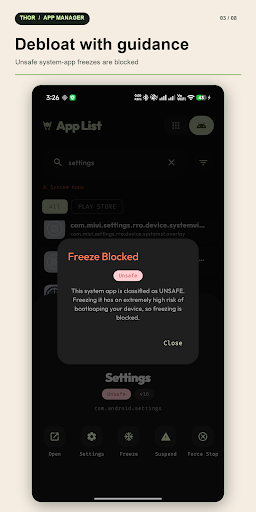
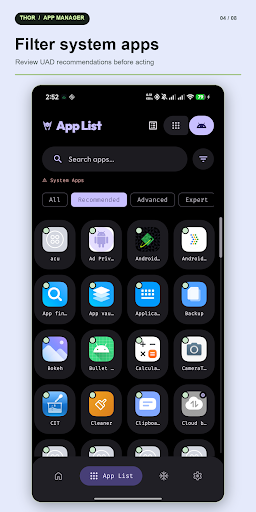
• Review Universal Android Debloater (UAD) advice before changing system apps. Filter by Recommended, Advanced, Expert, Unsafe or Unknown. Thor blocks Unsafe freeze targets and warns about Expert ones. UAD advice is not a guarantee.
• Uninstall a system app for the current Android user when supported, then restore it if its package remains on the device. Thor does not erase the system APK from the device partition. Shizuku's configurable removal fallback keeps data files when disabling is refused, but may affect app-managed accounts.
FIND AND MANAGE INSTALLED APPS
• Browse user apps, preinstalled system apps and packages removed for the current user. Filter by source, state, permissions and UAD advice.
• See frozen, suspended, hidden and split-package states. Choose list or grid view and export the app list to CSV.
• Open App Info for package details and quick actions. Reorder or hide quick actions.
• Select multiple apps for supported batch freeze, unfreeze, uninstall, reinstall, suspend, unsuspend, force stop, cache clearing, sharing or APK export. Batch install and batch clear data are not available.
APK INSTALLER, EXPORT AND BACKUP
• Install APK, APKM, APKS and XAPK files, including supported OBB expansion assets. Use Android's installer or a configured Root, Shizuku or Dhizuku mode, where supported.
• Export an app as APK, APKS or XAPK; share apps or export selected apps as installer bundles. Fix Store can restore Play installer attribution for eligible reinstalls with Root or Shizuku.
• Use the Backup & Restore hub to find, inspect, share, back up or restore app bundles and encrypted .thorbak archives. Root can include private app data; non-root modes have narrower access. Backup passphrases cannot be recovered.
• Guardians shows progress, logs, results and cancellation for supported long-running tasks.
PERMISSIONS AND POWER TOOLS
• Grant or revoke supported runtime permissions per app. With Root or Shizuku, inspect and change supported App Ops modes, search them and reset to platform defaults.
• Inspect activities, services, receivers and providers. Where your mode allows it, open activities or enable, disable and restore components.
• Clear app data, clear supported caches and restrict background activity. Availability varies by mode and device.
• Built-in Sett Edit lets Root or Shizuku users inspect Android settings and preview changes to supported System, Secure and Global values with confirmation and readback.
ROOT, SHIZUKU OR DHIZUKU
Root offers the broadest set of actions. Shizuku works without root after its separate service setup; Dhizuku uses Device Owner access and has its own setup. Without privilege, you can still browse, search and filter apps. Thor shows when an action is unavailable instead of silently claiming it worked.
PRIVATE AND PERSONAL
No ads, analytics or trackers. The optional Extension Manager connects to download a catalog and verified extensions; the Play build also uses Google Play Billing for optional support. Core app-management tools work offline. Thor is GPL-3.0-or-later free software, with Material 3 themes, AMOLED mode, tablet and foldable layouts, a biometric lock and an in-app language switcher.
Take control of your apps with Thor.
更多

1. 下載逍遙安裝器並完成設置

2. 啟動逍遙後打開位於桌面上的谷歌商店

3. 在谷歌商店中搜尋Thor: App Manager & Freezer
Install
4. 下載並安裝Thor: App Manager & Freezer
5. 下載完成後點擊圖標來啟動

6. 透過逍遙享受在電腦上體驗Thor: App Manager & Freezer
逍遙安卓是優秀的安卓模擬器,全球超過5000萬用戶的優先選擇。逍遙安卓以虛擬化技術為核心,為用户打造突破手機配備局限的應用平台!
大屏精細展示;無限待機,超越電池和流量限制
鍵鼠,手把操作全面支持,操作更精準
用逍遙多開同時運行多個遊戲、應用。
Use Thor: App Manager & Freezer on PC by following steps: