TrueNumber:Second Phone Number
更新日期
目前版本
2.4.0
提供者

想體驗TrueNumber:Second Phone Number,可是手機熒幕太小,一載軟體就變燙,怎麼辦?透過逍遙模擬器,在電腦的大熒幕上暢快體驗!用鍵鼠操作更精準流暢,逍遙模擬器滿足您的所有期待。在電腦上下載安裝TrueNumber:Second Phone Number,不用擔心電池當掉,想體驗多久就多久,順暢跑一天~全新的逍遙模擬器9,絕對是您體驗TrueNumber:Second Phone Number電腦版的最佳選擇。完美的按鍵映射系統讓TrueNumber:Second Phone Number如PC軟體般順手;強大的多開功能可同時執行多個任務;獨家虛擬化技術更能徹底釋放電腦效能,保障長時間穩定運作。我們致力於不讓設備限制您的體驗,助您輕鬆高效,暢快無比!
更多
使用逍遙模擬器在電腦上享受TrueNumber:Second Phone Number的卓越體驗。這是一款功能強大的免費安卓模擬器,為您提供數千款安卓應用程式的桌面版本。與好友互動,有效率完成工作,盡情享受! TrueNumber – Global Calls, Texts, Privacy Shield & Seamless Code Verification.
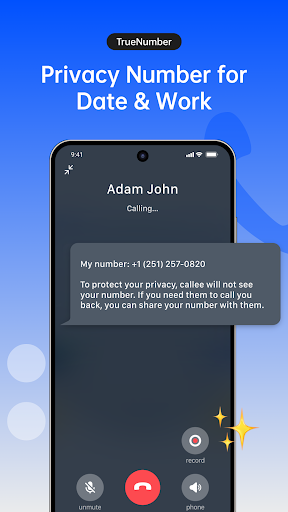
TrueNumber – Global Calls, Texts, Privacy Shield & Seamless Code Verification
Experience effortless global communication with TrueNumber. Benefit from free international calling, texting, and robust privacy protection. TrueNumber offers you a dedicated second phone number, an additional line, or burner numbers for diverse needs, from confidential chats to secure online verifications.
Key Features:
International Calls and SMS
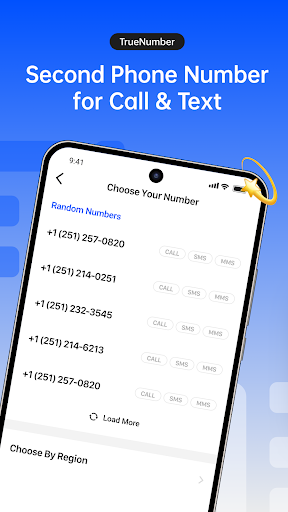
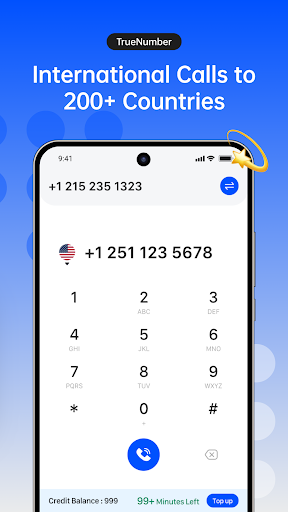
TrueNumber enables calls and SMS to the USA, Canada and Mexico. Whether for personal or business use, receive free minutes for each country. Your TrueNumber keeps your communications discreet—the recipient won't see your actual number.
Get a Second Phone Number
Acquire a second phone number or an additional line without needing an extra SIM or eSIM. Select your preferred area code for either temporary or long-term use. Safeguard your personal number while efficiently handling various communication streams.
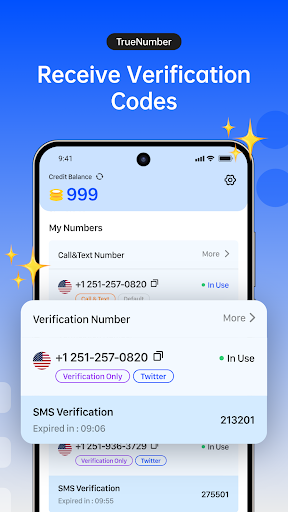
Receive Verification Codes
TrueNumber equips you with virtual numbers to receive verification codes for platforms like Facebook, Instagram, Snapchat, Telegram, Twitter, WhatsApp, Rednote, TikTok, and others. Utilize burner numbers for anonymous registrations without exposing your real phone number. After completing sign-up, simply discard the number to maintain your privacy.
Unlimited Wi-Fi Calling and Texting
Enjoy unlimited Wi-Fi calling and texting worldwide. No 3G/4G data required—only an internet connection is needed. Cut down on international calling costs while using your TrueNumber for crystal-clear communication.
High-Quality Voice Calls
Leveraging VoIP and HD voice technology, TrueNumber delivers exceptional call clarity, even with weak network signals. For personal or professional use, your TrueNumber ensures superior voice quality.
Virtual Phone Numbers for Any Use
For business, online dealings, or enhanced privacy, TrueNumber provides virtual phone numbers tailored to any requirement. Select your desired duration and effortlessly manage communications, verifications, and beyond.
Use Cases:
Privacy Protection: Use burner numbers for anonymous sign-ups on apps like Facebook, Instagram, Snapchat, and more. Shield your real number when registering for social apps or online services.
Separate Work and Life: Maintain a clear boundary between professional and personal communications by using a dedicated TrueNumber for work calls.
Swift Online Registrations: Use TrueNumber to quickly register on apps like Telegram, WhatsApp, Pinterest, LinkedIn, and others, without exposing your personal number.
Secure Online Transactions: When buying or selling on e-commerce platforms, use a TrueNumber for verification. You can remove the number after the transaction is finalized.
Stay in Touch with Loved Ones: Keep connected globally with unlimited Wi-Fi calls and texts to family and friends.
Versatile Online Services & Verification: Employ your TrueNumber to receive verification codes for social media, banking apps, and more. It’s perfect for account verification or two-factor authentication.
Important Notes:
Emergency services (e.g., 911) are not supported.
Please enable push notifications to ensure you receive messages and calls promptly.
Subscription auto-renewal can be managed and turned off at least 24 hours before the end of the current period.
Subscription Details:
Subscriptions offer phone number reservations along with additional credits. Options include monthly or annual renewals. Payments will be charged to your iTunes account upon confirmation of purchase. You can manage your subscriptions and auto-renewal settings in your iTunes Account Settings. Cancellation of the current active subscription period is not permitted.
Contact Us:
For support or inquiries, please contact us at: support@truenumber.com
更多

1. 下載逍遙安裝器並完成設置

2. 啟動逍遙後打開位於桌面上的谷歌商店

3. 在谷歌商店中搜尋TrueNumber:Second Phone Number
Install
4. 下載並安裝TrueNumber:Second Phone Number
5. 下載完成後點擊圖標來啟動

6. 透過逍遙享受在電腦上體驗TrueNumber:Second Phone Number
逍遙安卓是優秀的安卓模擬器,全球超過5000萬用戶的優先選擇。逍遙安卓以虛擬化技術為核心,為用户打造突破手機配備局限的應用平台!
大屏精細展示;無限待機,超越電池和流量限制
鍵鼠,手把操作全面支持,操作更精準
用逍遙多開同時運行多個遊戲、應用。
Use TrueNumber:Second Phone Number on PC by following steps: