PSX2
تاریخ بهروزرسانی
نسخه کنونی
1.2.1
ارائهکننده

با تمام اشتیاق شما به بازی PSX2، قرار نیست دست های شما روی صفحه نمایش کوچک گوشی شما محدود شود. مانند یک حرفه ای بازی کنید و کنترل کامل بازی خود را با صفحه کلید و ماوس بدست آورید.MEmu همه ی انتظاراتی که دارید را برآورده می کند.PSX2 را بر روی رایانه شخصی دانلود و بازی کنید. تا زمانی که می خواهید بازی کنید، دیگر محدودیتی در باتری، داده تلفن همراه و تماس های مزاحم وجود ندارد.MEmu 9 کاملاً جدید و بهترین انتخاب برای بازی PSX2 روی رایانه شخصی است. با تخصص ما، سیستم keymapping از پیش تعیین شده عالی،PSX2 را به یک بازی رایانه شخصی واقعی تبدیل می کند.مدیریت چند موردی MEmu امکان اجرای 2 یا چندین حساب در یک دستگاه را فراهم می کند.و مهمتر از همه، موتور شبیهسازی انحصاری ما میتواند پتانسیل کامل رایانه شما را آزاد کند و همه چیز را روان کند.
بیشتر نشان بده
دانلود بازی PSX2 برای کامپیوتر با MEmu Play. از بازی روی صفحه نمایش بزرگ لذت ببرید. Experience your favorite PlayStation 2 games on Android with PSX2, a emulator based on pcsx2.
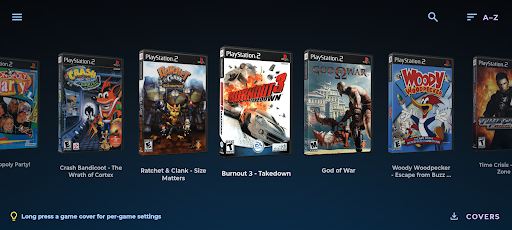
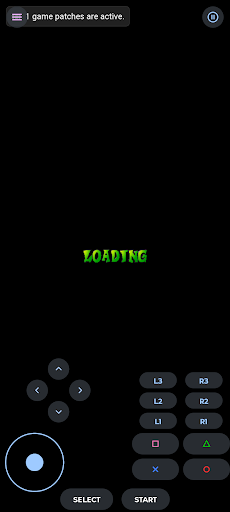
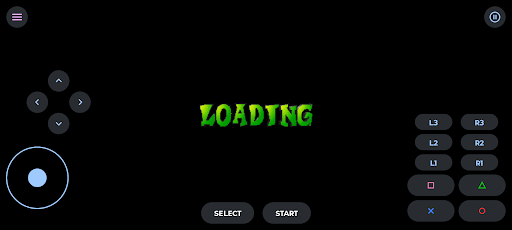
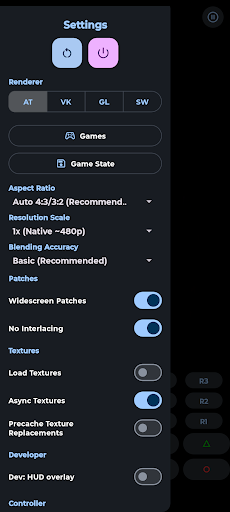
Experience your favorite PlayStation 2 games on Android with PSX2, a emulator based on pcsx2.
Key Features:
• High compatibility with thousands of PS2 games
• Enhanced graphics with upscaling and texture filtering
• Multiple game formats: ISO, CHD, CSO, ZSO, and more
• Intuitive touch controls with customizable layout
• Full Bluetooth and USB controller support
• Save states for quick save/load functionality
• Per-game settings for optimal performance
• Automatic cover art downloading
System Requirements:
• Android 8.0 (API 26) or higher
• ARM64 (64-bit) processor required
• 4GB RAM minimum (8GB+ recommended)
• OpenGL ES 3.2 or Vulkan support
Performance Options:
• Multiple renderer options (Vulkan, OpenGL, Software)
• Resolution scaling from 1x to 8x native
• Aspect ratio options including widescreen
Legal & Important Information:
• No games or BIOS files included
• You must own original PlayStation 2 games and console
• For educational and preservation purposes only
• Based on the open-source PCSX2 project
Open Source:
Based on the renowned PCSX2 project (https://github.com/PCSX2/pcsx2) and PCSX2_ARM64 (https://github.com/pontos2024/PCSX2_ARM64). Source code available at https://github.com/izzy2lost/PSX2.
Supported Formats:
ISO, CHD, CSO, ZSO, BIN/CUE, IMG, MDF, NRG
Compatibility:
PSX2 aims for high compatibility with the PlayStation 2 library. Performance varies by device capabilities and game requirements.
Support:
Report issues and get help through our GitHub repository (https://github.com/izzy2lost/PSX2) or contact support at izzynochill@gmail.com.
---
PlayStation and PlayStation 2 are trademarks of Sony Interactive Entertainment. This project is not affiliated with or endorsed by Sony Interactive Entertainment.
بیشتر نشان بده

1. نصب کننده Memu را دانلود کرده و راه اندازی را تمام کنید

2. Memu را اجرا کنید و سپس گوگل پلی را بر روی دستکتاپ باز کنید

3. PSX2 را بر روی گوگل پلی جستجو کنید
Install
4. PSX2 را دانلود و نصب کنید
5. پس از اتمام نصب روی آیکون کلیک کنید تا اجرا شود

6. از بازی کردن PSX2 بر روی رایانه شخصی با MEmu لذت ببرید
MEmu بهترین نمونه ساز رایگان اندروید است و پیش از این 50 میلیون نفر از تجربه بسیار خوب بازی اندروید در آن لذت برده اند. تکنولوژی مجازی ساز MEmu شما را قادر می سازد هزاران بازی اندرویدی را در کامپیوتر به طور روان اجرا کنید، حتی آنهایی که گرافیک سنگین تری دارند.
صفحه نمایش بزرگتر با گرافیک بهتر؛ زمان طولانی تر، بدون محدودیت باتری یا داده تلفن همراه.
پشتیبانی کامل از Keymapping برای کنترل دقیق صفحه کلید و ماوس یا گیم پد.
چندین حساب بازی یا وظایف در یک رایانه شخصی در یک زمان با مدیریت همزمان همه
Play PSX2 on PC by following steps: