CineB
تاریخ بهروزرسانی
نسخه کنونی
1.0.0
ارائهکننده

در مورد استفاده بیش از حد در هنگام استفاده از CineB بر روی تلفن همراه خود ، نگران نباشید ، خود را از صفحه ریز رها کنید و از استفاده از برنامه در یک صفحه نمایش بسیار بزرگتر لذت ببرید. از این پس ، تجربه تمام صفحه برنامه خود را با صفحه کلید و ماوس دریافت کنید .Mmu تمام ویژگی های شگفت انگیز مورد نظر شما را ارائه می دهد: نصب سریع و نصب آسان ، کنترل های بصری ، محدودیت بیشتر باتری ، داده های تلفن همراه و تماس های مزاحم. نام تجاری جدید MEmu 9 بهترین انتخاب برای استفاده از CineB در رایانه شما است. با جذب ما ، مدیر چند نمونه باعث می شود همزمان 2 یا چند حساب را باز کنید. و از همه مهمتر ، موتور انحصاری منحصر به فرد ما می تواند پتانسیل کامل کامپیوتر شما را آزاد کند ، همه چیز را صاف و لذت بخش کند.
بیشتر نشان بده
از تجربه فوقالعاده استفاده از CineB در کامپیوتر با MEmu Play لذت ببرید. این یک شبیهساز اندروید رایگان و قدرتمند است که هزاران برنامه اندروید را برای نسخه دسکتاپ در اختیار شما قرار میدهد. CineB helps when you are deciding what to watch and want quick, reliable background info.


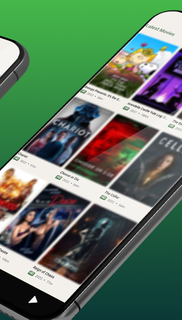

CineB helps when you are deciding what to watch and want quick, reliable background info. It focuses on browsing an up to date catalog across genres, with clear summaries and trailers so you can make a choice without jumping between sites. The app is free to use and does not stream or host media. Instead, it gathers data from trusted databases for consistent results. Listings refresh regularly as new titles arrive. For easy installation, get the CineB APK and start exploring on Android. What CineB offersExtensive catalog with rich detailsCineB presents a large library of movies and series from Hollywood to Bollywood. You can open a title to see summaries, cast, release information, ratings, and community reviews where available. Trailers are included so you can preview without leaving the app. This makes it simple to compare options before choosing what to watch next.Smart discovery by genres and categoriesYou can filter by genres like Action, Drama, Horror, Mystery, Animation, and Sports to narrow the list. CineB also organizes content by categories such as popular and trending to surface widely discussed titles. As a result, it is easy to move from a broad search to a focused shortlist. The flow from list to detail keeps the experience straightforward.Subtitles info and organized browsingCineB shows subtitle availability information where data is provided by its sources. You can check supported languages on the title page alongside other metadata. Browsing is structured so that subtitle notes appear with relevant details, which reduces the need to search elsewhere. This helps you see language options earlier in your decision process.Continuously updated listingsCineB uses movie and TV APIs to refresh data automatically. New releases and corrections appear without manual steps from the user. The app aggregates information from multiple sources and user communities to improve accuracy. This approach keeps entries current across genres and regions.Free, safe to use, and no root requiredCineB is free, simple to navigate, and does not require root access on your device. The app focuses on information and trailers and does not stream or download copyrighted content. Because it relies on metadata from reputable databases, you get a consistent experience with minimal setup. Everything is designed for quick lookup on mobile. CineB and third party streaming sitesCineB is an informational companion for movies and TV. It is not related to third party streaming websites such as cineb.net, and it does not host or stream media files. Some streaming sites may include intrusive ads or risky links, which is a different environment from this app. Here, you explore trailers and metadata only, then decide what interests you without playback inside the app. Data sources, fair use, and creditsCineB uses data and media sourced through the TMDB API under fair use for informational purposes. This product uses the TMDB API but is not endorsed or certified by TMDB. You can review the TMDB terms at TMDB Terms of Use. Where applicable, media or metadata may be subject to the CC BY NC 4.0 license. CineB focuses on trailers and facts, not streaming, and should not be confused with any Cinema HD app or similar playback tools. Where subtitles information appearsSubtitle details are shown on each title page when the data source provides language information. You will see available languages listed near the description or media section. Trailers may include captions from the original provider when available, and CineB displays that status as part of the title’s metadata. This helps you confirm language support during discovery. Rights holder requestsIf you are a rights holder and believe any listing information should be updated or removed, use the developer contact inside the app or the contact section on this listing to request review. Provide the specific title URL and the reason for your request so it can be handled efficiently. DMCA style takedown requests should include clear identification of the material and proof of ownership. How to discover content in CineBAfter you download CineB, the home screen guides you to popular lists and genres. The layout is simple, so you can scan highlights, check ratings, and open a title for full details without extra steps. Open CineB and start on the home screen to see popular and trending sections for quick picks. Tap Genres, then choose a category like Action or Drama to narrow results before browsing. Use the search bar if you already have a title or actor in mind, then select the best match. Open a title page to read the summary, view ratings, check subtitle information, and watch the trailer. Return to the list and adjust filters or genres to compare more options until you decide what to watch. Start exploring with CineBCineB helps you browse movies and series with current details, ratings, and trailers in one place. For the most stable experience, install the CineB latest version and use genre filters to narrow choices quickly.
بیشتر نشان بده

1. نصب کننده Memu را دانلود کرده و راه اندازی را تمام کنید

2. Memu را اجرا کنید و سپس گوگل پلی را بر روی دستکتاپ باز کنید

3. CineB را بر روی گوگل پلی جستجو کنید
Install
4. CineB را دانلود و نصب کنید
5. پس از اتمام نصب روی آیکون کلیک کنید تا اجرا شود

6. با استفاده از MEmu، CineB را روی کامپیوتر خود تجربه کنید.
MEmu در حال حاضر بهترین شبیهساز رایگان اندروید است که ۵۰ میلیون کاربر از تجربه استثنایی برنامههای اندروید لذت میبرند. فناوری مجازیسازی MEmu به شما امکان میدهد هزاران برنامه اندروید، حتی بازیهای با گرافیک بالا را به راحتی روی رایانه خود اجرا کنید.
صفحه نمایش بزرگتر با گرافیک بهتر؛ زمان طولانی تر، بدون محدودیت باتری یا داده تلفن همراه.
پشتیبانی کامل از Keymapping برای کنترل دقیق صفحه کلید و ماوس یا گیم پد.
چندین حساب بازی یا وظایف در یک رایانه شخصی در یک زمان با مدیریت همزمان همه
Use CineB on PC by following steps: