Ashes of Thornfield
Aggiornata
Versione corrente
0.1.0
Offerta da

Vista tutta la passione dimostrata nel giocare a Ashes of Thornfield, le tue mani non dovrebbero essere limitate al minuscolo schermo di un telefono. Gioca come un professionista e ottieni il pieno controllo del gioco con tastiera e mouse. MEmu ti offre tutto ciò che ti aspetti. Scarica e gioca a Ashes of Thornfield su PC. Gioca quanto vuoi, niente più limitazioni di batteria, dati mobili e chiamate inquietanti. Il nuovissimo MEmu 9 è la scelta migliore per giocare a Ashes of Thornfield su PC. Realizzato sulla base della nostra esperienza, lo squisito sistema di mappatura dei tasti preimpostati rende Ashes of Thornfield un vero e proprio gioco per PC. MEmu è un gestore multi-instanza che permette di giocare con 2 o più account sullo stesso dispositivo. E la cosa più importante, il nostro esclusivo motore di emulazione può liberare tutto il potenziale del tuo PC, rendendo tutto fluido.
Mostra altro
Scarica Ashes of Thornfield su PC con MEmu Android Emulator. Divertiti giocando sul grande schermo. Ashes of Thornfield is a dark fantasy isometric action RPG in the spirit of the classic hack-and-slash games: fast combat, deep loot, and a long endgame.
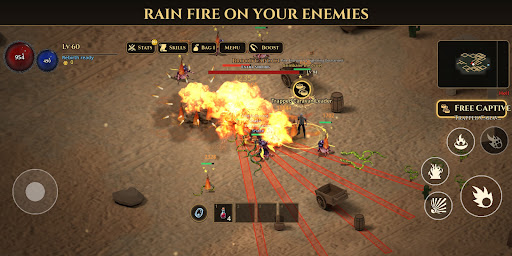
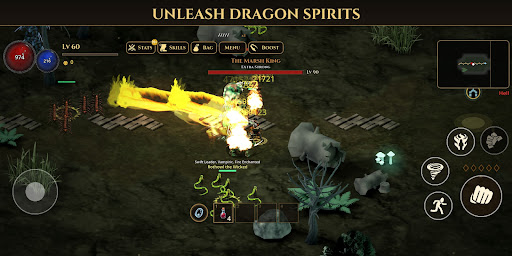
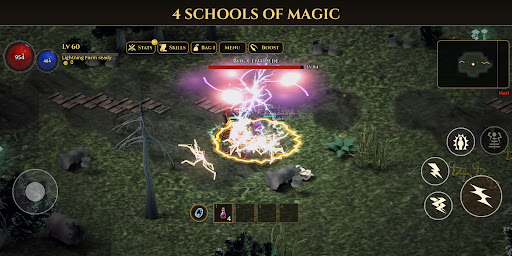
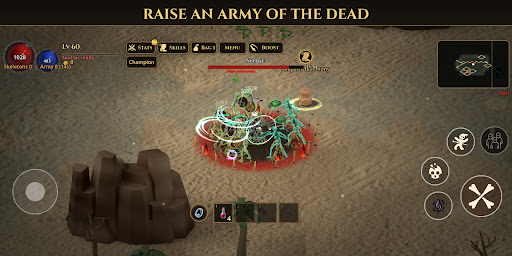
Ashes of Thornfield is a dark fantasy isometric action RPG in the spirit of the classic hack-and-slash games: fast combat, deep loot, and a long endgame. No account, no energy timers, nothing to buy. Play offline, or team up with friends.
FOUR CLASSES, MANY BUILDS
• Warrior: sword and shield. Charge in, block, whirl and leap into the crowd.
• Mage: master one of four schools, Fire, Cold, Lightning or Poison. Each one plays like a different class.
• Necromancer: raise a skeleton army, detonate corpses and curse your enemies.
• Fighter: a martial artist who unleashes dragon spirits with every fist.
SKILLS THAT GROW AS YOU FIGHT
Skills level up only by hitting real monsters. Every 5 levels a skill reaches a new tier that changes how it looks and plays. Put any unlocked skill on any button.
A DARK WORLD AND A LONG ENDGAME
Fight from the village of Thornfield across a cursed desert into the drowned swamps of Velmire. More than 25 bosses, each with its own attacks and phases. Beat the story on Normal, then return on Nightmare and Hell. Conquer Hell to unlock the Ashen Reach, five endgame zones built for your strongest builds.
LOOT WORTH HUNTING
Normal, Magic, Rare, Set and Unique items. Boss-only uniques, full item sets with set bonuses, gems and sockets, a stash, and a collection book of every unique you have found. Magic Find really matters: stack it to find more uniques and sets.
PLAY TOGETHER
• Up to 8 players in one room.
• Online with a room code, or on the same Wi-Fi without internet.
• Share the whole adventure: monsters, quests, XP and loot. Doors and Town Portals take the whole party.
• Optional PvP: fight in the open world or in the Arena with a kill / death scoreboard.
BUILT FOR PHONES
Touch controls made for one-handed fights, a Low / Medium / High graphics setting for older phones, and full offline play. Available in English and Vietnamese.
Free to play. Optional rewarded ads only, never forced.
Mostra altro

1. Scarica il programma di installazione di MEmu e completa l'installazione

2. Avvia il Memu e apri il Google Play sulla homepage

3. Cerca Ashes of Thornfield in Google Play
Install
4. Scarica e installa Ashes of Thornfield
5. Al termine dell'installazione, fai clic sull'icona per avviar

6. Divertiti giocando a Ashes of Thornfield su PC con MEmu
MEmu App Player è il miglior emulatore Android gratuito, utilizzato da 50 milioni di persone per ottenere un'esperienza di gioco Android superba. La tecnilogia di virtualizzazione MEmu ti permette di giocare a migliaia di giochi Android con semplicità sul tuo computer, anche i giochi con la grafica più esigente.
Schermo più grande con una grafica migliore; Lunga durata, senza limitazione di batteria o dati mobili.
Supporto completo per mappa di tastiera per un controllo preciso di tastiera e mouse o gamepad.
Multipli account di gioco o attività su un singolo PC contemporaneamente con il gestore di multi istanza.
Play Ashes of Thornfield on PC by following steps: