Dominion
Aggiornata
Versione corrente
1.0.3315
Offerta da

Vista tutta la passione dimostrata nel giocare a Dominion, le tue mani non dovrebbero essere limitate al minuscolo schermo di un telefono. Gioca come un professionista e ottieni il pieno controllo del gioco con tastiera e mouse. MEmu ti offre tutto ciò che ti aspetti. Scarica e gioca a Dominion su PC. Gioca quanto vuoi, niente più limitazioni di batteria, dati mobili e chiamate inquietanti. Il nuovissimo MEmu 9 è la scelta migliore per giocare a Dominion su PC. Realizzato sulla base della nostra esperienza, lo squisito sistema di mappatura dei tasti preimpostati rende Dominion un vero e proprio gioco per PC. MEmu è un gestore multi-instanza che permette di giocare con 2 o più account sullo stesso dispositivo. E la cosa più importante, il nostro esclusivo motore di emulazione può liberare tutto il potenziale del tuo PC, rendendo tutto fluido.
Mostra altro
Scarica Dominion su PC con MEmu Android Emulator. Divertiti giocando sul grande schermo. Espandi un piccolo regno in un potente dominio!
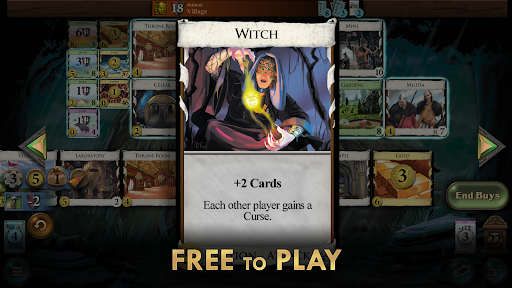
Espandi un piccolo regno in un potente dominio!
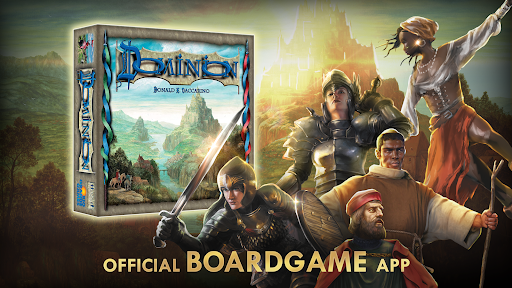
Gioca al vincitore dello Spiel des Jahres amato da milioni di appassionati di giochi da tavolo in tutto il mondo. Questa è l'implementazione con licenza ufficiale.
DECKBUILDER IN REGNA
Scopri il gioco che ha definito un genere, Dominion è stato il primo a rendere popolare la costruzione di mazzi e rimane un punto fermo del gioco da tavolo.
FAI CRESCERE IL TUO REGNO
Raccogli quanti più punti vittoria puoi costruendo un potente mazzo. Il tuo mazzo inizia con un piccolo e triste insieme di Proprietà e Rami, ma speri che alla fine del gioco sia pieno di Oro, Province, abitanti e strutture del tuo regno.
COSTRUISCI IL TUO MOTORE
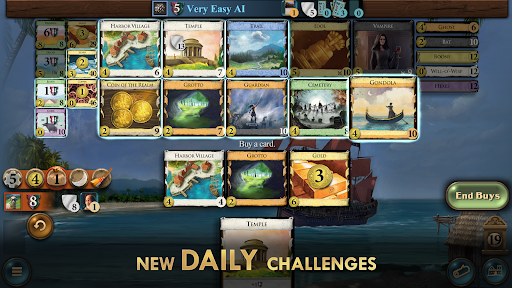
Scegli saggiamente tra le 10 carte disponibili nel tableau per creare le combo più forti per dominare il tuo avversario.
COLLEZIONA TUTTE LE ESPANSIONI
Rendi i tuoi giochi più emozionanti con carte e regole aggiuntive provenienti da un massimo di 15 espansioni, inclusa la recente espansione Plunder!
UNA VARIETÀ QUASI INFINITA
Oltre centotrentadue settilioni di possibili combinazioni del Regno, oltre 500 carte, 15 espansioni e oltre e pacchetti promozionali in corso rendono Dominion uno dei giochi da tavolo più estesi e rigiocabili di questo hobby.
COMPETERE CON IL COMPUTER
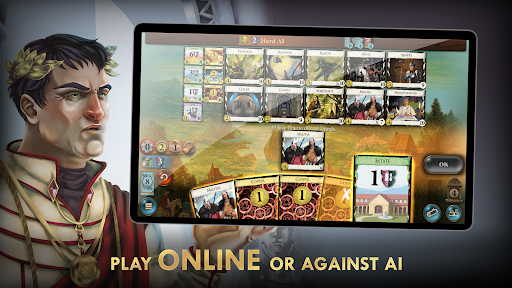
Affina le tue abilità giocando in solitario in stile solitario contro una potente intelligenza artificiale, con quattro livelli di difficoltà. La nostra IA innovativa impara attraverso il gioco autonomo. Ottieni obiettivi e vinci nei set consigliati contro ogni livello dell'IA.
GIOCA CON AMICI O SCONOSCIUTI
Gioca con un massimo di 6 giocatori online tramite il tuo dispositivo oppure passa e gioca tra i tuoi amici. Partecipa al matchmaking classificato o non classificato, con modalità in tempo reale e asincrona. Prepara un tavolo privato per un gioco in famiglia, sfida uno sconosciuto nella lobby o invita un amico!
PUZZLE GIORNALIERO
Un rituale quotidiano per rilassarsi davanti a una tazza di caffè. Prova Daily Dominion, un livello puzzle gratuito disponibile per i giocatori di tutto il mondo. Metti in pratica la tua strategia per mantenere una serie di vittorie consecutive e scalare la classifica.
GIOCO MULTIPIATTAFORMA
Gioca da qualsiasi dispositivo supportato, quando vuoi, dopo aver verificato la tua email nel gioco. Partecipa a partite con avversari su piattaforme diverse dalla tua.
UNISCITI ALLA COMUNITÀ
Con Discord attivo e una community online, fai nuove amicizie o sfida nuove persone a un gioco. Esporta e condividi regni e riepiloghi di gioco per confrontare le strategie.
LIBERO DI GIOCARE
Scarica gratuitamente il gioco da cui tutto ha avuto inizio! Il set base di Dominion è disponibile gratuitamente. Prova la rotazione delle carte di espansione Giornaliera gratuitamente una volta al giorno. Entra in un gioco nella lobby con le espansioni abilitate da provare prima di acquistare. Solo l'host deve possedere le espansioni.
INTRODUZIONE AL TABLETOP
Impara i fondamenti di questo titolo facile da imparare ma difficile da padroneggiare. Gioca a uno dei giochi da tavolo di strategia più apprezzati di tutti i tempi attraverso il nostro semplice tutorial. Il ciclo principale è facile da seguire, ma offre numerose strategie da esplorare.
• Supporto da 1 a 6 giocatori
• Oltre cinquecento carte
• Gioca in solitario contro 4 difficoltà IA
• Multigiocatore asincrono e in tempo reale
• Matchmaking classificato e non classificato
• Lobby e tavoli da gioco privati
• Multigiocatore multipiattaforma
• Acquisti multipiattaforma
• Sfida quotidiana
• IA stimolante che impara attraverso il gioco autonomo
• Set consigliati
• Personalizza, salva e condividi Regni
• Risultati, statistiche e classifiche
• Modalità Passa e Gioca
• Punteggio e suggerimenti automatizzati
• Opzioni di gioco intelligente per semplificare il gioco
• Modalità Jumbo per la leggibilità sui telefoni
• Modalità Turbo per scorrere rapidamente i giochi
• Tutorial e regole
• 4 lingue: inglese, giapponese, tedesco, francese
• 15 espansioni più tre pacchetti promozionali
Mostra altro

1. Scarica il programma di installazione di MEmu e completa l'installazione

2. Avvia il Memu e apri il Google Play sulla homepage

3. Cerca Dominion in Google Play
Install
4. Scarica e installa Dominion
5. Al termine dell'installazione, fai clic sull'icona per avviar

6. Divertiti giocando a Dominion su PC con MEmu
MEmu App Player è il miglior emulatore Android gratuito, utilizzato da 50 milioni di persone per ottenere un'esperienza di gioco Android superba. La tecnilogia di virtualizzazione MEmu ti permette di giocare a migliaia di giochi Android con semplicità sul tuo computer, anche i giochi con la grafica più esigente.
Schermo più grande con una grafica migliore; Lunga durata, senza limitazione di batteria o dati mobili.
Supporto completo per mappa di tastiera per un controllo preciso di tastiera e mouse o gamepad.
Multipli account di gioco o attività su un singolo PC contemporaneamente con il gestore di multi istanza.
Play Dominion on PC by following steps: