Let It Ride Poker
Aggiornata
Versione corrente
2.12.6
Offerta da

Vista tutta la passione dimostrata nel giocare a Let It Ride Poker, le tue mani non dovrebbero essere limitate al minuscolo schermo di un telefono. Gioca come un professionista e ottieni il pieno controllo del gioco con tastiera e mouse. MEmu ti offre tutto ciò che ti aspetti. Scarica e gioca a Let It Ride Poker su PC. Gioca quanto vuoi, niente più limitazioni di batteria, dati mobili e chiamate inquietanti. Il nuovissimo MEmu 9 è la scelta migliore per giocare a Let It Ride Poker su PC. Realizzato sulla base della nostra esperienza, lo squisito sistema di mappatura dei tasti preimpostati rende Let It Ride Poker un vero e proprio gioco per PC. MEmu è un gestore multi-instanza che permette di giocare con 2 o più account sullo stesso dispositivo. E la cosa più importante, il nostro esclusivo motore di emulazione può liberare tutto il potenziale del tuo PC, rendendo tutto fluido.
Mostra altro
Scarica Let It Ride Poker su PC con MEmu Android Emulator. Divertiti giocando sul grande schermo. This is the No.


This is the No. 1 Online Poker app for Let It Ride on Android.
Let It Ride is a variation of five card stud poker. It is based on player’s three cards and two community cards where you can Pull Back or ‘Let Them Ride’ based on how strong your hand is. There is no need to worry about beating dealer’s hand or wagering against other players.
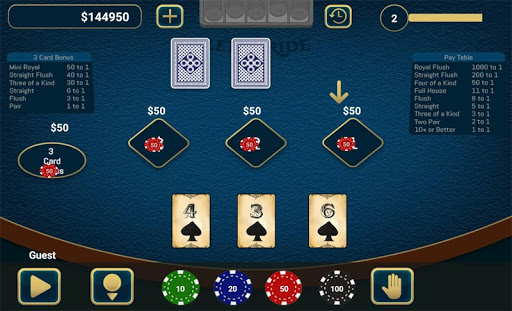
In this game, all 3 bets are made at once. You place them on the 1, 2 and $ marker. The $ bet is mandatory. That’s your ante, your table stakes.
You can also place a 3-card bonus bet.
The twist is that as the cards are revealed the player has the opportunity to withdraw or decrease two-third of his total wager if he doesn’t like his cards.
This game is a extremely popular casino poker game with potential for high pay outs.
It’s a fun game to play. And slow paced, which is great for older players or table game enthusiasts.
How To play :
1. Player must make three equal bets at three betting areas - 1, 2, $ on the table
2. The dealer then deals three cards to the player and two community cards are dealt face down
3. After looking at your three cards, if you feel you have the beginning of a good hand or if you are feeling lucky, then Let It Ride, else Pull Back your first bet by clicking on the arrow on 1st betting spot on the table
4. The first community card is then turned over. Again if it looks like a good hand, Let It Ride. If not, Pull Back your second bet by clicking on the arrow on 2nd Betting spot.
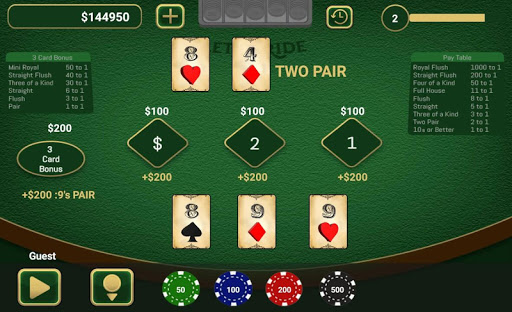
5. Finally the second community card is turned over completing your five-card poker hand.
6. If you have pulled back your first two bets, the third bet has to play.
7. If your poker hand has a pair of 10s or better, you win.
8. In the event of a winning, player is paid according to the poker value of his five cards, remaining wager and the payout table mentioned below:
Royal Flush - 1,000 to 1
Straight Flush - 200 to 1
Four of a Kind - 50 to 1
Full House - 11 to 1
Flush - 8 to 1
Straight - 5 to 1
Three of a Kind - 3 to 1
Two Pairs - 2 to 1
Pair of 10s or Better - 1 to 1
Any other - Loss
Features:
* HD Graphics and User Friendly Interface
* Leader board to show off your score with friends on social sites
* 16 Tables with different betting options
* Start the game with 50,000 bonus chips
* 225 Levels to be cleared
* Hourly bonus
* First 3 Tables are Unlocked
* High stake tables are locked which can be unlocked as you clear Levels
* In App chip purchases
* Invite your friends and get extra chips
* Send and Receive Gifts from your friends in the form of chips
Mostra altro

1. Scarica il programma di installazione di MEmu e completa l'installazione

2. Avvia il Memu e apri il Google Play sulla homepage

3. Cerca Let It Ride Poker in Google Play
Install
4. Scarica e installa Let It Ride Poker
5. Al termine dell'installazione, fai clic sull'icona per avviar

6. Divertiti giocando a Let It Ride Poker su PC con MEmu
MEmu App Player è il miglior emulatore Android gratuito, utilizzato da 50 milioni di persone per ottenere un'esperienza di gioco Android superba. La tecnilogia di virtualizzazione MEmu ti permette di giocare a migliaia di giochi Android con semplicità sul tuo computer, anche i giochi con la grafica più esigente.
Schermo più grande con una grafica migliore; Lunga durata, senza limitazione di batteria o dati mobili.
Supporto completo per mappa di tastiera per un controllo preciso di tastiera e mouse o gamepad.
Multipli account di gioco o attività su un singolo PC contemporaneamente con il gestore di multi istanza.
Play Let It Ride Poker on PC by following steps: