4XCAMERA
Aggiornata
Versione corrente
1.5.1
Offerta da

Non devi più preoccuparti dei sovraccarichi durante l'utilizzo di 4XCAMERA sul tuo cellulare, liberati dal piccolo schermo e goditi dell'App su uno schermo molto più grande. D'ora in poi, sperimenta la tua App a schermo intero con tastiera e mouse. MEmu ti offre tutte le sorprendenti funzioni che ti aspettavi: installazione rapida e impostazione semplice, controlli intuitivi, niente più limitazioni di batteria, dati mobili e chiamate fastidiose. Il MEmu 9 nuovo di zecca è la prima scelta per utilizzare 4XCAMERA sul tuo computer. Codificato con il nostro assorbimento, il gestore multi-istanza consente di aprire 2 o più account contemporaneamente. E soprattutto, il nostro esclusivo motore di emulazione può sbloccare il pieno potenziale del tuo PC, rendendo tutto liscio e piacevole.
Mostra altro
Scarica 4XCAMERA su PC con MEmu Android Emulator. Divertiti giocando sul grande schermo. * Customers who purchased 4XCAMERA before December 14, 2021 can reinstall it by following the steps below.
* Customers who purchased 4XCAMERA before December 14, 2021 can reinstall it by following the steps below.
From the GooglePlay account settings, open [Manage apps & device]-[Manage].
Tap [Installed] and change it to [Not installed.]
4XCAMERA will appear in the list of apps. Select and download it.
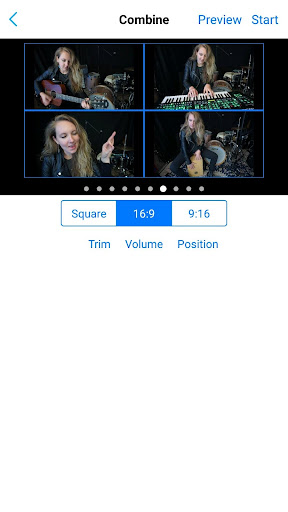
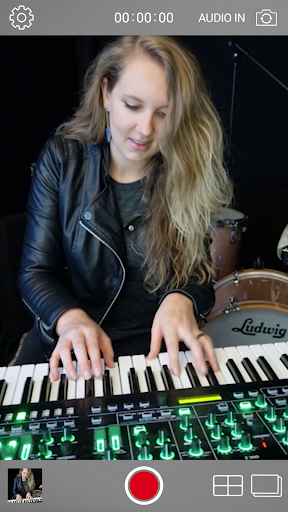
Roland’s 4XCAMERA is a unique app that allows you to create impressive music videos with up to four performances split on the screen. Start by capturing one video performance to the app, which becomes your guide. Then sing or play along and capture up to three more performances, adding new parts on each pass. As you perform, sound is recorded via the device’s built-in mic or through a connected audio capture device.
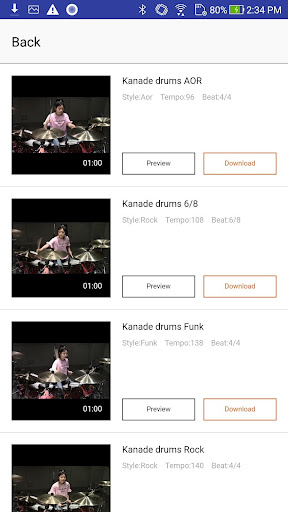
With just 4XCAMERA and a smartphone or tablet, it’s easy to get creative and take your video performances to new levels. And by sharing 4XCAMERA video projects through cloud-based storage, multiple musicians can use the app to contribute performances to your songs from anywhere in the world! The latest version adds integrated access to free video clips featuring live drummers, letting you spice up songs with on-demand backing.
4XCAMERA can split up to two screens free of charge. If you purchase an upgrade with in-app purchase, you can use up to 4 splits and 10 templates. You can also use the same upgrade function by connecting Roland GO: MIXER PRO / PRO-X.
Supports Roland Cloud membership
Roland Cloud Membership is now available in-app. All memberships come with 4XCamera Upgrade for as little as $2.99 USD per month.
■Features
• Easy-to-use app for creating split-screen music videos with up to four different performances
• Supports 1:1, 16:9 (landscape) and 9:16 (portrait) aspect ratios
• Two unique split-screen patterns available for each aspect ratio (Ten split-screen patterns available in 4XCAMERA full version)
• Adjust the volume for each screen and create the perfect sound mix
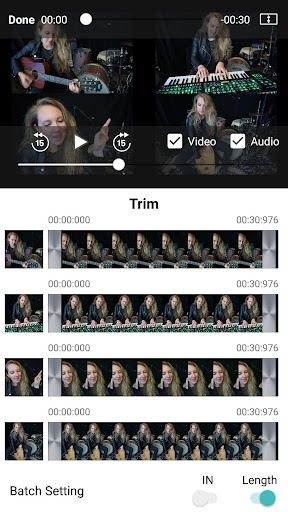
• Trim videos to the desired length in the app
• Use songs stored on your device as discrete monitoring guides while performing
• Download and play along with drum performance video clips
• Roland's GO:MIXER PRO/PRO-X arrows you to connect and mix a professional mic, musical instruments, and other audio sources and record them in high quality. It also lets you access full functionality with no upgrade fee.
Audio In setting
you can select the headset microphone for recording.
Compatible with GO:MIXER PRO-X's SMARTPHONE IN/OUT jack
When connecting via the SMARTPHONE IN/OUT jack of GO: MIXER PRO-X, select the heasdset microphone for AUDIO IN.
Visit https://www.roland.com/global/products/4xcamera/ for more details.
About GO:MIXER PRO-X: https://www.roland.com/global/products/gomixer_pro-x/
* Roland Cloud membership might not be available depending on your country or region.
* When using GO:MIXER PRO/PRO-X together, please check the operating conditions and the smartphone compatibility of GO:MIXER PRO/PRO-X.
* Available video files are in mp4 format.
Mostra altro

1. Scarica il programma di installazione di MEmu e completa l'installazione

2. Avvia il Memu e apri il Google Play sulla homepage

3. Cerca 4XCAMERA in Google Play
Install
4. Scarica e installa 4XCAMERA
5. Al termine dell'installazione, fai clic sull'icona per avviar

6. Divertiti giocando a 4XCAMERA su PC con MEmu
MEmu App Player è il miglior emulatore Android gratuito, utilizzato da 50 milioni di persone per ottenere un'esperienza di gioco Android superba. La tecnilogia di virtualizzazione MEmu ti permette di giocare a migliaia di giochi Android con semplicità sul tuo computer, anche i giochi con la grafica più esigente.
Schermo più grande con una grafica migliore; Lunga durata, senza limitazione di batteria o dati mobili.
Supporto completo per mappa di tastiera per un controllo preciso di tastiera e mouse o gamepad.
Multipli account di gioco o attività su un singolo PC contemporaneamente con il gestore di multi istanza.
Use 4XCAMERA on PC by following steps: