App Backup Restore Transfer
Aggiornata
Versione corrente
7.4.9
Offerta da

Non devi più preoccuparti dei sovraccarichi durante l'utilizzo di App Backup Restore Transfer sul tuo cellulare, liberati dal piccolo schermo e goditi dell'App su uno schermo molto più grande. D'ora in poi, sperimenta la tua App a schermo intero con tastiera e mouse. MEmu ti offre tutte le sorprendenti funzioni che ti aspettavi: installazione rapida e impostazione semplice, controlli intuitivi, niente più limitazioni di batteria, dati mobili e chiamate fastidiose. Il MEmu 9 nuovo di zecca è la prima scelta per utilizzare App Backup Restore Transfer sul tuo computer. Codificato con il nostro assorbimento, il gestore multi-istanza consente di aprire 2 o più account contemporaneamente. E soprattutto, il nostro esclusivo motore di emulazione può sbloccare il pieno potenziale del tuo PC, rendendo tutto liscio e piacevole.
Mostra altro
Scarica App Backup Restore Transfer su PC con MEmu Android Emulator. Divertiti giocando sul grande schermo. Backup, Restore, Transfer Apps for FREE.
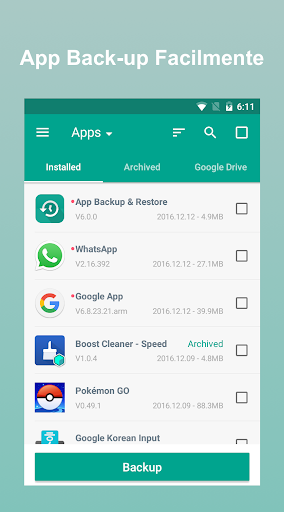
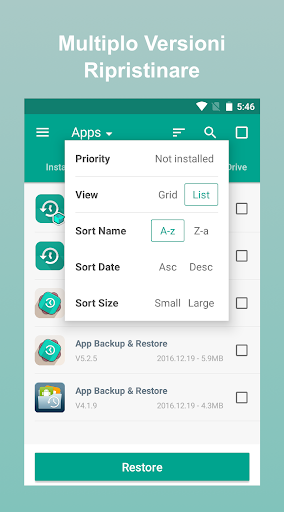
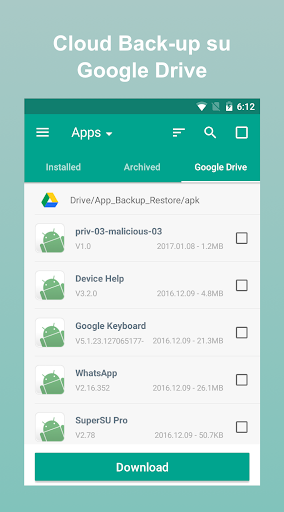
Backup, Restore, Transfer Apps for FREE.
Easy Extract Apk. Never lose your data!
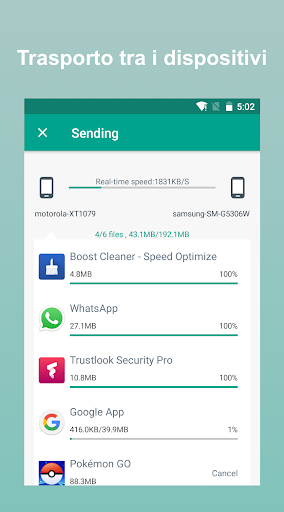
App Backup Restore - Transfer can batch Backup & Restore apk of apps that are not frequently used to save phone space. Backup & Restore multi-versions to avoid unnecessary updates. Backup & Restore personal data for safety. Cloud Backup & Restore for data security. Transfer & Share files between Android devices.
Editor's Choice
No.1 in "10 best Android backup apps and other ways to backup Android!” - Android Authority
No.1 Free backup & restore app in “10 Best Android Backup Apps” - Tom’s Guide
◈ Backup & Restore to Local or Cloud
App
APK
Contacts
SMS
Call log
◈ Transfer & Share in Seconds
App
APK
Contacts
SMS
Call log
◈ Features
· Backup & Restore to phone memory in default
· Backup & Restore to SD card or USB
· Cloud backup to Google Drive, Dropbox, etc.
· Send files to the third party platforms
· Backup & Restore apps, contacts, sms, calls
· Extract & Retrieve APK files
· Overwrite, downgrade app versions
· Auto backup at all times
· Set auto backup list
· Transfer & Share by building private Wifi-hotspot
· Wireless Transfer & Share with dizzying speed
· Auto backup & personal update with notifications
· Google Drive upload/download with notifications
· Onekey backup & restore system apps
· Scan APK files stored in your phone
· Scan virus for more protection
· Auto install/uninstall
· Touch & Hold apps to check details
· Batch backup, restore, transfer, share
· Manage app by installed, archived, Drive
· Sort files by name, date, size
· Show backups’ size & time
· Show used & total storage
· Recover phone after factor reset, Samsung supported
Notice:
App Backup Restore - Transfer CANNOT backup, restore, transfer data or settings of apps, it only backup, restore, transfer the apk files.
App Backup Restore - Transfer can only restore files that have backed up BEFORE.
Please backup to sd card or cloud before factor reset, or all backups will be deleted due to system restriction.
For Android 4.4 and above, Google reserved the permission to write plug-in SD card. It is now granted only for Google and cellphone manufactures.
Requested Permissions:
READ CONTACTS/SMS/PHONE to backup & restore your personal data
READ PHOTO/MEDIA/FILES to transfer & share your media files
READ WIFI/BLUETOOTH/GPS to ensure transfer & share feature
REQUEST CERTAIN PRIVACY PERMISSIONS to enable virus scan & Google Drive backup
Like us on Facebook: https://goo.gl/9Blp5L
Join our Google+ Community: https://goo.gl/rViS0q
Contact us if you want to help making the app into your language: support@apexapps.xyz
Mostra altro

1. Scarica il programma di installazione di MEmu e completa l'installazione

2. Avvia il Memu e apri il Google Play sulla homepage

3. Cerca App Backup Restore Transfer in Google Play
Install
4. Scarica e installa App Backup Restore Transfer
5. Al termine dell'installazione, fai clic sull'icona per avviar

6. Divertiti giocando a App Backup Restore Transfer su PC con MEmu
MEmu App Player è il miglior emulatore Android gratuito, utilizzato da 50 milioni di persone per ottenere un'esperienza di gioco Android superba. La tecnilogia di virtualizzazione MEmu ti permette di giocare a migliaia di giochi Android con semplicità sul tuo computer, anche i giochi con la grafica più esigente.
Schermo più grande con una grafica migliore; Lunga durata, senza limitazione di batteria o dati mobili.
Supporto completo per mappa di tastiera per un controllo preciso di tastiera e mouse o gamepad.
Multipli account di gioco o attività su un singolo PC contemporaneamente con il gestore di multi istanza.
Use App Backup Restore Transfer on PC by following steps: