Artificial Intelligence (AI)
Aggiornata
Versione corrente
3.0.0
Offerta da

Non devi più preoccuparti dei sovraccarichi durante l'utilizzo di Artificial Intelligence (AI) sul tuo cellulare, liberati dal piccolo schermo e goditi dell'App su uno schermo molto più grande. D'ora in poi, sperimenta la tua App a schermo intero con tastiera e mouse. MEmu ti offre tutte le sorprendenti funzioni che ti aspettavi: installazione rapida e impostazione semplice, controlli intuitivi, niente più limitazioni di batteria, dati mobili e chiamate fastidiose. Il MEmu 9 nuovo di zecca è la prima scelta per utilizzare Artificial Intelligence (AI) sul tuo computer. Codificato con il nostro assorbimento, il gestore multi-istanza consente di aprire 2 o più account contemporaneamente. E soprattutto, il nostro esclusivo motore di emulazione può sbloccare il pieno potenziale del tuo PC, rendendo tutto liscio e piacevole.
Mostra altro
Scarica Artificial Intelligence (AI) su PC con MEmu Android Emulator. Divertiti giocando sul grande schermo. What is Artificial intelligence (AI) ?
What is Artificial intelligence (AI) ?
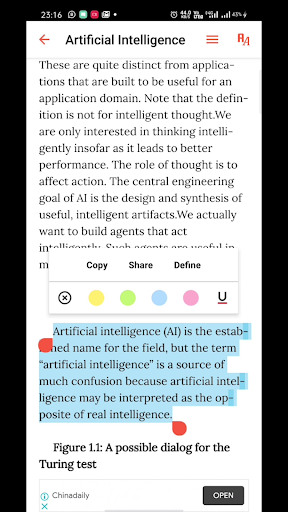
Artificial intelligence (AI) refers to the simulation of human intelligence in machines that are programmed to think like humans and mimic their actions. The term may also be applied to any machine that exhibits traits associated with a human mind such as learning and problem-solving.
Artificial intelligence (AI) is an area of computer science that emphasizes the creation of intelligent machines that work and react like humans. The processes include learning, reasoning and self-correction. AI is accomplished by studying how human brain thinks, and how humans learn, decide, and work while trying to solve a problem.
Discover how to build intelligent applications centered on images, text, and time series data. It is used extensively across many fields such as search engines, image recognition, robotics, finance, and so on. You'll learn about various algorithms that can be used to build Artificial Intelligence apps.
What is for you ?
- Introduction to Artificial Intelligence and intelligent agents, history of Artificial Intelligence
- Building intelligent agents (search, games, logic, constraint satisfaction problems)
- Machine Learning algorithms
- Applications of AI (Natural Language Processing, Robotics/Vision, Language Understanding)
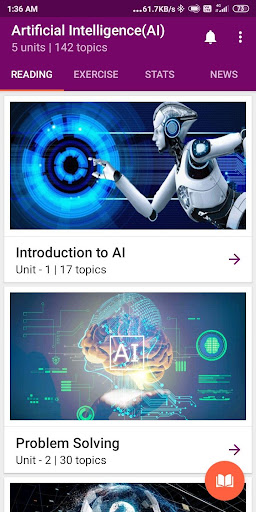
App contents
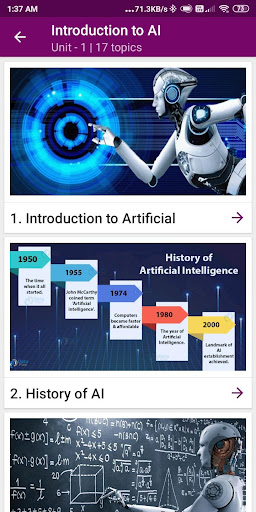
1) Introduction to AI
- Turing Test
- History of Artificial Intelligence
- Typical Artificial Intelligence problem
- The Artificial Intelligence Cycle
2) Problem solving approach AI
- State Space
- Graph Searching
- A* search
- A Generic Search
- Genetic Algorithm
- Breadth-First Search
- Depth Search
- Heuristic Search
- Games
- Backtracking
- Minimax Algorithm
- Uninformed Search
- N-Queen sample
- Optimal Decision
- Proof of Admissibility
- Search Tree
- Alpha Beta Pruning
- Look Ahead
- Iterative-Deepening
- Greedy Search
- Search Graph
- Informed Search
- Bi-directional Search
- Consistency driven
- Adversarial Search
- Path consistency
- Method of Informed
- Other Memory limited
- Properties of depth
3) Knowledge and reasoning
- Propositional Logic
- Rule of Inference
- Hidden Markov Model
- Bayesian networks
- Forward chaining
- First order logic
- AND/OR Trees
- Semantics
- Knowledge Level
- Rule based systems
- Pure Pro-log
- Unification
- Herbrand Universe
- Soundness
- Non-Monotonic
4) Acting logically and learning
- Reinforced Learning
- Semantics of Bayesian
- Supervised Learning
- Learning issue
- Semantic Networks
- Neural Network
- Native Bayes Model
- Artificial Neural
- Probabilistic
- Frames
- Decision Tree Pruning
- Perceptron
- Statistical learning
- Candidate Elimination
- Back-Propagation
- Unsupervised
- Taxonomy of Learning
- Extending Semantic
- Multi-Layer
- Splitting Functions
- Interleaving vs. Non-Interleaving of Sub-Plan
- Planning as search
- The General form of EM Algorithm
5) Communicating, perceiving and acting
- Regression Algorithm
- Natural Language
- Clustering Algorithm
- Statistical Algorithm
- Pattern Recognition
- Usage & Application
- Ambiguity
- Steps in Language
These five units contains 142 topics and by reading all you will be good enough to design a system using languages like R, Python, SAS, Matlab, Weka, SPSS etc.
Mostra altro

1. Scarica il programma di installazione di MEmu e completa l'installazione

2. Avvia il Memu e apri il Google Play sulla homepage

3. Cerca Artificial Intelligence (AI) in Google Play
Install
4. Scarica e installa Artificial Intelligence (AI)
5. Al termine dell'installazione, fai clic sull'icona per avviar

6. Divertiti giocando a Artificial Intelligence (AI) su PC con MEmu
MEmu App Player è il miglior emulatore Android gratuito, utilizzato da 50 milioni di persone per ottenere un'esperienza di gioco Android superba. La tecnilogia di virtualizzazione MEmu ti permette di giocare a migliaia di giochi Android con semplicità sul tuo computer, anche i giochi con la grafica più esigente.
Schermo più grande con una grafica migliore; Lunga durata, senza limitazione di batteria o dati mobili.
Supporto completo per mappa di tastiera per un controllo preciso di tastiera e mouse o gamepad.
Multipli account di gioco o attività su un singolo PC contemporaneamente con il gestore di multi istanza.
Use Artificial Intelligence (AI) on PC by following steps: