Audibook
Aggiornata
Versione corrente
2.3.9.3
Offerta da

Non devi più preoccuparti dei sovraccarichi durante l'utilizzo di Audibook sul tuo cellulare, liberati dal piccolo schermo e goditi dell'App su uno schermo molto più grande. D'ora in poi, sperimenta la tua App a schermo intero con tastiera e mouse. MEmu ti offre tutte le sorprendenti funzioni che ti aspettavi: installazione rapida e impostazione semplice, controlli intuitivi, niente più limitazioni di batteria, dati mobili e chiamate fastidiose. Il MEmu 9 nuovo di zecca è la prima scelta per utilizzare Audibook sul tuo computer. Codificato con il nostro assorbimento, il gestore multi-istanza consente di aprire 2 o più account contemporaneamente. E soprattutto, il nostro esclusivo motore di emulazione può sbloccare il pieno potenziale del tuo PC, rendendo tutto liscio e piacevole.
Mostra altro
Scarica Audibook su PC con MEmu Android Emulator. Divertiti giocando sul grande schermo. Audibook app allows you to listen to audiobooks on your smartphone or tablet devices whenever and wherever you want.

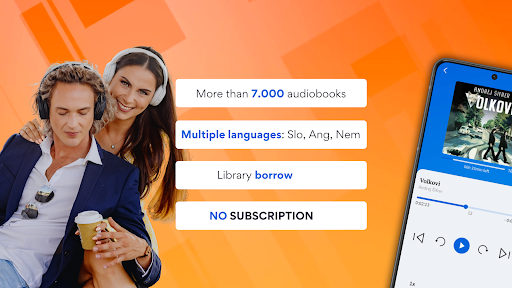
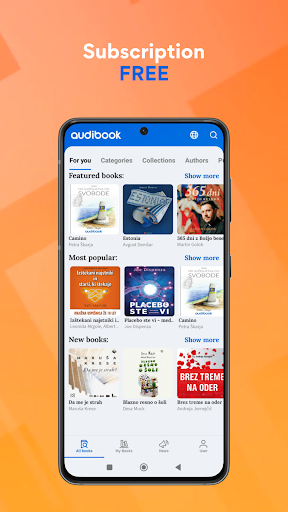
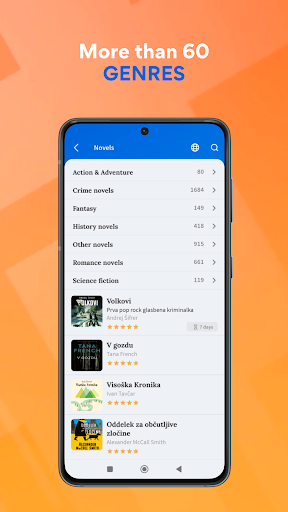
Audibook app allows you to listen to audiobooks on your smartphone or tablet devices whenever and wherever you want.
Audiobooks are currently available in the following languages:
- SLOVENIAN, CROATIAN, GERMAN, ENGLISH
You can browse the Audibook library and choose from many different categories of audiobooks:
• Fiction
• Romance
• Kids books
• Education
• Business & Economics
• Real Estate
• Law
• Science & Technology
• History
• …
You can listen to free audio samples of each audiobook before borrowing or buying an audiobook.
Our entire library of audiobooks is equipped with a unique and easy to use bookmark system to help the user navigate through each audiobook with ease.
With the Audibook app you can download audiobooks to your device and listen to them even when your device is without an internet connection. You can access your entire local audiobook library offline and save on mobile data outside your home or office, while traveling, commuting, on holidays, ...
Download the Audibook app now and enjoy listening to audiobooks for 60 days free.
App feature overview:
• Free trial - Audibook offers new users a 60 days free trial access to more than 1 000 audiobooks. Not sure if audiobooks are your thing? Here is your chance to give them a try.
• News - always keep up to date with the latest book releases via our in-app news tab
• My books - your very own bookshelf to keep all your audiobooks in one place
• Library - we expand our audiobook library daily, with new titles from over 20 different categories
• Book description - each book is equipped with a short free audio sample and a book description to allow the user to get acquainted with the narrator and decide if this is the right book for them
• Bookmarks - navigate through audiobooks without trouble, with our detailed multi-level bookmark system, designed specifically for ease of use
• Settings - a variety of settings for users to choose from (list view or bookshelf view, 5s - 10m skip ahead sensitivity) ensures the app is tailor made for each and every user
• Checkout history - always be in control with our real time check out and transaction history
Mostra altro

1. Scarica il programma di installazione di MEmu e completa l'installazione

2. Avvia il Memu e apri il Google Play sulla homepage

3. Cerca Audibook in Google Play
Install
4. Scarica e installa Audibook
5. Al termine dell'installazione, fai clic sull'icona per avviar

6. Divertiti giocando a Audibook su PC con MEmu
MEmu App Player è il miglior emulatore Android gratuito, utilizzato da 50 milioni di persone per ottenere un'esperienza di gioco Android superba. La tecnilogia di virtualizzazione MEmu ti permette di giocare a migliaia di giochi Android con semplicità sul tuo computer, anche i giochi con la grafica più esigente.
Schermo più grande con una grafica migliore; Lunga durata, senza limitazione di batteria o dati mobili.
Supporto completo per mappa di tastiera per un controllo preciso di tastiera e mouse o gamepad.
Multipli account di gioco o attività su un singolo PC contemporaneamente con il gestore di multi istanza.
Use Audibook on PC by following steps: