
BenBen TV
Aggiornata
Versione corrente
1.0.0
Offerta da

Non devi più preoccuparti dei sovraccarichi durante l'utilizzo di BenBen TV sul tuo cellulare, liberati dal piccolo schermo e goditi dell'App su uno schermo molto più grande. D'ora in poi, sperimenta la tua App a schermo intero con tastiera e mouse. MEmu ti offre tutte le sorprendenti funzioni che ti aspettavi: installazione rapida e impostazione semplice, controlli intuitivi, niente più limitazioni di batteria, dati mobili e chiamate fastidiose. Il MEmu 9 nuovo di zecca è la prima scelta per utilizzare BenBen TV sul tuo computer. Codificato con il nostro assorbimento, il gestore multi-istanza consente di aprire 2 o più account contemporaneamente. E soprattutto, il nostro esclusivo motore di emulazione può sbloccare il pieno potenziale del tuo PC, rendendo tutto liscio e piacevole.
Mostra altro
Goditi un'esperienza straordinaria con BenBen TV su PC con MEmu Play. È un potente emulatore Android gratuito che ti offre migliaia di app Android per la versione desktop. Divertiti a connetterti con gli amici e a perfezionare il tuo lavoro con maggiore efficienza! BenBen TV is a simple, fast video player for your own streams and playlists.
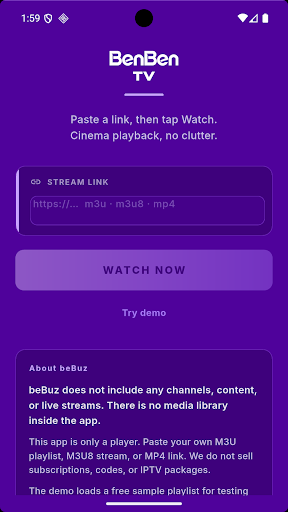
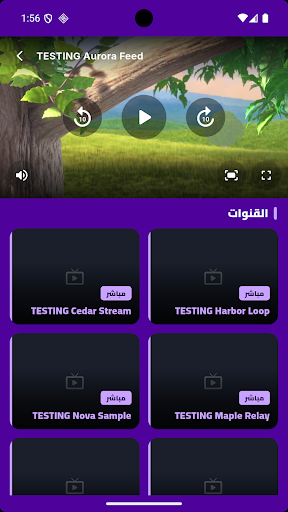
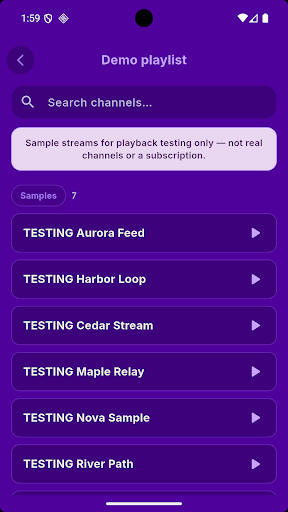
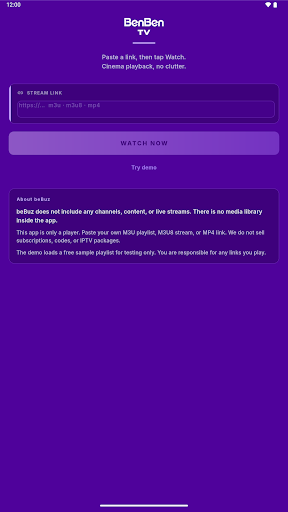
BenBen TV is a simple, fast video player for your own streams and playlists.
Paste a link, tap Watch, and your video starts playing in a clean, distraction-free player. BenBen TV supports the most common streaming formats, so you can open the playlists and links you already have in one place.
IMPORTANT: BenBen TV does not include any channels, content or live streams. There is no media library inside the app. You must add your own links or playlists. We do not sell subscriptions, codes or playlists, and we are not affiliated with any content provider. Please only play content you have the right to access.
WHAT YOU CAN DO
• Paste an M3U or M3U8 playlist link, or a direct MP4 / HLS video link
• Browse your playlist as a clean list, with search to find a stream quickly
• Watch in a smooth player with play / pause and 10-second rewind and forward
• Switch to fullscreen with one tap, or rotate your phone for landscape
• Mute and unmute instantly
• Change the video fit to fill the screen or keep the original size
• Switch between items in your playlist without leaving the player
• Works on phones and tablets
TRY IT FIRST
Not sure how it works? Tap "Try demo" to load a free sample playlist made for playback testing, and see the player in action before adding your own links.
SIMPLE BY DESIGN
• No account or sign-up required
• Lightweight and quick to open
• Clean dark purple interface that keeps the focus on your video
SUPPORTED FORMATS
• M3U and M3U8 playlists
• HLS streams (.m3u8)
• MP4 video files
Playback depends on the link you provide and your internet connection. Some streams may not work if the source is offline, restricted or uses an unsupported format.
ADS
BenBen TV is free and shows ads to support development.
FEEDBACK
Have a suggestion or found a problem? Contact us through the email on this page. We read every message and keep improving the player.
Mostra altro

1. Scarica il programma di installazione di MEmu e completa l'installazione

2. Avvia il Memu e apri il Google Play sulla homepage

3. Cerca BenBen TV in Google Play
Install
4. Scarica e installa BenBen TV
5. Al termine dell'installazione, fai clic sull'icona per avviar

6. Divertiti giocando a BenBen TV su PC con MEmu
MEmu App Player è il miglior emulatore Android gratuito, utilizzato da 50 milioni di persone per ottenere un'esperienza di gioco Android superba. La tecnilogia di virtualizzazione MEmu ti permette di giocare a migliaia di giochi Android con semplicità sul tuo computer, anche i giochi con la grafica più esigente.
Schermo più grande con una grafica migliore; Lunga durata, senza limitazione di batteria o dati mobili.
Supporto completo per mappa di tastiera per un controllo preciso di tastiera e mouse o gamepad.
Multipli account di gioco o attività su un singolo PC contemporaneamente con il gestore di multi istanza.
Use BenBen TV on PC by following steps: