BillHub: Recharge App
Aggiornata
Versione corrente
1.5
Offerta da

Non devi più preoccuparti dei sovraccarichi durante l'utilizzo di BillHub: Recharge App sul tuo cellulare, liberati dal piccolo schermo e goditi dell'App su uno schermo molto più grande. D'ora in poi, sperimenta la tua App a schermo intero con tastiera e mouse. MEmu ti offre tutte le sorprendenti funzioni che ti aspettavi: installazione rapida e impostazione semplice, controlli intuitivi, niente più limitazioni di batteria, dati mobili e chiamate fastidiose. Il MEmu 9 nuovo di zecca è la prima scelta per utilizzare BillHub: Recharge App sul tuo computer. Codificato con il nostro assorbimento, il gestore multi-istanza consente di aprire 2 o più account contemporaneamente. E soprattutto, il nostro esclusivo motore di emulazione può sbloccare il pieno potenziale del tuo PC, rendendo tutto liscio e piacevole.
Mostra altro
Scarica BillHub: Recharge App su PC con MEmu Android Emulator. Divertiti giocando sul grande schermo. BillHub: Recharge, Pay Bills & Earn.
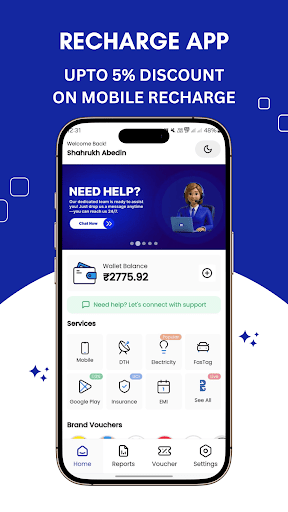
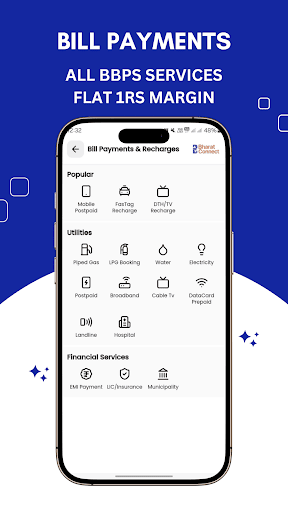
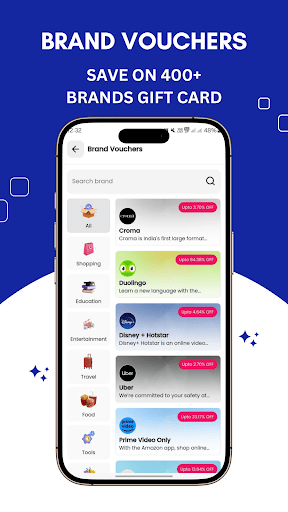
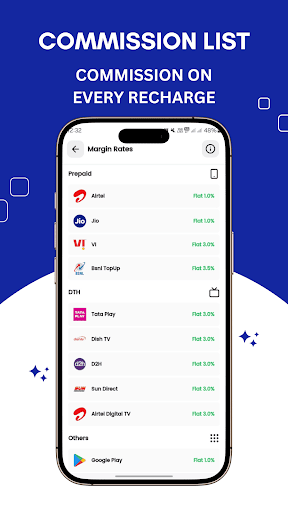
BillHub: Recharge, Pay Bills & Earn
Your ultimate mobile recharge commission app that combines convenience, Cashback, and earnings! With BillHub, you get access to an all-in-one recharge app that simplifies your daily transactions while offering unbeatable recharge margins and exclusive deals.
Why Choose BillHub?
1. All-in-One Recharge Services
Prepaid Mobile Recharge for Jio, Airtel, Vi, BSNL
DTH Recharge for Airtel TV, Dish TV, SunTV, Tata Play (formerly TataSky), Videocon
Fastag Recharge
Insurance/LIC Payments
EMI Repayment
Gas Bill
Water Bill
v
Postpaid Mobile Recharge
All BBPS Services
2. Earn Commission on Every Recharge
BillHub lets you earn a recharge margin with every transaction. Whether you’re an individual or a small business owner, you can boost your income effortlessly by using this mobile recharge commission app.
3. Brand Vouchers & Cashback
Discover amazing deals on brand gift cards for top names like Flipkart, Amazon, Zomato, Swiggy, and more. Enjoy discounts and cashback on every purchase!
Vouchers Available for:
Shopping: Amazon, Flipkart
Food & Drinks: Swiggy, Zomato, Domino’s, McDonald’s, KFC
Electronics: Reliance Digital, Vijay Sales
Fashion: Myntra, Ajio, Only, Vero Moda, Tata Cliq
Beauty: Nykaa, Myglamm, The Body Shop
Grocery: Swiggy Instamart, Bigbasket, Amazon Fresh
Home: Urban Ladder, Wakefit, Pepperfry
Travel: Makemytrip, Uber, Yatra
Lifestyle: Decathlon, Titan
- Entertainment: PVR, Bookmyshow, SONY LIV, Zee5
- Jewellery: Giva, Kalyan Jewelers
- Luxury Brands: Armani, Jimmy Choo, Hugo Boss, Steve Madden
Kids: Hamleys, Mothercare
OTT & Music: SonyLiv, Amazon Prime, Discovery+, MXPlayer, Spotify
4. Refer and Earn
Earn cash for each and every recharge by referring your friends and family to BillHub. The more you refer, the more you earn!
5. 24/7 Customer Support
We're always here to help you with any questions or issues you may have, anytime, anywhere.
### Key Features:
- Earn Commission: Get rewarded for every recharge transaction.
- Instant Cashback: Earn cashback on select recharges and bill payments.
- Multiple Payment Methods: Pay via UPI, wallets, credit/debit cards, and net banking.
- Real-Time Updates: Track your transaction history and earnings easily.
- Secure Transactions: We prioritize the safety of your funds and personal information.
---
BillHub is the go-to app for anyone looking for a mobile recharge commission app with seamless recharge options and added benefits. Download now and start earning with every recharge!
Mostra altro

1. Scarica il programma di installazione di MEmu e completa l'installazione

2. Avvia il Memu e apri il Google Play sulla homepage

3. Cerca BillHub: Recharge App in Google Play
Install
4. Scarica e installa BillHub: Recharge App
5. Al termine dell'installazione, fai clic sull'icona per avviar

6. Divertiti giocando a BillHub: Recharge App su PC con MEmu
MEmu App Player è il miglior emulatore Android gratuito, utilizzato da 50 milioni di persone per ottenere un'esperienza di gioco Android superba. La tecnilogia di virtualizzazione MEmu ti permette di giocare a migliaia di giochi Android con semplicità sul tuo computer, anche i giochi con la grafica più esigente.
Schermo più grande con una grafica migliore; Lunga durata, senza limitazione di batteria o dati mobili.
Supporto completo per mappa di tastiera per un controllo preciso di tastiera e mouse o gamepad.
Multipli account di gioco o attività su un singolo PC contemporaneamente con il gestore di multi istanza.
Use BillHub: Recharge App on PC by following steps: