BlinkTalk Intercom App
Aggiornata
Versione corrente
16
Offerta da

Non devi più preoccuparti dei sovraccarichi durante l'utilizzo di BlinkTalk Intercom App sul tuo cellulare, liberati dal piccolo schermo e goditi dell'App su uno schermo molto più grande. D'ora in poi, sperimenta la tua App a schermo intero con tastiera e mouse. MEmu ti offre tutte le sorprendenti funzioni che ti aspettavi: installazione rapida e impostazione semplice, controlli intuitivi, niente più limitazioni di batteria, dati mobili e chiamate fastidiose. Il MEmu 9 nuovo di zecca è la prima scelta per utilizzare BlinkTalk Intercom App sul tuo computer. Codificato con il nostro assorbimento, il gestore multi-istanza consente di aprire 2 o più account contemporaneamente. E soprattutto, il nostro esclusivo motore di emulazione può sbloccare il pieno potenziale del tuo PC, rendendo tutto liscio e piacevole.
Mostra altro
Scarica BlinkTalk Intercom App su PC con MEmu Android Emulator. Divertiti giocando sul grande schermo. Say hello to BlinkTalk, an internet based intercom app for motorcycle & bike rides which allows you to be in constant communication with your riding buddies or pillion rider.
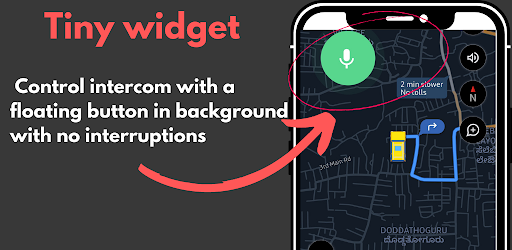
Say hello to BlinkTalk, an internet based intercom app for motorcycle & bike rides which allows you to be in constant communication with your riding buddies or pillion rider. Make your rides more enjoyable and safer with BlinkTalk.
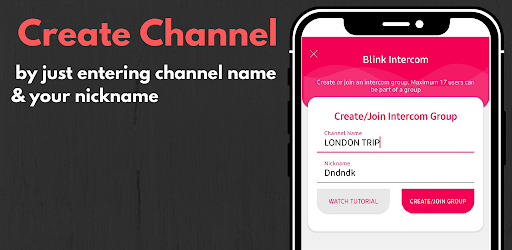
Enjoy unlimited range, HD quality clear audio and speak simultaneously with upto 17 riders. Just create a channel with simple name and other can pair with you very easily.
When compared to intercom systems, Blinktalk offers so much more features such as:
Blinktalk app is perfect to use as:
Also if you are using an intercom system already such as Sena or Cardo, no problem, our app will work with them too. You can use us as a range extender and when you are close enough mute our channel.
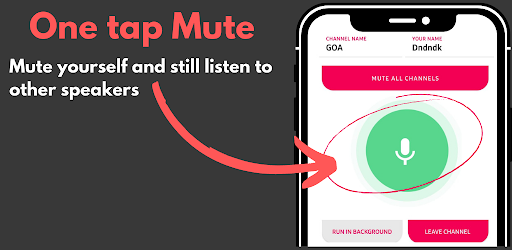
When riding with a pillion rider, you no longer need to turn back and shout to speak . Our app has a pillion mode where the app can run in the background, you can put your phone away or mute your channel with a single tap.
Do I need to get an intercom device such as Sena or Cardo to use Blinktalk app as intercom ?
No. You can use any bluetooth enabled or wired headset with mic to use Blinktalk. You will find helmet bluetooth headset with mic for just $20 on amazon. No need to buy a full system. Our app will also work with Galaxy buds or Apple Airpods !!.
If I already own an intercom system will this app work with that ?
Yes. Our app will work with any existing bluetooth intercom system. You can use our app to extend your range and when within range you can mute your channel.
How do I pair with other owners of this app ?
Just create a channel with any name ("NewYorkRide") and share the name with other riders to join the channel. That is it.
Will the app work on bluetooth ?
No. the app is internet based so you will need internet connection for the app to work.
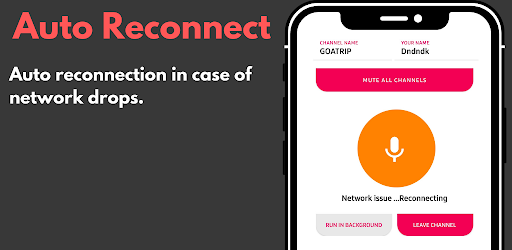
What happens if the network drops ?
Then the app will reconnect you back on the same channel once you are online.
Is Blinktalk app free ?
We have a free 300 minute trial for you to try it out. After that our app has unlimited minutes of as low as $2 p.m.
Mostra altro

1. Scarica il programma di installazione di MEmu e completa l'installazione

2. Avvia il Memu e apri il Google Play sulla homepage

3. Cerca BlinkTalk Intercom App in Google Play
Install
4. Scarica e installa BlinkTalk Intercom App
5. Al termine dell'installazione, fai clic sull'icona per avviar

6. Divertiti giocando a BlinkTalk Intercom App su PC con MEmu
MEmu App Player è il miglior emulatore Android gratuito, utilizzato da 50 milioni di persone per ottenere un'esperienza di gioco Android superba. La tecnilogia di virtualizzazione MEmu ti permette di giocare a migliaia di giochi Android con semplicità sul tuo computer, anche i giochi con la grafica più esigente.
Schermo più grande con una grafica migliore; Lunga durata, senza limitazione di batteria o dati mobili.
Supporto completo per mappa di tastiera per un controllo preciso di tastiera e mouse o gamepad.
Multipli account di gioco o attività su un singolo PC contemporaneamente con il gestore di multi istanza.
Use BlinkTalk Intercom App on PC by following steps: