CL Service
Aggiornata
Versione corrente
1.3
Offerta da

Non devi più preoccuparti dei sovraccarichi durante l'utilizzo di CL Service sul tuo cellulare, liberati dal piccolo schermo e goditi dell'App su uno schermo molto più grande. D'ora in poi, sperimenta la tua App a schermo intero con tastiera e mouse. MEmu ti offre tutte le sorprendenti funzioni che ti aspettavi: installazione rapida e impostazione semplice, controlli intuitivi, niente più limitazioni di batteria, dati mobili e chiamate fastidiose. Il MEmu 9 nuovo di zecca è la prima scelta per utilizzare CL Service sul tuo computer. Codificato con il nostro assorbimento, il gestore multi-istanza consente di aprire 2 o più account contemporaneamente. E soprattutto, il nostro esclusivo motore di emulazione può sbloccare il pieno potenziale del tuo PC, rendendo tutto liscio e piacevole.
Mostra altro
Scarica CL Service su PC con MEmu Android Emulator. Divertiti giocando sul grande schermo. Attention!
Attention! This application is an add-on to the main Car Launcher PRO app and will only work with the paid version of Car Launcher PRO.
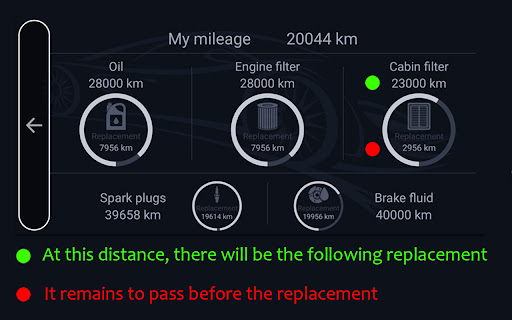
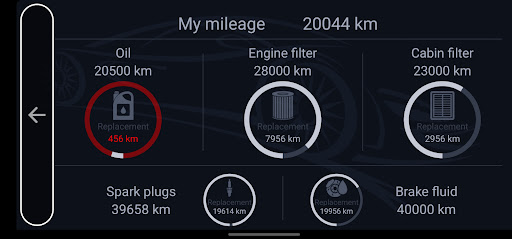
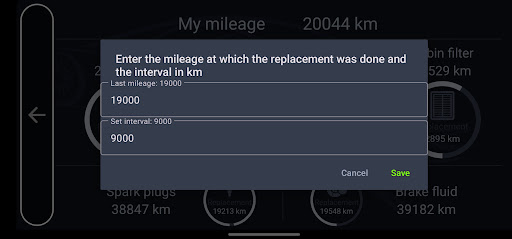
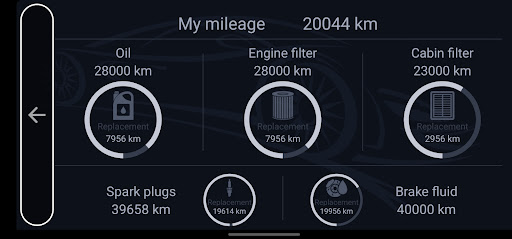
This application processes data received from Car Launcher PRO and displays information on the screen, calculating the remaining distance until your vehicle's next maintenance. When the limit reaches 1000 km before the replacement of a fluid or part in the vehicle, Car Launcher PRO will notify you in a dialog box.
How this program works:
1. Enter your mileage in the "My Mileage" parameter. The mileage should match the reading on your vehicle's dashboard.
2. Enter the mileage at which the last fluid or part replacement was done.
3. Set the replacement limit for fluids or parts based on how often you change them.
4. After entering the data, you will see the mileage at which the next replacement is due and the remaining distance until the replacement of the fluid or part.
Currently supported parts and fluids:
- Cabin filter
- Engine filter
- Engine oil
- Spark plugs
- Brake fluid
Dear users!
Please note that GPS data provides a more accurate display of your vehicle's mileage than the built-in speedometer. Therefore, the mileage data in the CL Service program and on the standard speedometer may slightly differ. We recommend periodically manually adjusting the mileage in the CL Service program. Please be aware that the data may differ from the actual mileage, especially in cases where GPS satellites are determined with some delay.
Mostra altro

1. Scarica il programma di installazione di MEmu e completa l'installazione

2. Avvia il Memu e apri il Google Play sulla homepage

3. Cerca CL Service in Google Play
Install
4. Scarica e installa CL Service
5. Al termine dell'installazione, fai clic sull'icona per avviar

6. Divertiti giocando a CL Service su PC con MEmu
MEmu App Player è il miglior emulatore Android gratuito, utilizzato da 50 milioni di persone per ottenere un'esperienza di gioco Android superba. La tecnilogia di virtualizzazione MEmu ti permette di giocare a migliaia di giochi Android con semplicità sul tuo computer, anche i giochi con la grafica più esigente.
Schermo più grande con una grafica migliore; Lunga durata, senza limitazione di batteria o dati mobili.
Supporto completo per mappa di tastiera per un controllo preciso di tastiera e mouse o gamepad.
Multipli account di gioco o attività su un singolo PC contemporaneamente con il gestore di multi istanza.
Use CL Service on PC by following steps: