
Control4
Aggiornata
Versione corrente
426.19.0.26
Offerta da

Non devi più preoccuparti dei sovraccarichi durante l'utilizzo di Control4 sul tuo cellulare, liberati dal piccolo schermo e goditi dell'App su uno schermo molto più grande. D'ora in poi, sperimenta la tua App a schermo intero con tastiera e mouse. MEmu ti offre tutte le sorprendenti funzioni che ti aspettavi: installazione rapida e impostazione semplice, controlli intuitivi, niente più limitazioni di batteria, dati mobili e chiamate fastidiose. Il MEmu 9 nuovo di zecca è la prima scelta per utilizzare Control4 sul tuo computer. Codificato con il nostro assorbimento, il gestore multi-istanza consente di aprire 2 o più account contemporaneamente. E soprattutto, il nostro esclusivo motore di emulazione può sbloccare il pieno potenziale del tuo PC, rendendo tutto liscio e piacevole.
Mostra altro
Goditi un'esperienza straordinaria con Control4 su PC con MEmu Play. È un potente emulatore Android gratuito che ti offre migliaia di app Android per la versione desktop. Divertiti a connetterti con gli amici e a perfezionare il tuo lavoro con maggiore efficienza! Take control of your connected space with the Control4 App, designed for effortless, personalized automation.
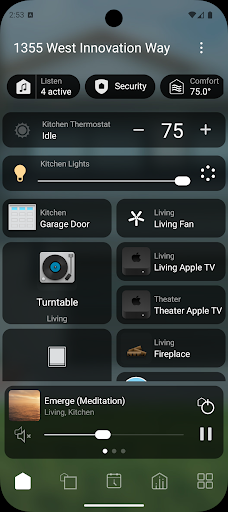
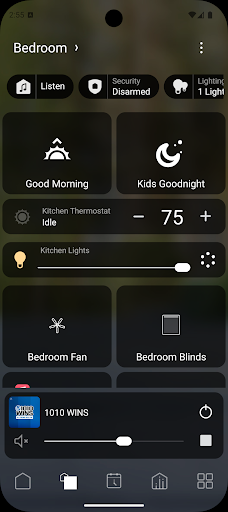
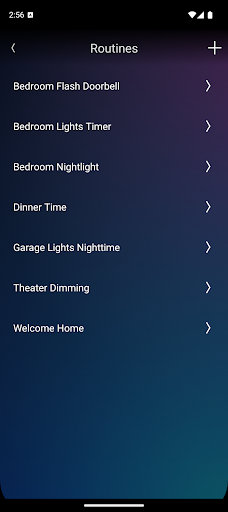
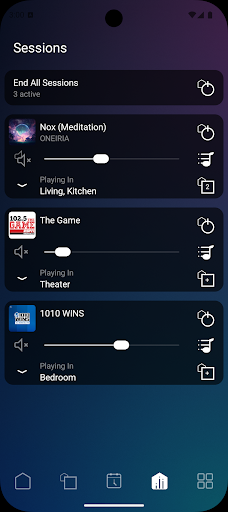
Take control of your connected space with the Control4 App, designed for effortless, personalized automation. Whether at home or away, manage lighting, motorized shades, music, video, thermostats, security, cameras, door locks, garage, and more — all from one intuitive app. With the X4 update you get ultimate control of your system with deeper personalization paired with additional quality-of-life improvements giving you greater control, right at your fingertips.
NOTE: Prior to using this app, your Control4 system must be updated to Control4 X4 or later. If you are unsure of the software version of our system, check with your Control4 Integrator or log into your Control4 account at control4.com.
A Smarter, More Personalized Experience
• All-in-One Home Screen – Your central hub for controlling your favorite devices. Manage lighting, motorized shades, music, video, thermostats, security, cameras, door locks, garage doors, and more. See real-time status updates, access favorite devices, and control everything with ease.
• Customizable Favorites – Pin the devices and controls you use most for instant access.
• Quick Actions & Widgets – Resize, reorder, and organize widgets for seamless control over lighting, security cameras, and more.
Personalized to You
• Routines & Scenes – Save time by automating your day with pre-set routines for the morning, evening, or any moment in between.
• Timers & Schedules – Set outdoor lights to turn on at sunset, TVs to turn off at bedtime, or security to arm at a set time.
• Multiroom Entertainment – Control music and video in every room from one app. Play your favorite streaming services or set TVs to turn on when you walk in.
Easy Control, Inside and Out
• Live Camera Views – Monitor security cameras in real time and receive instant alerts.
• Apple HomeKit Integration – Control your space with Siri, Apple Widgets, and CarPlay.* apple store only
• Smart Notifications – Stay informed with alerts for doorbell rings, motion sensors, or security events.
With the Control4 App, your space works the way you want it to — simplifying your life with effortless control.
Download today and experience personalized automation like never before!
*HomeKit, Siri, CarPlay are trademarks of Apple Inc., registered in the U.S. and other countries and regions.
Mostra altro

1. Scarica il programma di installazione di MEmu e completa l'installazione

2. Avvia il Memu e apri il Google Play sulla homepage

3. Cerca Control4 in Google Play
Install
4. Scarica e installa Control4
5. Al termine dell'installazione, fai clic sull'icona per avviar

6. Divertiti giocando a Control4 su PC con MEmu
MEmu App Player è il miglior emulatore Android gratuito, utilizzato da 50 milioni di persone per ottenere un'esperienza di gioco Android superba. La tecnilogia di virtualizzazione MEmu ti permette di giocare a migliaia di giochi Android con semplicità sul tuo computer, anche i giochi con la grafica più esigente.
Schermo più grande con una grafica migliore; Lunga durata, senza limitazione di batteria o dati mobili.
Supporto completo per mappa di tastiera per un controllo preciso di tastiera e mouse o gamepad.
Multipli account di gioco o attività su un singolo PC contemporaneamente con il gestore di multi istanza.
Use Control4 on PC by following steps: