Coople Jobs | Flex & temp work
Aggiornata
Versione corrente
3.96.1_251(3082)
Offerta da

Non devi più preoccuparti dei sovraccarichi durante l'utilizzo di Coople Jobs | Flex & temp work sul tuo cellulare, liberati dal piccolo schermo e goditi dell'App su uno schermo molto più grande. D'ora in poi, sperimenta la tua App a schermo intero con tastiera e mouse. MEmu ti offre tutte le sorprendenti funzioni che ti aspettavi: installazione rapida e impostazione semplice, controlli intuitivi, niente più limitazioni di batteria, dati mobili e chiamate fastidiose. Il MEmu 9 nuovo di zecca è la prima scelta per utilizzare Coople Jobs | Flex & temp work sul tuo computer. Codificato con il nostro assorbimento, il gestore multi-istanza consente di aprire 2 o più account contemporaneamente. E soprattutto, il nostro esclusivo motore di emulazione può sbloccare il pieno potenziale del tuo PC, rendendo tutto liscio e piacevole.
Mostra altro
Scarica Coople Jobs | Flex & temp work su PC con MEmu Android Emulator. Divertiti giocando sul grande schermo. Find jobs you like, meet your goals with Coople.
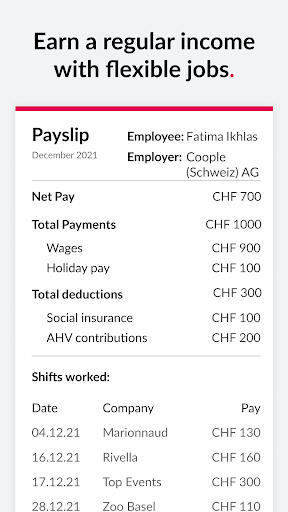
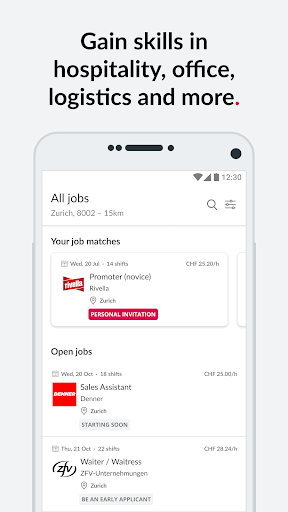
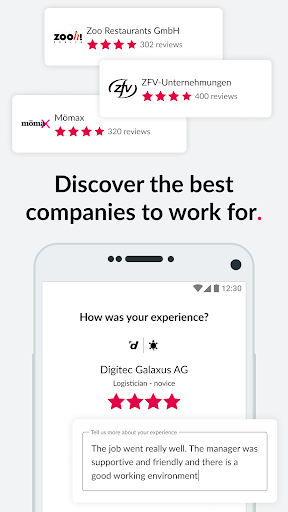
Find jobs you like, meet your goals with Coople
1. Download Coople Jobs - it’s free
2. Create your worker profile and get verified
3. Explore hundreds of open jobs
4. Apply in seconds - there are no interviews
5. Get hired directly from the app
6. Earn a regular salary + holiday pay
Make money, develop your skills, work with great companies
Earn a regular income
Work with multiple companies, get one monthly paycheck and create the schedule you want with temporary, part-time, and flexible jobs.
Gain skills, grow your career
Find jobs across office, retail, healthcare, hospitality, logistics, events and more. Try novice roles, explore the jobs’ marketplace and build a career that fits your life.
Choose great companies
Review company ratings and apply for jobs that offer a great work environment. Build your reputation, become a favourite and get hired regularly by companies you love.
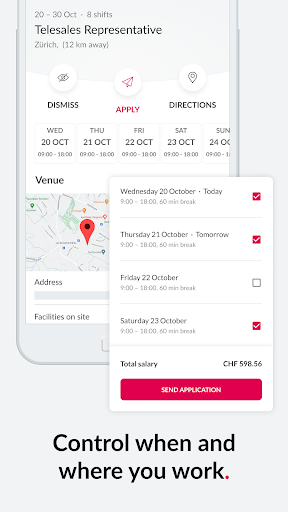
Control when and where you work
Explore jobs by location, company, role and salary. Apply to and dismiss jobs to personalise your experience of Coople and view job opportunities that match your interests.
Access permanent jobs
Find permanent jobs on the app and work flexible shifts before committing. Have the opportunity to transition from flex to perm.
Let us do all the admin
Get paid by Coople when you work with many companies. We deal with your social insurance and tax contributions. Focus only on getting jobs.
Register now, we’re hiring for these jobs today
Baristas, waiters/waitresses
Chefs and Cooks
Sales assistants
Retail professionals
Promo and event professionals
Reception assistant
Logisticians, promoters, forklift drivers, couriers
Bonuses and rewards
Take part in our winter and summer bonuses, become one of our Super Cooplers and enjoy various benefits from the hiring companies on our platform.
Download the Coople Jobs App today and discover where your career can take you.
Get in touch with us
info.ch@coople.com
https://www.facebook.com/CoopleSchweiz
https://www.facebook.com/CoopleSuisseRomande
https://www.twitter.com/coople
https://www.instagram.com/coople_switzerland/
Mostra altro

1. Scarica il programma di installazione di MEmu e completa l'installazione

2. Avvia il Memu e apri il Google Play sulla homepage

3. Cerca Coople Jobs | Flex & temp work in Google Play
Install
4. Scarica e installa Coople Jobs | Flex & temp work
5. Al termine dell'installazione, fai clic sull'icona per avviar

6. Divertiti giocando a Coople Jobs | Flex & temp work su PC con MEmu
MEmu App Player è il miglior emulatore Android gratuito, utilizzato da 50 milioni di persone per ottenere un'esperienza di gioco Android superba. La tecnilogia di virtualizzazione MEmu ti permette di giocare a migliaia di giochi Android con semplicità sul tuo computer, anche i giochi con la grafica più esigente.
Schermo più grande con una grafica migliore; Lunga durata, senza limitazione di batteria o dati mobili.
Supporto completo per mappa di tastiera per un controllo preciso di tastiera e mouse o gamepad.
Multipli account di gioco o attività su un singolo PC contemporaneamente con il gestore di multi istanza.
Use Coople Jobs | Flex & temp work on PC by following steps: