DAIKIN Control
Aggiornata
Versione corrente
1.5.13
Offerta da

Non devi più preoccuparti dei sovraccarichi durante l'utilizzo di DAIKIN Control sul tuo cellulare, liberati dal piccolo schermo e goditi dell'App su uno schermo molto più grande. D'ora in poi, sperimenta la tua App a schermo intero con tastiera e mouse. MEmu ti offre tutte le sorprendenti funzioni che ti aspettavi: installazione rapida e impostazione semplice, controlli intuitivi, niente più limitazioni di batteria, dati mobili e chiamate fastidiose. Il MEmu 9 nuovo di zecca è la prima scelta per utilizzare DAIKIN Control sul tuo computer. Codificato con il nostro assorbimento, il gestore multi-istanza consente di aprire 2 o più account contemporaneamente. E soprattutto, il nostro esclusivo motore di emulazione può sbloccare il pieno potenziale del tuo PC, rendendo tutto liscio e piacevole.
Mostra altro
Goditi un'esperienza straordinaria con DAIKIN Control su PC con MEmu Play. È un potente emulatore Android gratuito che ti offre migliaia di app Android per la versione desktop. Divertiti a connetterti con gli amici e a perfezionare il tuo lavoro con maggiore efficienza! DAIKIN Control.
DAIKIN Control
Control your Heating system through the internet.
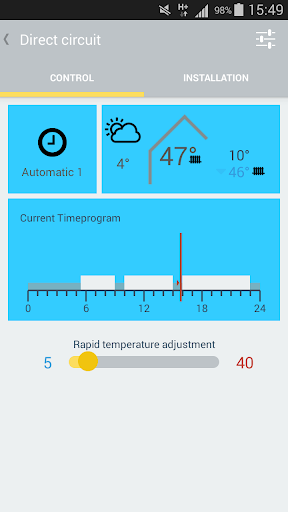
Control your DAIKIN Heating system easily and comfortably with your smartphone. The user friendly and intuitive “DAIKIN Control” App provides you with a range of features for you to adjust and control your heating system.
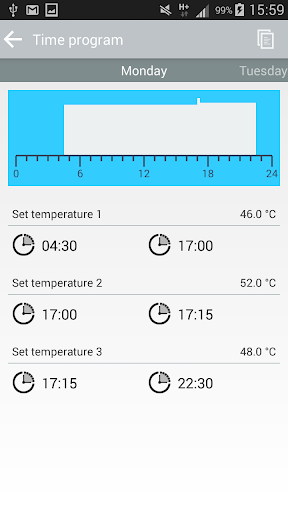
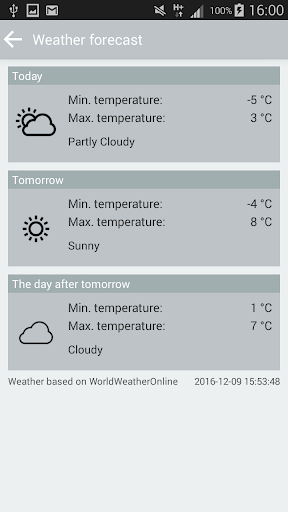
Set the desired heating temperature conveniently and easy. In addition modify timer programs and operation modes all directly from the DAIKIN Control App. The app also provides the outdoor temperature, current weather conditions and a weather forecast for the next 3 days.
Main features and benefits of the DAIKIN Control App:
- Quick adjustment of the heating temperatures, for increased comfort
- Easily create and adjust timer programs, for ease of use
- Adjustable operation modes to suit you, such as Party and Holiday mode.
- Coming-Home-Feature for One time heat-up of hot water
- Display of outdoor temperature and weather conditions
- Manage unlimited number of heating installations with up to 16 heating circuits per installation
- Free DAIKIN Control Cloud-Service-Account
Technical Requirements:
- DAIKIN Heating system with DAIKIN RoCon Controller (March 2013 or newer)
- DAIKIN Gateway RoCon G1 as a link between the DAIKIN RoCon and the Internet
- Android 4.0.3 or newer
- Existing LAN Network (Router with a free RJ45 connection)
Tip:
An Internet flat rate is recommended, as it may cause additional costs for the Internet connection.
Mostra altro

1. Scarica il programma di installazione di MEmu e completa l'installazione

2. Avvia il Memu e apri il Google Play sulla homepage

3. Cerca DAIKIN Control in Google Play
Install
4. Scarica e installa DAIKIN Control
5. Al termine dell'installazione, fai clic sull'icona per avviar

6. Divertiti giocando a DAIKIN Control su PC con MEmu
MEmu App Player è il miglior emulatore Android gratuito, utilizzato da 50 milioni di persone per ottenere un'esperienza di gioco Android superba. La tecnilogia di virtualizzazione MEmu ti permette di giocare a migliaia di giochi Android con semplicità sul tuo computer, anche i giochi con la grafica più esigente.
Schermo più grande con una grafica migliore; Lunga durata, senza limitazione di batteria o dati mobili.
Supporto completo per mappa di tastiera per un controllo preciso di tastiera e mouse o gamepad.
Multipli account di gioco o attività su un singolo PC contemporaneamente con il gestore di multi istanza.
Use DAIKIN Control on PC by following steps: