DarknessBot
Aggiornata
Versione corrente
1731924012
Offerta da

Non devi più preoccuparti dei sovraccarichi durante l'utilizzo di DarknessBot sul tuo cellulare, liberati dal piccolo schermo e goditi dell'App su uno schermo molto più grande. D'ora in poi, sperimenta la tua App a schermo intero con tastiera e mouse. MEmu ti offre tutte le sorprendenti funzioni che ti aspettavi: installazione rapida e impostazione semplice, controlli intuitivi, niente più limitazioni di batteria, dati mobili e chiamate fastidiose. Il MEmu 9 nuovo di zecca è la prima scelta per utilizzare DarknessBot sul tuo computer. Codificato con il nostro assorbimento, il gestore multi-istanza consente di aprire 2 o più account contemporaneamente. E soprattutto, il nostro esclusivo motore di emulazione può sbloccare il pieno potenziale del tuo PC, rendendo tutto liscio e piacevole.
Mostra altro
Scarica DarknessBot su PC con MEmu Android Emulator. Divertiti giocando sul grande schermo. The application for active EUC/EScooter/Segway owners!
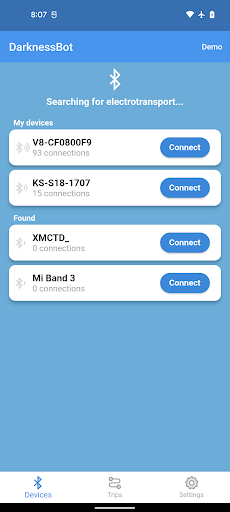
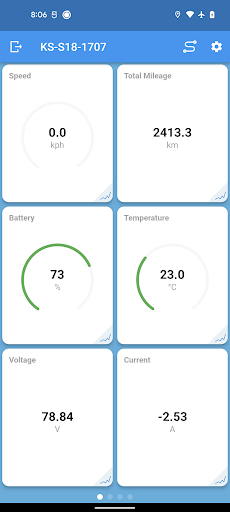
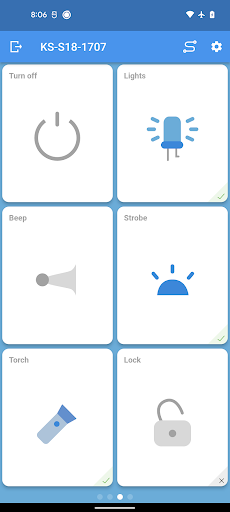
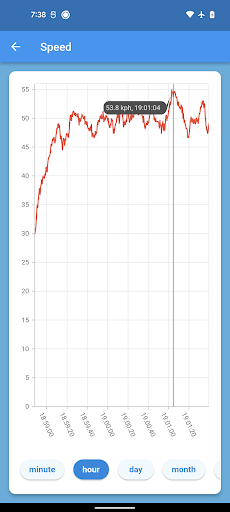
The application for active EUC/EScooter/Segway owners!
The following models are supported:
► Ninebot (One C/C+/E/E+/P/A1/S2/Z6/Z8/Z10, Segway C/E/P/R/T, Mini/Pro/Plus/Lite/GoKart/Mecha Kit, KickScooter ES/E45/G30/G30P/G30D/G30LE/G30LD/G30LP
► Inmotion (V3, V3C, V3S, V3Pro, V5, V5+, V5F, V8, V8F, V10, V10F, V11, V12, V13, R1, R2, L6, L8, L9)
▶ Solowheel (Glide 3)
► Begode (MTen3, MCM4, MCM5, ACM, MSuper V3/X/Pro, Monster/Pro, Tesla 1/2/3, Nikola/Plus, RS, EX, EXN, DTen/Plus, EX2S, Master/Pro, Hero, RecioWheel, T4)
► KingSong (14, 14S, 16, 16S, 16X, 18, 18L, 18S, 18XL, N8, N10, N10P, S18, S3, S22)
► Rockwheel (GT14, GT16)
► Xiaomi (M365, Pro, Pro2, 1S)
► Veteran (Sherman/Max/S, Abrams, Patton)
► Extreme Bull (Commander, XM)
► Xiaoxiang (Smart BMS)
► Ant (Smart BMS)
► Yokamura (i8, i8 Pro)
Features:
◉ Modify tiled interface that you can customize
◉ Sorting and grouping devices to connect
◉ Displaying all available metrics through Bluetooth LE:
► Current speed
► Maximum speed
► Avarage speed
► Total mileage
► Remaining mileage
► Trip mileage
► Total runtime
► Trip runtime
► Battery level
► Temperatures of the controller and battery
► Power
► Voltage
► Pitch and roll
► PWM
► Remaining mileage prediction
► Charge/Discharge time prediction
◉ Changing parameters of the device:
► Maximum speed
► Riding mode
► Lock mode
► Limited speed mode
► Volume level
► Gyro level
► Transportation mode
► LED mode
► Horn
► Alarms
► Strobe
► Calibration
► Turn off
► Cruise control
► Recuperation mode
► Brake lights
► Brightness
► Shutdown time
► Max Roll Angle
► Speed and PWM correction
► Bluetooth pincode
► Battery and cells info
◉ Automatic torch: Turning on the torch when driving after sunset and turning off when stopping
◉ Automatic volume: The volume of the music will change depending on the speed
◉ Custom Dashboard: Flexible adjustment of tile sizes on the dashboard. Zoom in on the tiles with two fingers
◉ VideoRecorder: Record video from the camera with widgets superimposed on it
◉ Custom beep: Beep playback via speaker or speaker, selection from file or preset
◉ Export/Import app data: Transfer your trips from one device to another
◉ Logging and displaying graphs of metrics (up to year)
◉ Setup triple alerts by speed and PWM
◉ Wear OS app: Track electrotransport metrics and manage settings directly from your watch
◉ Dynamic mileage estimation: The remaining mileage will be calculated dynamically depending on the driving style for the last time
◉ Flic Button 2 integration
◉ Support for English, Russian, Ukrainian, German, Chinese, Korean, French, Spanish, Italian, Hungarian and Greek
Beta test: https://t.me/DarknessBotAndroidENG
Mostra altro

1. Scarica il programma di installazione di MEmu e completa l'installazione

2. Avvia il Memu e apri il Google Play sulla homepage

3. Cerca DarknessBot in Google Play
Install
4. Scarica e installa DarknessBot
5. Al termine dell'installazione, fai clic sull'icona per avviar

6. Divertiti giocando a DarknessBot su PC con MEmu
MEmu App Player è il miglior emulatore Android gratuito, utilizzato da 50 milioni di persone per ottenere un'esperienza di gioco Android superba. La tecnilogia di virtualizzazione MEmu ti permette di giocare a migliaia di giochi Android con semplicità sul tuo computer, anche i giochi con la grafica più esigente.
Schermo più grande con una grafica migliore; Lunga durata, senza limitazione di batteria o dati mobili.
Supporto completo per mappa di tastiera per un controllo preciso di tastiera e mouse o gamepad.
Multipli account di gioco o attività su un singolo PC contemporaneamente con il gestore di multi istanza.
Use DarknessBot on PC by following steps: