Demus
Aggiornata
Versione corrente
1.0.1
Offerta da

Non devi più preoccuparti dei sovraccarichi durante l'utilizzo di Demus sul tuo cellulare, liberati dal piccolo schermo e goditi dell'App su uno schermo molto più grande. D'ora in poi, sperimenta la tua App a schermo intero con tastiera e mouse. MEmu ti offre tutte le sorprendenti funzioni che ti aspettavi: installazione rapida e impostazione semplice, controlli intuitivi, niente più limitazioni di batteria, dati mobili e chiamate fastidiose. Il MEmu 9 nuovo di zecca è la prima scelta per utilizzare Demus sul tuo computer. Codificato con il nostro assorbimento, il gestore multi-istanza consente di aprire 2 o più account contemporaneamente. E soprattutto, il nostro esclusivo motore di emulazione può sbloccare il pieno potenziale del tuo PC, rendendo tutto liscio e piacevole.
Mostra altro
Goditi un'esperienza straordinaria con Demus su PC con MEmu Play. È un potente emulatore Android gratuito che ti offre migliaia di app Android per la versione desktop. Divertiti a connetterti con gli amici e a perfezionare il tuo lavoro con maggiore efficienza! Demus — Playful Music Player, Streaming & Offline.
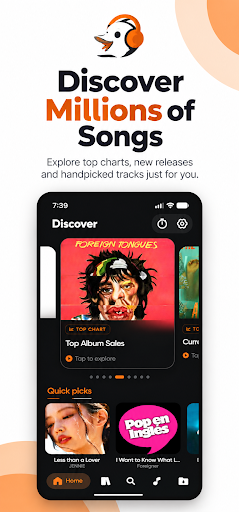
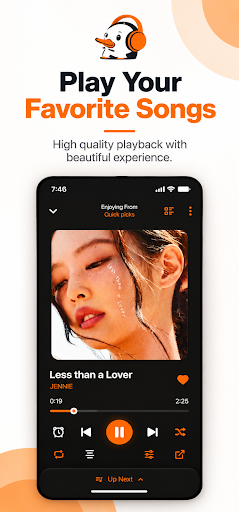
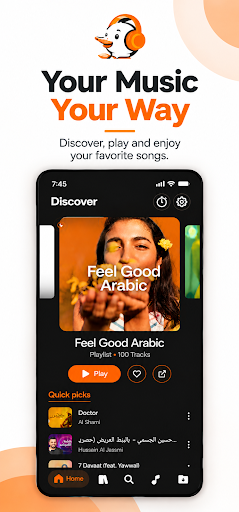
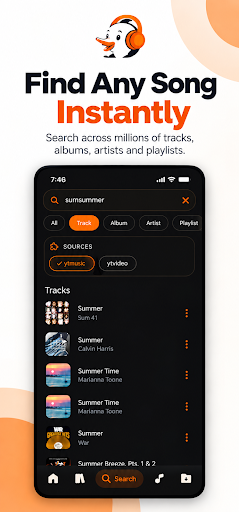
Demus — Playful Music Player, Streaming & Offline
Meet Demus: a friendly, playful music player designed to make music
feel easy. Search, tap, play. Save songs for offline listening.
Follow along with synced lyrics. Fine-tune every mix with a
built-in equalizer. No sign-up, no accounts, no bloat — just the
music, and a little friend along for the ride.
Whether you're commuting, working out, cooking, or unwinding at
night, Demus keeps your music playing beautifully — online or
completely offline.
WHY DEMUS
• A friendly, playful interface designed for daily listening
• Fast, snappy playback — tap and go
• Full offline mode once your tracks are downloaded
• Built-in 10-band equalizer with genre presets
• Synced lyrics that follow every song in real time
• 100 % free — no sign-up, no account, no dark patterns
• Small install size, gentle on your battery
A REAL MUSIC PLAYER
• Silky-smooth playback with a modern audio engine
• Gapless playback and crossfade for seamless listening
• Background music player with lock-screen and notification controls
• Bluetooth, headphone, and car audio support
• Full-screen now-playing view with album artwork
• Shuffle, repeat one, repeat all
• Smart queue and easy Up Next management
• Sleep timer for late-night music sessions
STREAM + LISTEN OFFLINE
• Search a huge catalogue of songs
• Stream instantly with a single tap
• Download tracks for offline listening — take your music anywhere
• Choose your preferred listening quality
• Manage your downloads with pause, resume, and retry
• Zero buffering when you're offline — perfect for travel and commutes
LYRICS THAT KEEP UP
• Synced, line-by-line lyrics that follow the song in real time
• Plain-text lyrics fallback when synced isn't available
• Full-screen lyric view — perfect for sing-alongs
• Manual lyric search when you want a specific version
TUNE YOUR SOUND
• Built-in graphic equalizer with fine per-band control
• Genre presets: rock, jazz, classical, electronic, vocal, bass boost
• Save your own custom EQ profiles
• Volume-per-track control
• Live audio spectrum on the now-playing screen
BUILD YOUR MUSIC LIBRARY
• Auto-scans and organises music already on your phone
• Create unlimited playlists — reorder tracks freely
• Favourites, recently played, most played, and full history
• Import and export playlists for easy backup
• Powerful search across your entire music library
DISCOVER MORE MUSIC
• Trending charts and curated collections
• Explore by artist, album, and genre
• Related songs and smart recommendations
• Multi-source search brings the best matches in one tap
LITTLE DETAILS
• Warm dark interface with a friendly mascot at the heart of it
• Last.fm scrobbling for listeners who track their taste
• Discord Rich Presence — show friends what you're playing
• Share songs and playlists with friends in one tap
• Available in English, Spanish, German, Hindi, Japanese,
Korean, Chinese and more
PRIVACY & PERMISSIONS — SIMPLE AND FAIR
Demus only requests what it actually needs: storage for your
offline library, notifications for background-playback controls,
and network access for search and streaming. No hidden tracking,
no personal-data harvesting. Your music library stays yours, on
your device.
IMPORTANT
Demus is a general-purpose music player. Please use it only to
play or download content you own or that is legally free to enjoy
in your country. Always respect artists, labels and copyright law.
Demus is an independent application and is not affiliated with,
endorsed by, or sponsored by any third-party streaming service,
video platform, or music brand.
READY TO PLAY?
Install Demus, tap search, hit play. Music, made a little friendlier
— clean, offline, and always ready.
Have feedback or a feature request? We read every review — leave
one and help shape the next update.
Mostra altro

1. Scarica il programma di installazione di MEmu e completa l'installazione

2. Avvia il Memu e apri il Google Play sulla homepage

3. Cerca Demus in Google Play
Install
4. Scarica e installa Demus
5. Al termine dell'installazione, fai clic sull'icona per avviar

6. Divertiti giocando a Demus su PC con MEmu
MEmu App Player è il miglior emulatore Android gratuito, utilizzato da 50 milioni di persone per ottenere un'esperienza di gioco Android superba. La tecnilogia di virtualizzazione MEmu ti permette di giocare a migliaia di giochi Android con semplicità sul tuo computer, anche i giochi con la grafica più esigente.
Schermo più grande con una grafica migliore; Lunga durata, senza limitazione di batteria o dati mobili.
Supporto completo per mappa di tastiera per un controllo preciso di tastiera e mouse o gamepad.
Multipli account di gioco o attività su un singolo PC contemporaneamente con il gestore di multi istanza.
Use Demus on PC by following steps: