dm Passport Photo App
Aggiornata
Versione corrente
3.1.147-dm
Offerta da

Non devi più preoccuparti dei sovraccarichi durante l'utilizzo di dm Passport Photo App sul tuo cellulare, liberati dal piccolo schermo e goditi dell'App su uno schermo molto più grande. D'ora in poi, sperimenta la tua App a schermo intero con tastiera e mouse. MEmu ti offre tutte le sorprendenti funzioni che ti aspettavi: installazione rapida e impostazione semplice, controlli intuitivi, niente più limitazioni di batteria, dati mobili e chiamate fastidiose. Il MEmu 9 nuovo di zecca è la prima scelta per utilizzare dm Passport Photo App sul tuo computer. Codificato con il nostro assorbimento, il gestore multi-istanza consente di aprire 2 o più account contemporaneamente. E soprattutto, il nostro esclusivo motore di emulazione può sbloccare il pieno potenziale del tuo PC, rendendo tutto liscio e piacevole.
Mostra altro
Goditi un'esperienza straordinaria con dm Passport Photo App su PC con MEmu Play. È un potente emulatore Android gratuito che ti offre migliaia di app Android per la versione desktop. Divertiti a connetterti con gli amici e a perfezionare il tuo lavoro con maggiore efficienza! Important information for Germany.
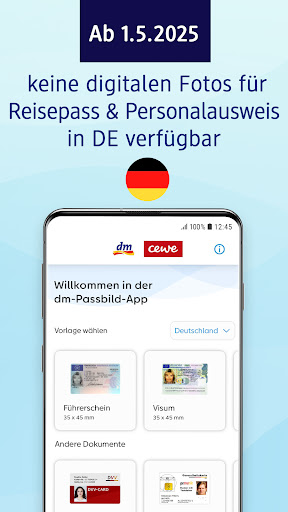
Important information for Germany
Since 1 May 2025, passport photos for ID cards, passports and residence permits in Germany may only be taken by authorised providers. We now offer this service in your dm store.
Please note: These changes only apply to Germany. In Austria, everything remains as usual, there are no changes for passport photos.
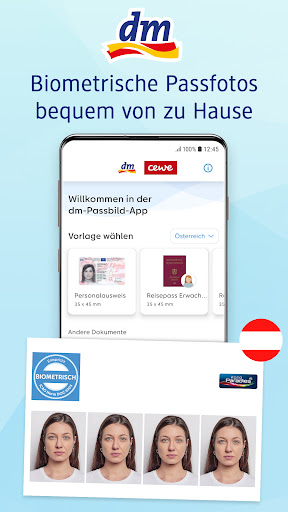
Create perfect passport photos from home with the dm Passbild App!
With the dm Passbild App, you can create biometric passport photos easily, quickly, and securely directly from your smartphone. Whether for an ID card, driver's license, passport, or various other documents – our app makes it possible. And the best part: No in-app payments required!
Why should you use the dm Passbild App?
- Private: Create professional-quality passport photos comfortably from home.
- Lightning Fast: Instantly available, no appointments or waiting times needed.
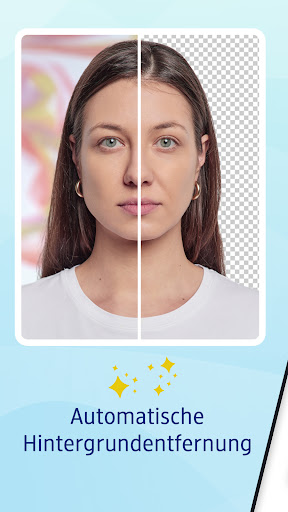
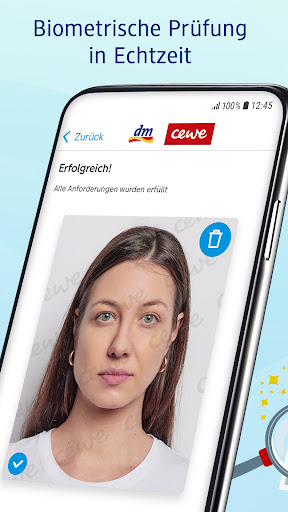
- Effortless: Automatic biometric check and background removal ensure your photo meets all requirements.
- Transparent: No in-app payments – pay conveniently at the dm store.
Here's how it works:
1. Take Your Photo: Choose the desired document template and take a photo. You'll get the best quality if someone else photographs you and you ensure even lighting.
2. Biometric Check: Select your favorite photo and have it checked for biometric compliance. Your photo will be perfectly cropped and the background removed.
3. Print Ready: Generate the QR code for printing. Scan the QR code at the CEWE photo station in the dm store and get your passport photo immediately! In some German stores the order is either printed or the printout can be started with the access code shown in the app.
Your benefits at a glance:
- Private: Create professional-quality passport photos from home.
- Fast: Instantly available, no appointments or waiting.
- Simple: Automatic biometric compliance check and background removal.
- Transparent: No in-app payments – pay conveniently at the dm store.
Integrated Biometric Check:
Thanks to our special verification software, you’ll know before you purchase if your photo meets biometric requirements – so you can be sure it’s right.
Variety of Document Templates:
Our selection of templates covers various official and everyday ID documents – for adults and children:
- ID card
- Passport
- Driver's license
- Residence permit
- Visa
- Health card
- Public transport pass
- Student ID
- University ID
Do you have questions or feedback?
We are happy to assist you! Contact us by email or phone
Germany
email: service@fotoparadies.de
phone: 0441-18131903
Austria
email: dm-paradies-foto@dm-paradiesfoto.at
phone: 0800 37 63 20
Our service team is available daily from Monday to Sunday (08:00 - 22:00).
Mostra altro

1. Scarica il programma di installazione di MEmu e completa l'installazione

2. Avvia il Memu e apri il Google Play sulla homepage

3. Cerca dm Passport Photo App in Google Play
Install
4. Scarica e installa dm Passport Photo App
5. Al termine dell'installazione, fai clic sull'icona per avviar

6. Divertiti giocando a dm Passport Photo App su PC con MEmu
MEmu App Player è il miglior emulatore Android gratuito, utilizzato da 50 milioni di persone per ottenere un'esperienza di gioco Android superba. La tecnilogia di virtualizzazione MEmu ti permette di giocare a migliaia di giochi Android con semplicità sul tuo computer, anche i giochi con la grafica più esigente.
Schermo più grande con una grafica migliore; Lunga durata, senza limitazione di batteria o dati mobili.
Supporto completo per mappa di tastiera per un controllo preciso di tastiera e mouse o gamepad.
Multipli account di gioco o attività su un singolo PC contemporaneamente con il gestore di multi istanza.
Use dm Passport Photo App on PC by following steps: