DubMog: AI Video Dubbing
Aggiornata
Versione corrente
2.2.7
Offerta da

Non devi più preoccuparti dei sovraccarichi durante l'utilizzo di DubMog: AI Video Dubbing sul tuo cellulare, liberati dal piccolo schermo e goditi dell'App su uno schermo molto più grande. D'ora in poi, sperimenta la tua App a schermo intero con tastiera e mouse. MEmu ti offre tutte le sorprendenti funzioni che ti aspettavi: installazione rapida e impostazione semplice, controlli intuitivi, niente più limitazioni di batteria, dati mobili e chiamate fastidiose. Il MEmu 9 nuovo di zecca è la prima scelta per utilizzare DubMog: AI Video Dubbing sul tuo computer. Codificato con il nostro assorbimento, il gestore multi-istanza consente di aprire 2 o più account contemporaneamente. E soprattutto, il nostro esclusivo motore di emulazione può sbloccare il pieno potenziale del tuo PC, rendendo tutto liscio e piacevole.
Mostra altro
Goditi un'esperienza straordinaria con DubMog: AI Video Dubbing su PC con MEmu Play. È un potente emulatore Android gratuito che ti offre migliaia di app Android per la versione desktop. Divertiti a connetterti con gli amici e a perfezionare il tuo lavoro con maggiore efficienza! DubMog is an AI dubbing app and live video translator.
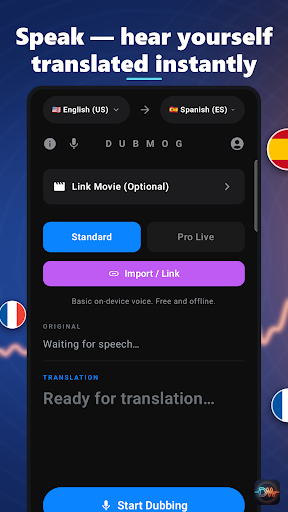
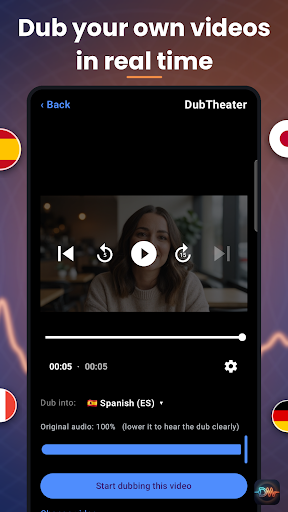
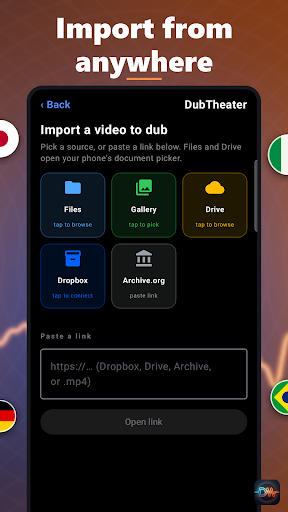
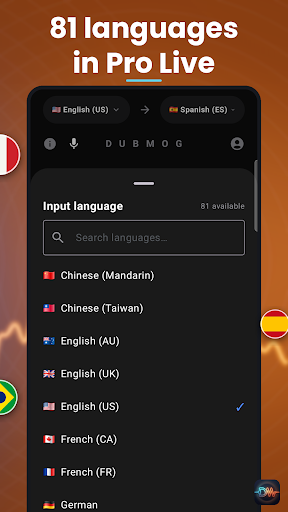
DubMog is an AI dubbing app and live video translator. Watch any video in your language: DubMog translates what people say and speaks it in a natural AI voice as the video plays, in real time. 81 languages.
WATCH ANY VIDEO IN YOUR LANGUAGE
• Dub Any App (Pro Live): switch to the app you're watching and DubMog dubs its video live in the background. Nothing to import.
• Dub a Website (Pro Live): open a site in DubMog's browser, play the video and hear it in your language.
• DubTheater: bring in a video from your Gallery, Files, Google Drive, Dropbox, or paste a link, and watch it dubbed as it plays.
• Dub a File: pick a video and get a dubbed copy back, saved on your phone and ready to share.
WATCH THE VIDEO, NOT THE SUBTITLES
Hide the subtitles and just listen. The dub keeps playing in your language. Lower the original audio to hear the dub clearly, or open the live transcript to see the original and the translation.
LIVE VOICE
Point your phone at whoever is speaking and hear them in your language. No typing, no transcript to read. Works for conversations, meetings and travel.
81 LANGUAGES
81 languages in Pro Live, including English, Spanish, French, German, Portuguese, Italian, Arabic, Hindi, Russian, Chinese, Japanese, Korean, Swahili, Vietnamese, Polish, Thai and Indonesian. 57 of these are also available in Standard. Translate a video into English, or an English video into your language.
TWO WAYS TO DUB
Standard — free and unlimited. On-device translation and a natural voice, covering 57 languages. Needs a connection for speech.
Pro Live — streaming, simultaneous translation across all 81 languages. Lower latency, best on a strong connection. Uses energy.
PRICING
Standard is free and unlimited, forever. Pro Live and DubTheater run on energy. Buy energy when you need it, or subscribe to DubMog Pro for 10 hours of Pro energy every month, plus an ad-free app. $9.99/month or $79.99/year.
GOOD TO KNOW
• Dub Any App and Dub a Website need Android 10 or newer.
• Some apps and copy-protected videos block audio capture, so DubMog can't dub them.
• Link a movie title to label your dubbing session with its poster and release year.
• Sign in with Google to keep your balance on any device.
PRIVACY
Audio is processed as it happens and is never saved to our servers.
Mostra altro

1. Scarica il programma di installazione di MEmu e completa l'installazione

2. Avvia il Memu e apri il Google Play sulla homepage

3. Cerca DubMog: AI Video Dubbing in Google Play
Install
4. Scarica e installa DubMog: AI Video Dubbing
5. Al termine dell'installazione, fai clic sull'icona per avviar

6. Divertiti giocando a DubMog: AI Video Dubbing su PC con MEmu
MEmu App Player è il miglior emulatore Android gratuito, utilizzato da 50 milioni di persone per ottenere un'esperienza di gioco Android superba. La tecnilogia di virtualizzazione MEmu ti permette di giocare a migliaia di giochi Android con semplicità sul tuo computer, anche i giochi con la grafica più esigente.
Schermo più grande con una grafica migliore; Lunga durata, senza limitazione di batteria o dati mobili.
Supporto completo per mappa di tastiera per un controllo preciso di tastiera e mouse o gamepad.
Multipli account di gioco o attività su un singolo PC contemporaneamente con il gestore di multi istanza.
Use DubMog: AI Video Dubbing on PC by following steps: