Famelack
Aggiornata
Versione corrente
3.6
Offerta da

Non devi più preoccuparti dei sovraccarichi durante l'utilizzo di Famelack sul tuo cellulare, liberati dal piccolo schermo e goditi dell'App su uno schermo molto più grande. D'ora in poi, sperimenta la tua App a schermo intero con tastiera e mouse. MEmu ti offre tutte le sorprendenti funzioni che ti aspettavi: installazione rapida e impostazione semplice, controlli intuitivi, niente più limitazioni di batteria, dati mobili e chiamate fastidiose. Il MEmu 9 nuovo di zecca è la prima scelta per utilizzare Famelack sul tuo computer. Codificato con il nostro assorbimento, il gestore multi-istanza consente di aprire 2 o più account contemporaneamente. E soprattutto, il nostro esclusivo motore di emulazione può sbloccare il pieno potenziale del tuo PC, rendendo tutto liscio e piacevole.
Mostra altro
Goditi un'esperienza straordinaria con Famelack su PC con MEmu Play. È un potente emulatore Android gratuito che ti offre migliaia di app Android per la versione desktop. Divertiti a connetterti con gli amici e a perfezionare il tuo lavoro con maggiore efficienza! Famelack – Watch Live Sports, News and TV ShowsFamelack is the hub for watching live TV, sports, and news from all around the world in regional and foreign languages.
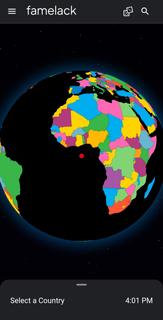
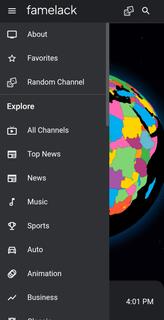
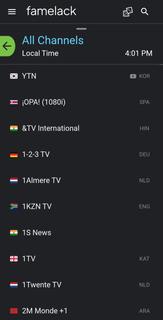
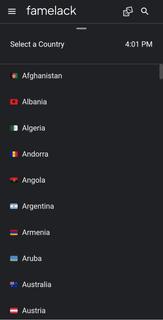
Famelack – Watch Live Sports, News and TV ShowsFamelack is the hub for watching live TV, sports, and news from all around the world in regional and foreign languages. It has a neatly organized library that contains the list of more than 1000 live TV channels in high quality, with minimal buffering or lag issues.With 130+ countries and HD TV channels, Famelack has one of the largest databases of streamable TV channels, and it draws attention to the eyes of millions of people. All you need is to install the Famelack, and you’re all set to choose your favourite TV channels from the thousands it has to offer to watch your beloved live sports or TV programs.There are various sections, such as Kids for those under 13, and adults can watch movies, sports, news, TV series, reality shows, and whatnot.Even though there are thousands of channels, it never feels complicated finding the desired one, as the app has a smart search functionality with filter options, allowing you to easily locate a TV channel simply by searching its name. A new favourite list option has been introduced in the Famelack to add the channels you watch the most, so that next time you can easily find them.Download Famelack APK for Android and enjoy 4K quality TV channels streaming across all genres with a feature-rich built-in media player!
Mostra altro

1. Scarica il programma di installazione di MEmu e completa l'installazione

2. Avvia il Memu e apri il Google Play sulla homepage

3. Cerca Famelack in Google Play
Install
4. Scarica e installa Famelack
5. Al termine dell'installazione, fai clic sull'icona per avviar

6. Divertiti giocando a Famelack su PC con MEmu
MEmu App Player è il miglior emulatore Android gratuito, utilizzato da 50 milioni di persone per ottenere un'esperienza di gioco Android superba. La tecnilogia di virtualizzazione MEmu ti permette di giocare a migliaia di giochi Android con semplicità sul tuo computer, anche i giochi con la grafica più esigente.
Schermo più grande con una grafica migliore; Lunga durata, senza limitazione di batteria o dati mobili.
Supporto completo per mappa di tastiera per un controllo preciso di tastiera e mouse o gamepad.
Multipli account di gioco o attività su un singolo PC contemporaneamente con il gestore di multi istanza.
Use Famelack on PC by following steps: