FindBadi - Ring Silent Phone
Aggiornata
Versione corrente
1.0.0
Offerta da

Non devi più preoccuparti dei sovraccarichi durante l'utilizzo di FindBadi - Ring Silent Phone sul tuo cellulare, liberati dal piccolo schermo e goditi dell'App su uno schermo molto più grande. D'ora in poi, sperimenta la tua App a schermo intero con tastiera e mouse. MEmu ti offre tutte le sorprendenti funzioni che ti aspettavi: installazione rapida e impostazione semplice, controlli intuitivi, niente più limitazioni di batteria, dati mobili e chiamate fastidiose. Il MEmu 9 nuovo di zecca è la prima scelta per utilizzare FindBadi - Ring Silent Phone sul tuo computer. Codificato con il nostro assorbimento, il gestore multi-istanza consente di aprire 2 o più account contemporaneamente. E soprattutto, il nostro esclusivo motore di emulazione può sbloccare il pieno potenziale del tuo PC, rendendo tutto liscio e piacevole.
Mostra altro
Goditi un'esperienza straordinaria con FindBadi - Ring Silent Phone su PC con MEmu Play. È un potente emulatore Android gratuito che ti offre migliaia di app Android per la versione desktop. Divertiti a connetterti con gli amici e a perfezionare il tuo lavoro con maggiore efficienza! FindBadi: Ring & Find My Phone.
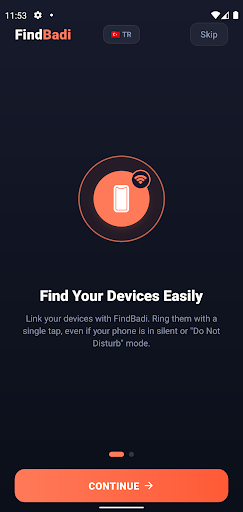
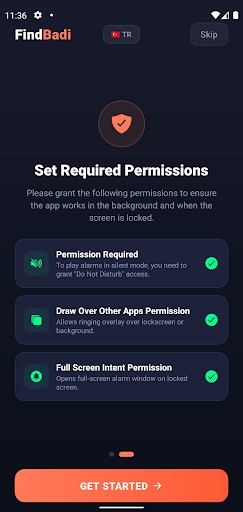
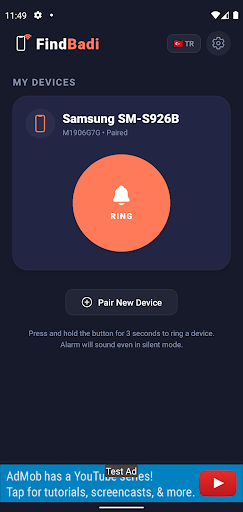
FindBadi: Ring & Find My Phone
Never lose your phone in the house again! FindBadi is the ultimate companion phone finder designed to help you and your loved ones instantly locate your lost devices—even if they are on silent or "Do Not Disturb" (DND) mode.
We’ve all been there: you’ve misplaced your phone under a pillow, in another room, or at the bottom of a bag, and calling it does nothing because it’s on silent mode. With FindBadi, you can ring your paired devices with a single tap and locate them in seconds.
KEY FEATURES
Bypass Silent & DND Modes: FindBadi overrides silent settings and plays a loud custom alarm so you can easily locate your phone.
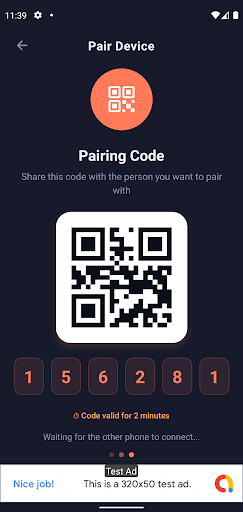
Seamless Device Pairing: Quickly connect two or more phones using a secure, temporary pairing code or by scanning a QR code.
Home Screen Widgets: Add 1x1 or 4x1 shortcut widgets to your home screen to ring your partner's or family members' devices without even opening the app.
Customizable Alarm Sounds: Choose from a list of high-priority zesty ringtones and set the volume level to your liking.
Premium Multi-Device Pairing: Pair up to 10 devices (perfect for families, couples, or anyone with multiple devices).
Lightweight & Battery-Friendly: Built using modern technology to run efficiently in the background without draining your battery.
HOW IT WORKS
Install FindBadi on both devices you want to link.
Start Pairing on one device to generate a unique QR code or a 6-digit PIN.
Join Pairing on the second device by entering the PIN or scanning the QR code.
Ring Instantly: Tap and hold the "Ring" button for 3 seconds, and the other device will start sounding immediately!
SECURE & PRIVATE
Your privacy is our priority. FindBadi does not track your GPS location, read your personal files, or share your data. The pairing is secure and only used to send instant wake-up alerts when you need to find a device.
IMPORTANT PERMISSIONS EXPLAINED
To guarantee that FindBadi can ring your phone when it's lost, we require a few Android permissions:
Do Not Disturb (DND) Access: Allowed so the alarm can sound even when your phone is in silent or DND mode.
Display Over Other Apps (Overlay): Allows the full-screen alarm screen to pop up immediately when another app is open.
Full Screen Intent: Required on Android 14+ to display the alarm UI directly on your lock screen so you can stop it instantly when found.
Camera Permission: Only used to scan the QR code for quick pairing.
Say goodbye to the panic of losing your phone in the couch. Download FindBadi today and enjoy the peace of mind of knowing you can always ring your devices!
Mostra altro

1. Scarica il programma di installazione di MEmu e completa l'installazione

2. Avvia il Memu e apri il Google Play sulla homepage

3. Cerca FindBadi - Ring Silent Phone in Google Play
Install
4. Scarica e installa FindBadi - Ring Silent Phone
5. Al termine dell'installazione, fai clic sull'icona per avviar

6. Divertiti giocando a FindBadi - Ring Silent Phone su PC con MEmu
MEmu App Player è il miglior emulatore Android gratuito, utilizzato da 50 milioni di persone per ottenere un'esperienza di gioco Android superba. La tecnilogia di virtualizzazione MEmu ti permette di giocare a migliaia di giochi Android con semplicità sul tuo computer, anche i giochi con la grafica più esigente.
Schermo più grande con una grafica migliore; Lunga durata, senza limitazione di batteria o dati mobili.
Supporto completo per mappa di tastiera per un controllo preciso di tastiera e mouse o gamepad.
Multipli account di gioco o attività su un singolo PC contemporaneamente con il gestore di multi istanza.
Use FindBadi - Ring Silent Phone on PC by following steps: