klattsch - retro vocal synth
Aggiornata
Versione corrente
1.5.2
Offerta da

Non devi più preoccuparti dei sovraccarichi durante l'utilizzo di klattsch - retro vocal synth sul tuo cellulare, liberati dal piccolo schermo e goditi dell'App su uno schermo molto più grande. D'ora in poi, sperimenta la tua App a schermo intero con tastiera e mouse. MEmu ti offre tutte le sorprendenti funzioni che ti aspettavi: installazione rapida e impostazione semplice, controlli intuitivi, niente più limitazioni di batteria, dati mobili e chiamate fastidiose. Il MEmu 9 nuovo di zecca è la prima scelta per utilizzare klattsch - retro vocal synth sul tuo computer. Codificato con il nostro assorbimento, il gestore multi-istanza consente di aprire 2 o più account contemporaneamente. E soprattutto, il nostro esclusivo motore di emulazione può sbloccare il pieno potenziale del tuo PC, rendendo tutto liscio e piacevole.
Mostra altro
Goditi un'esperienza straordinaria con klattsch - retro vocal synth su PC con MEmu Play. È un potente emulatore Android gratuito che ti offre migliaia di app Android per la versione desktop. Divertiti a connetterti con gli amici e a perfezionare il tuo lavoro con maggiore efficienza! klattsch is a retro vocal synthesizer for your pocket.
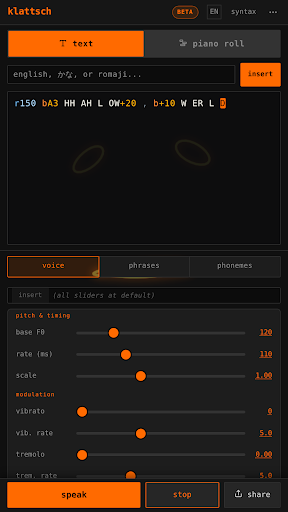
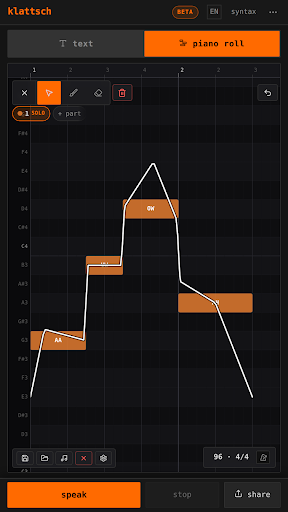
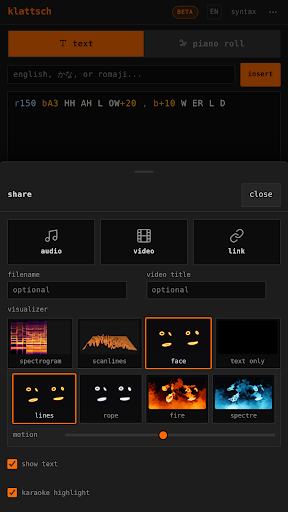
klattsch is a retro vocal synthesizer for your pocket. It is built on the kind of formant speech synthesis that made computers talk in the 1980s, so it does not sound smooth or human. It sounds strange, buzzy, and stiff, but eerily alive, and with a little practice it can talk, sing, and make sounds you have never heard come out of a phone.
Type something and hear it speak. Then bend the pitch, stretch the timing, and shape the voice until it is singing a melody or muttering like a haunted answering machine. klattsch rewards curiosity: the deeper you go, the more expressive and strange it gets. People have made amazing things with it, and you will too.
WHAT YOU CAN DO
- Type plain English and klattsch sounds it out phoneme by phoneme.
- Write in Japanese kana or romaji and it speaks that too.
- Drop into raw ARPABET phoneme codes for total control over every sound.
- Give words a melody with notes, pitch glides, vibrato, and tremolo.
- Sculpt the voice with breathiness, spectral tilt, vocal effort, and formant scale.
MAKE IT SING
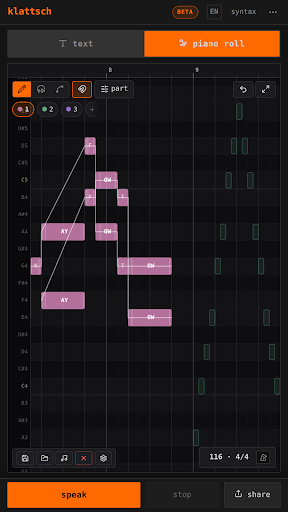
Switch to the piano roll and draw notes directly. Place syllables on a grid, set their pitch and length, and build a full vocal line. Six built-in voices (default, soprano, baritone, whisper, robot, and choir) get you started, and you can save your own. Import a MIDI file and its tracks become vocal lines.
DRAW THE PITCH ITSELF
Solo parts open a full pitch editor. Place control points and shape the curve between them, paint the pitch freehand with your finger, or drop a jump where a note should break in two. Decide how each note leads into the next: smooth, hard, or the original phoneme timing. Scoops, falls, and overshoot are yours to draw.
FOUR SYNTHESIS ENGINES
Every part can run on a different engine. klattsch is the original voice. theremez strips it down to three pure whistling tones. rodetage rebuilds it out of formant wave functions. klattsch jr. runs a later, stricter Klatt design with its own phoneme bank. Put them all in one piece and every part keeps its own character.
SHARE YOUR CREATIONS
Export a video to share anywhere, with an optional karaoke-style highlight that follows along as it sings. Export audio to keep or reuse. Import a backing track and make klattsch sing over it.
BUILT TO RESPECT YOU
klattsch works entirely offline. It has no ads and no accounts, and it never tracks you. The interface is available in English, Japanese, Korean, Spanish, Portuguese, Traditional Chinese, German, French, Thai, and Indonesian.
FREE, WITH AN OPTIONAL UPGRADE
klattsch is free to use, including video export, the full voice engine, and the pitch editor. A one-time "klattsch pro" unlock adds longer piano-roll compositions, multiple voice parts, the rodetage and klattsch jr. engines, and lossless WAV audio export, if you want to take it further.
AUTHENTIC RETRO SPEECH SYNTHESIS TECH
Based on real 40+ year old text-to-speech technology and the work of early speech synthesis pioneers. klattsch can sound similar to many old computer voices and speech synths, because it works on the same principles.
100% SUPER OFFICIAL
Made by the original creator of the viral klattsch site.
Whether you want to make a robot sing your favorite song, build glitchy vocal textures for a track, prank a friend with a little talking computer guy on your phone, or just explore how synthetic speech actually works, klattsch is a playground for the human voice at its most delightfully artificial.
Mostra altro

1. Scarica il programma di installazione di MEmu e completa l'installazione

2. Avvia il Memu e apri il Google Play sulla homepage

3. Cerca klattsch - retro vocal synth in Google Play
Install
4. Scarica e installa klattsch - retro vocal synth
5. Al termine dell'installazione, fai clic sull'icona per avviar

6. Divertiti giocando a klattsch - retro vocal synth su PC con MEmu
MEmu App Player è il miglior emulatore Android gratuito, utilizzato da 50 milioni di persone per ottenere un'esperienza di gioco Android superba. La tecnilogia di virtualizzazione MEmu ti permette di giocare a migliaia di giochi Android con semplicità sul tuo computer, anche i giochi con la grafica più esigente.
Schermo più grande con una grafica migliore; Lunga durata, senza limitazione di batteria o dati mobili.
Supporto completo per mappa di tastiera per un controllo preciso di tastiera e mouse o gamepad.
Multipli account di gioco o attività su un singolo PC contemporaneamente con il gestore di multi istanza.
Use klattsch - retro vocal synth on PC by following steps: