LevelLab: LUFS Loudness Meter
Aggiornata
Versione corrente
1.0.16
Offerta da

Non devi più preoccuparti dei sovraccarichi durante l'utilizzo di LevelLab: LUFS Loudness Meter sul tuo cellulare, liberati dal piccolo schermo e goditi dell'App su uno schermo molto più grande. D'ora in poi, sperimenta la tua App a schermo intero con tastiera e mouse. MEmu ti offre tutte le sorprendenti funzioni che ti aspettavi: installazione rapida e impostazione semplice, controlli intuitivi, niente più limitazioni di batteria, dati mobili e chiamate fastidiose. Il MEmu 9 nuovo di zecca è la prima scelta per utilizzare LevelLab: LUFS Loudness Meter sul tuo computer. Codificato con il nostro assorbimento, il gestore multi-istanza consente di aprire 2 o più account contemporaneamente. E soprattutto, il nostro esclusivo motore di emulazione può sbloccare il pieno potenziale del tuo PC, rendendo tutto liscio e piacevole.
Mostra altro
Goditi un'esperienza straordinaria con LevelLab: LUFS Loudness Meter su PC con MEmu Play. È un potente emulatore Android gratuito che ti offre migliaia di app Android per la versione desktop. Divertiti a connetterti con gli amici e a perfezionare il tuo lavoro con maggiore efficienza! I'm a solo developer in the Netherlands.
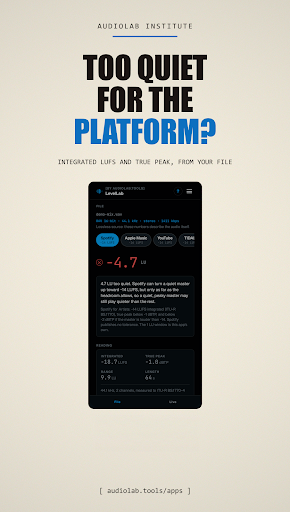
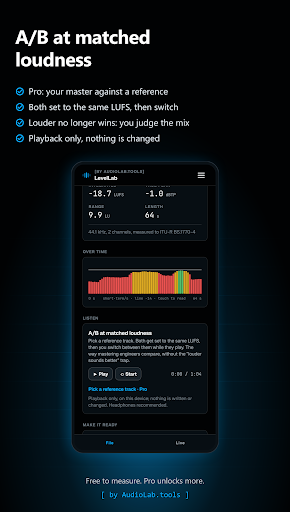
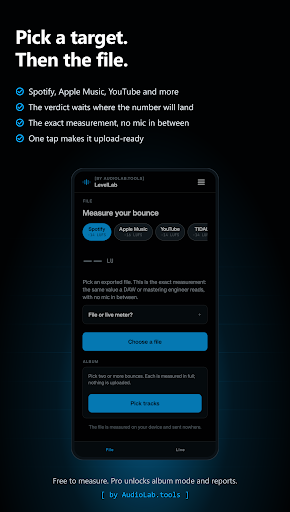
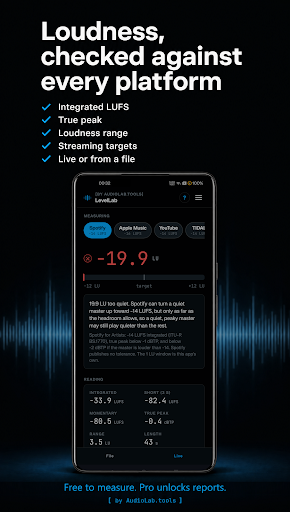
I'm a solo developer in the Netherlands. I built LevelLab for the moment after you export a bounce and wonder whether it is on target for streaming without clipping. It measures the file itself, on the phone, with no microphone in between, so the number is the one a mastering engineer or a platform reads.
Pick a WAV, MP3 or other decodable file:
- integrated LUFS, plus short-term and momentary, per ITU-R BS.1770
- true peak in dBTP and loudness range (LRA)
- pass or fail against Spotify, Apple Music, YouTube and other targets
- a loudness timeline you can scrub, with playback
- what you fed it: container, bit depth, sample rate, channels, bitrate
If the file is off target, LevelLab writes a normalised copy: a new 16-bit (dithered) or 24-bit WAV with a true-peak limiter, and leaves your original alone. A live mode uses the phone mic as a quick, relative meter and stores nothing.
All of that is free, including normalising, the live meter and your history. Your first PDF report is free too. Pro is a one-time purchase through Google Play, no subscription, for when the master has to go out under your name. It gives you unlimited reports with your own logo on them, and album mode: several bounces normalised per track or album-wide with the balance kept. It also adds comparing two measurements from history, so you can see whether v3 landed closer to target than v2, and A/B against a reference track at matched loudness.
LevelLab is one of seven small labs by AudioLab.tools, each made to do one job well: RoomLab (room acoustics, RT60), NoiseLab (sound level meter), MicLab (mic check), LevelLab (LUFS loudness meter), SignalLab (tone generator), TuneLab (chromatic tuner) and SkillLab (ear training). They share one look, and some hand their results to each other.
No ads. No account. Your audio never leaves your phone. Anonymous usage stats are off by default.
Questions or a bug: hello@audiolab.tools
Mostra altro

1. Scarica il programma di installazione di MEmu e completa l'installazione

2. Avvia il Memu e apri il Google Play sulla homepage

3. Cerca LevelLab: LUFS Loudness Meter in Google Play
Install
4. Scarica e installa LevelLab: LUFS Loudness Meter
5. Al termine dell'installazione, fai clic sull'icona per avviar

6. Divertiti giocando a LevelLab: LUFS Loudness Meter su PC con MEmu
MEmu App Player è il miglior emulatore Android gratuito, utilizzato da 50 milioni di persone per ottenere un'esperienza di gioco Android superba. La tecnilogia di virtualizzazione MEmu ti permette di giocare a migliaia di giochi Android con semplicità sul tuo computer, anche i giochi con la grafica più esigente.
Schermo più grande con una grafica migliore; Lunga durata, senza limitazione di batteria o dati mobili.
Supporto completo per mappa di tastiera per un controllo preciso di tastiera e mouse o gamepad.
Multipli account di gioco o attività su un singolo PC contemporaneamente con il gestore di multi istanza.
Use LevelLab: LUFS Loudness Meter on PC by following steps: