Link2it: Create Link Playlists
Aggiornata
Versione corrente
Offerta da

Non devi più preoccuparti dei sovraccarichi durante l'utilizzo di Link2it: Create Link Playlists sul tuo cellulare, liberati dal piccolo schermo e goditi dell'App su uno schermo molto più grande. D'ora in poi, sperimenta la tua App a schermo intero con tastiera e mouse. MEmu ti offre tutte le sorprendenti funzioni che ti aspettavi: installazione rapida e impostazione semplice, controlli intuitivi, niente più limitazioni di batteria, dati mobili e chiamate fastidiose. Il MEmu 9 nuovo di zecca è la prima scelta per utilizzare Link2it: Create Link Playlists sul tuo computer. Codificato con il nostro assorbimento, il gestore multi-istanza consente di aprire 2 o più account contemporaneamente. E soprattutto, il nostro esclusivo motore di emulazione può sbloccare il pieno potenziale del tuo PC, rendendo tutto liscio e piacevole.
Mostra altro
Goditi un'esperienza straordinaria con Link2it: Create Link Playlists su PC con MEmu Play. È un potente emulatore Android gratuito che ti offre migliaia di app Android per la versione desktop. Divertiti a connetterti con gli amici e a perfezionare il tuo lavoro con maggiore efficienza! Link2it: Your All-in-One Personal Link Hub.
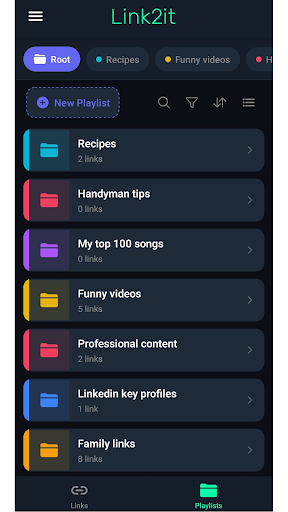
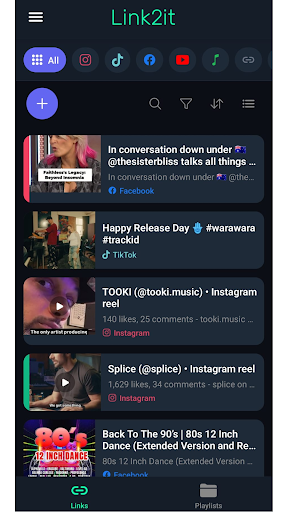
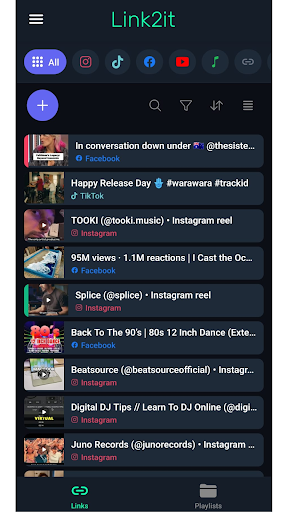
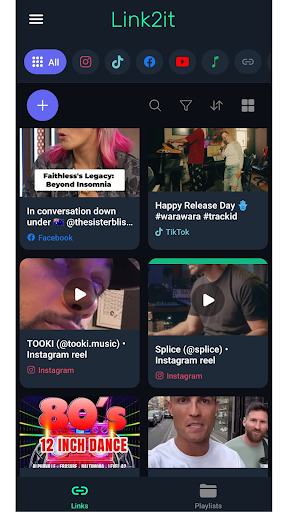
Link2it: Your All-in-One Personal Link Hub
Link2it is the simplest way to consolidate your entire digital presence into one beautiful, shareable playlist.
Have you watched a cool video in Tiktok or Instagram Reels ?
Or maybe a good tip you found on Facebook or You would like to create your links portfolio ?
Looking for a way to save and organize all your links to find them later and share them with your friends ?
Whether you are a creator, professional, or social media enthusiast, Link2it helps you connect your audience to everything you do with just one link.
Key Features:
All your important links in one place:
Any link you'll share with Link2it will auto categorize into the right tab, helping you to find it later.
You can sort them as you like, change their names and share it with friends.
Custom multi source playlists:
Create your own links playlists with content you collected from all around the web and social media.
Share your playlists:
Created helpful tips playlist ? maybe videos of recipes from different social media platforms ?
Gather them all into one playlist and share it with anyone you'd like to.
How it works:
Add: Share your social links, website URLs, or add paste them manually to the app.
Organize: All your links will automatically get into categorized tabs based on its source. You can sort them as you like, color code them and add them to a desired Playlist.
Share: Created an interesting Playlist ?
Share it with your friends and family, directly into Link2it app or just over WhatsApp, Telegram or any other text based messaging app.
Download Link2it today and start building your digital identity !
Mostra altro

1. Scarica il programma di installazione di MEmu e completa l'installazione

2. Avvia il Memu e apri il Google Play sulla homepage

3. Cerca Link2it: Create Link Playlists in Google Play
Install
4. Scarica e installa Link2it: Create Link Playlists
5. Al termine dell'installazione, fai clic sull'icona per avviar

6. Divertiti giocando a Link2it: Create Link Playlists su PC con MEmu
MEmu App Player è il miglior emulatore Android gratuito, utilizzato da 50 milioni di persone per ottenere un'esperienza di gioco Android superba. La tecnilogia di virtualizzazione MEmu ti permette di giocare a migliaia di giochi Android con semplicità sul tuo computer, anche i giochi con la grafica più esigente.
Schermo più grande con una grafica migliore; Lunga durata, senza limitazione di batteria o dati mobili.
Supporto completo per mappa di tastiera per un controllo preciso di tastiera e mouse o gamepad.
Multipli account di gioco o attività su un singolo PC contemporaneamente con il gestore di multi istanza.
Use Link2it: Create Link Playlists on PC by following steps: