
Liven: Improving Wellbeing
Aggiornata
Versione corrente
1.36.0
Offerta da

Non devi più preoccuparti dei sovraccarichi durante l'utilizzo di Liven: Improving Wellbeing sul tuo cellulare, liberati dal piccolo schermo e goditi dell'App su uno schermo molto più grande. D'ora in poi, sperimenta la tua App a schermo intero con tastiera e mouse. MEmu ti offre tutte le sorprendenti funzioni che ti aspettavi: installazione rapida e impostazione semplice, controlli intuitivi, niente più limitazioni di batteria, dati mobili e chiamate fastidiose. Il MEmu 9 nuovo di zecca è la prima scelta per utilizzare Liven: Improving Wellbeing sul tuo computer. Codificato con il nostro assorbimento, il gestore multi-istanza consente di aprire 2 o più account contemporaneamente. E soprattutto, il nostro esclusivo motore di emulazione può sbloccare il pieno potenziale del tuo PC, rendendo tutto liscio e piacevole.
Mostra altro
Scarica Liven: Improving Wellbeing su PC con MEmu Android Emulator. Divertiti giocando sul grande schermo. Liven is your self-discovery companion, a system of tools designed to help you better understand and transform yourself.
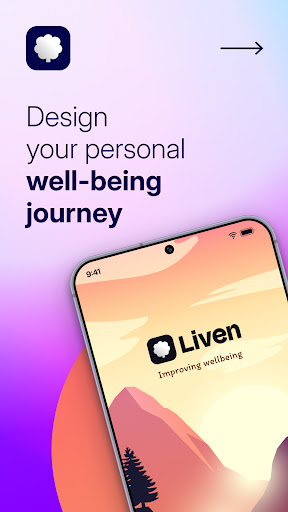
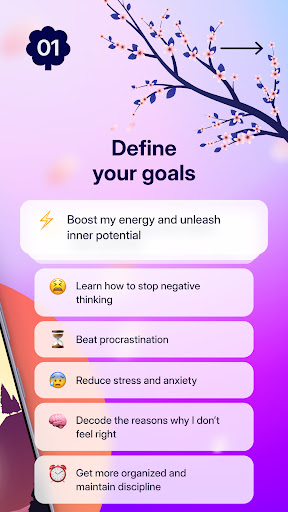
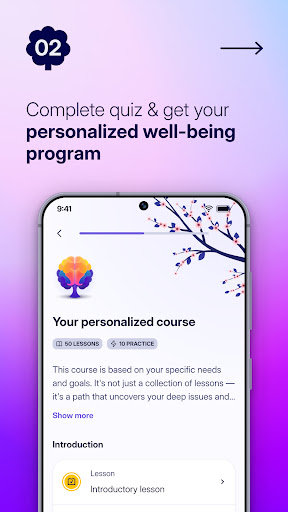
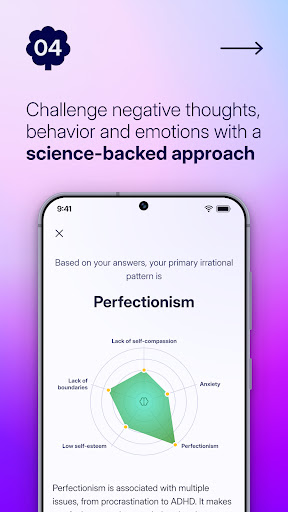
Liven is your self-discovery companion, a system of tools designed to help you better understand and transform yourself.
WHO’S LIVEN FOR?
• For you, me, anyone trying to survive in this hyperstimulated world.
• For those under pressure, living to meet others’ expectations, or struggling to say ‘no’.
• For those wanting to build a positive self-image, improve focus, or manage time.
• For anyone ready to liven up!
Are you ready to take your inner dialogue out of your head and gain a new perspective on life? Because if you are, we’ve got tools to help you observe your experiences and reframe your days. Sounds good?
CHECK OUT OUR APPROACH:
• Personalized program
Set a clear, achievable goal—whether it's improving your self-image, saying "no," or challenging negative thoughts. Choose your direction, and we'll help you get there with evidence-based techniques and tools.
• Mood tracker
Pause during the day to check in with your emotions. See how you're doing—Good, Bad, Amazing! Use our emotional menu to name your feelings, notice what triggered them, and track changes over time with the Mood Calendar.
• Routine builder
Check out our Tasks tool to plan new activities and get ideas for things to try each day. By adding new tasks and routines to your days, you can change your behaviour and transform.
• AI companion
Ever wish someone would listen to you rant without judgment, even at 3 a.m.? Meet Livie, our AI companion. If you're tired of the inner dialogue or need a fresh perspective on life, just talk to her. She'll help you break down your situations and suggest new ideas to try.
• Bite-size knowledge
Scientists have studied the human mind for over 100 years, uncovering how our emotions, thoughts, and actions connect to unconscious "auto-pilot" behaviors. We've distilled this knowledge into bite-sized insights for you to apply in your decision-making.
• Well-being tests
Everyone loves quizzes! Take a break and answer a set of questions to define experiences you’re going through. Check back every week to track the changes in emotional and behavioural dynamics.
• Deep focus soundscapes
When you don’t feel like listening to music but still want to wear headphones and block out the world, try our soundscapes.
———————
WHAT OUR USERS ARE SAYING ABOUT US
"Positive thoughts and a calmer attitude come after 10 minutes of use."
"Great app to use as a guide at the start of your day."
"Liven is helping me turn healthy activities into habits."
———————
SUBSCRIPTION AND TERMS
After you decide to begin your growth with Liven and download the app, you can unlock all features by subscribing to the premium subscription.
If you choose to purchase a premium subscription, payment will be charged to your Apple account, and your account will be charged for renewal within 24 hours prior to the end of the current period. Auto-renewal may be turned off at any time by going to your settings in the App Store after purchase.
Our app aims to provide you with helpful guidance on mindfulness. However, it is important to note that the information presented in the app is for general purposes only, and should not be considered as a substitute for professional medical care.
Livie is not a substitute for professional advice. It helps you understand your feelings, discover self-care ideas, and manage overwhelming thoughts. Please consult a professional if you need medical advice.
This app is not intended to diagnose, treat, cure, or prevent any health conditions, and may not be suitable for everyone.
Therefore, we strongly advise that you consult with a healthcare professional before adopting any advice or activities suggested in the app.
Please use this app at your discretion, and always keep in mind your own unique needs and circumstances.
Privacy Policy: https://quiz.theliven.com/en/privacy-policy
Terms of Service: https://quiz.theliven.com/en/terms-of-use
Mostra altro

1. Scarica il programma di installazione di MEmu e completa l'installazione

2. Avvia il Memu e apri il Google Play sulla homepage

3. Cerca Liven: Improving Wellbeing in Google Play
Install
4. Scarica e installa Liven: Improving Wellbeing
5. Al termine dell'installazione, fai clic sull'icona per avviar

6. Divertiti giocando a Liven: Improving Wellbeing su PC con MEmu
MEmu App Player è il miglior emulatore Android gratuito, utilizzato da 50 milioni di persone per ottenere un'esperienza di gioco Android superba. La tecnilogia di virtualizzazione MEmu ti permette di giocare a migliaia di giochi Android con semplicità sul tuo computer, anche i giochi con la grafica più esigente.
Schermo più grande con una grafica migliore; Lunga durata, senza limitazione di batteria o dati mobili.
Supporto completo per mappa di tastiera per un controllo preciso di tastiera e mouse o gamepad.
Multipli account di gioco o attività su un singolo PC contemporaneamente con il gestore di multi istanza.
Use Liven: Improving Wellbeing on PC by following steps: