MINI
Aggiornata
Versione corrente
6.5.3
Offerta da

Non devi più preoccuparti dei sovraccarichi durante l'utilizzo di MINI sul tuo cellulare, liberati dal piccolo schermo e goditi dell'App su uno schermo molto più grande. D'ora in poi, sperimenta la tua App a schermo intero con tastiera e mouse. MEmu ti offre tutte le sorprendenti funzioni che ti aspettavi: installazione rapida e impostazione semplice, controlli intuitivi, niente più limitazioni di batteria, dati mobili e chiamate fastidiose. Il MEmu 9 nuovo di zecca è la prima scelta per utilizzare MINI sul tuo computer. Codificato con il nostro assorbimento, il gestore multi-istanza consente di aprire 2 o più account contemporaneamente. E soprattutto, il nostro esclusivo motore di emulazione può sbloccare il pieno potenziale del tuo PC, rendendo tutto liscio e piacevole.
Mostra altro
Scarica MINI su PC con MEmu Android Emulator. Divertiti giocando sul grande schermo. With a modern design and intuitive user guidance features, the MINI App is made to help you navigate a completely new mobility experience.

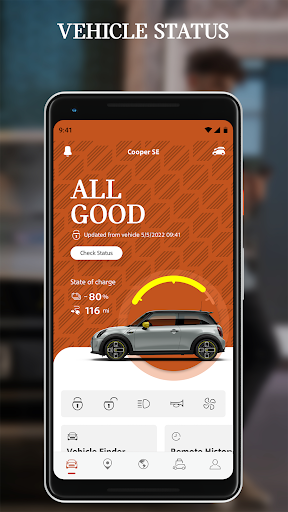
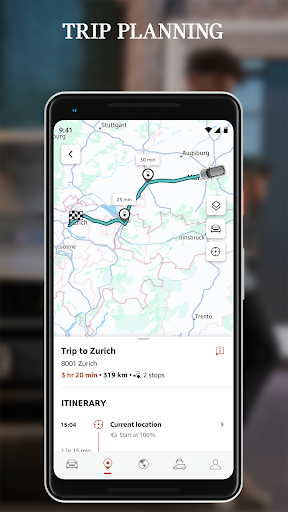
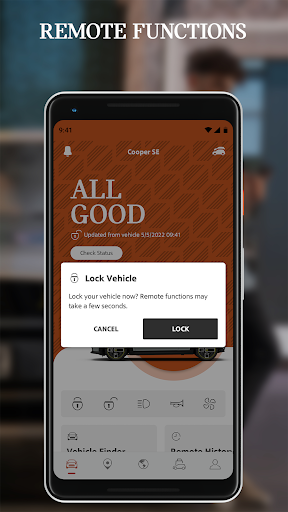
With a modern design and intuitive user guidance features, the MINI App is made to help you navigate a completely new mobility experience. Check the status of your MINI, use one of the many remote control features, plan trips in advance, book your next service appointment, or discover the world of MINI – all from the convenience of your smartphone.
The MINI App at a glance:
•Immediate access to vehicle status and functions
•Smart e-mobility services
•Extensive navigation and map features for planning trips
•Stories and news from the world of MINI
•Direct access to your MINI Service
•Use app in demo mode even without owning vehicle
•Regular updates and upgrades for all features
Discover what makes the MINI App great:
CHECK YOUR VEHICLE STATUS
“All Good” – The MINI App provides you with an overview of crucial status information like your MINI’s drive-ready state, enabling you to:
•View your vehicle's location
•Check your current fuel level and range
•Check that doors and windows are locked
OPERATE YOUR VEHICLE REMOTELY
Use your MINI's features directly from your smartphone:
•Plan and switch on air conditioning
•Lock and unlock doors
•Operate the horn and flashers
PLAN DRIVES
Find and send destinations, gas stations, charging stations, and parking areas directly to the navigation system
•Plan trips and keep an eye on current traffic
•Read detailed information on gas stations and charging stations
•Find parking spaces at your destination
•Plan for charging stops and times with charge-optimized route planning
ENHANCED E-MOBILITY
Smart e-mobility support for planning vehicle range and necessary charging:
•Plan electric range and necessary charging
•Find nearby charging stations
•View your charging history at any time
EXPLORE THE WORLD OF MINI
Stay up to date and find the right products for your MINI:
•Discover exclusive stories and news from MINI
•Receive messages in the Message Center
•Link directly to MINI Shop
MANAGE REQUIRED SERVICES
The MINI app is your direct line to your dealer if service is needed:
•Keep an eye on required services
•Book service appointments via the app
EXPERIENCE MINI APP WITH DEMO MODE
Explore the benefits of the MINI app even without owning a vehicle:
• Choose an attractive MINI demo vehicle from the app garage
• Get to know the variety of app functions, e.g. for electric mobility
• Use MINI app to get you into the world of MINI
Download the MINI App now and try out its many features.
The MINI App is only supported by vehicles that were built after March 2018 and have the optional MINI Connected Services services in combination with a compatible smartphone. The optional Remote Services option is required for an optimal app experience. The availability of app functions can vary from country to country.
Mostra altro

1. Scarica il programma di installazione di MEmu e completa l'installazione

2. Avvia il Memu e apri il Google Play sulla homepage

3. Cerca MINI in Google Play
Install
4. Scarica e installa MINI
5. Al termine dell'installazione, fai clic sull'icona per avviar

6. Divertiti giocando a MINI su PC con MEmu
MEmu App Player è il miglior emulatore Android gratuito, utilizzato da 50 milioni di persone per ottenere un'esperienza di gioco Android superba. La tecnilogia di virtualizzazione MEmu ti permette di giocare a migliaia di giochi Android con semplicità sul tuo computer, anche i giochi con la grafica più esigente.
Schermo più grande con una grafica migliore; Lunga durata, senza limitazione di batteria o dati mobili.
Supporto completo per mappa di tastiera per un controllo preciso di tastiera e mouse o gamepad.
Multipli account di gioco o attività su un singolo PC contemporaneamente con il gestore di multi istanza.
Use MINI on PC by following steps: