MobileFitting
Aggiornata
Versione corrente
4.2.0.1072
Offerta da

Non devi più preoccuparti dei sovraccarichi durante l'utilizzo di MobileFitting sul tuo cellulare, liberati dal piccolo schermo e goditi dell'App su uno schermo molto più grande. D'ora in poi, sperimenta la tua App a schermo intero con tastiera e mouse. MEmu ti offre tutte le sorprendenti funzioni che ti aspettavi: installazione rapida e impostazione semplice, controlli intuitivi, niente più limitazioni di batteria, dati mobili e chiamate fastidiose. Il MEmu 9 nuovo di zecca è la prima scelta per utilizzare MobileFitting sul tuo computer. Codificato con il nostro assorbimento, il gestore multi-istanza consente di aprire 2 o più account contemporaneamente. E soprattutto, il nostro esclusivo motore di emulazione può sbloccare il pieno potenziale del tuo PC, rendendo tutto liscio e piacevole.
Mostra altro
Goditi un'esperienza straordinaria con MobileFitting su PC con MEmu Play. È un potente emulatore Android gratuito che ti offre migliaia di app Android per la versione desktop. Divertiti a connetterti con gli amici e a perfezionare il tuo lavoro con maggiore efficienza! MobileFitting is a unique and innovative app that allows the hearing care professional to perform a quick and user-friendly setup and adjustment of supported Signia hearing aids with only a smart mobile device.
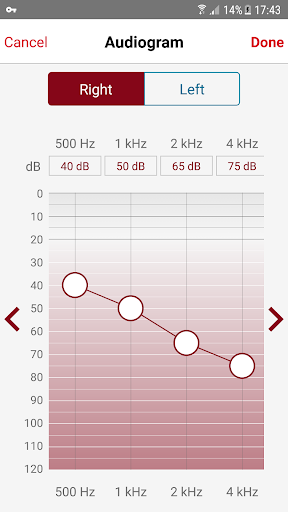
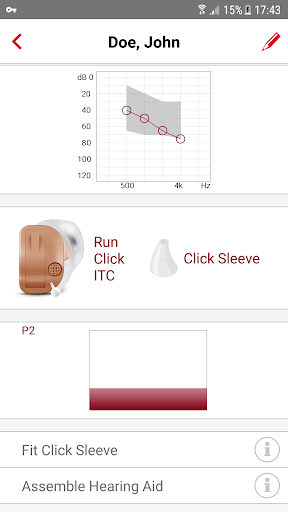
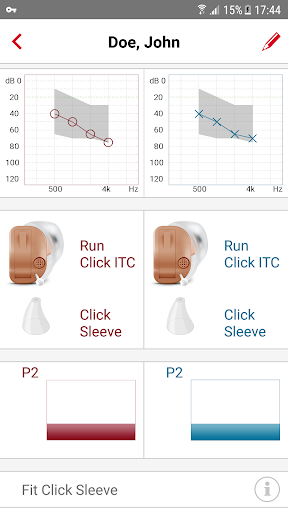
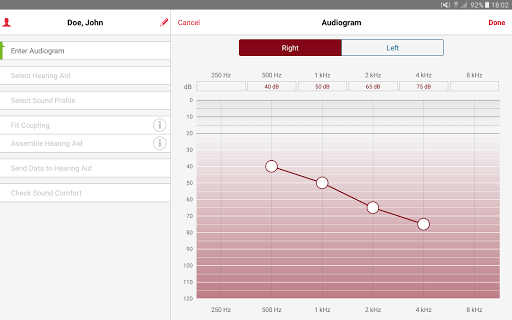
MobileFitting is a unique and innovative app that allows the hearing care professional to perform a quick and user-friendly setup and adjustment of supported Signia hearing aids with only a smart mobile device. There is no need for a laptop or PC to set up the hearing aids. This enables the hearing care professional to be truly mobile and reach the hearing impaired more easily than ever before.
Features:
Audiogram input or creation of headphone based estimation
Programming of hearing aids one side at a time
Intended use:
The Mobile Fitting app is a tool whereby the hearing care professional can adjust comfort functions of a hearing aid within a given framework. It also enables the hearing care professional to personalize the sound.
The MobileFitting app is intended to be used by HEARING CARE PROFESSIONALS ONLY. In order to be able to use the app you must apply for an access code from your country's Sivantos representative. This can be done via an option in the app.
Supported headphones: Sennheiser HD201/HD206, Vic Firth Stereo Isolation
Permissions:
The granted app permissions are necessary to to e.g. display ambient noise level, enable e-mail client to contact us, enable backup & restore, access information online, validating access code.
Control signals:
The MobileFitting app generates short control signals which may be audible. While using the app do not hold the loudspeaker of this device to your ears or the ears of others. Do not use the device with headphones, headsets or other audio playback devices unless the app requests you to do so.
User guide:
The user guide is available exclusively in electronic form on this site: https://www.wsaud.com/signia. We do not provide a paper version, aligning with our commitment to sustainability. To retrieve the user guide PDF, please select 'MobileFitting App' as the product name and click on the search option.
Legal Manufacturer
WSAUD A/S
https://www.wsa.com
Nymøllevej 6
3540 Lynge
Denmark
Medical Device:
UDI-DI (01) 05714880187212
UDI-PI (8012) 3A2A0A1234
PLEASE CAREFULLY READ THE MANUAL OF THE HEARING AIDS AND THE "INFO" SECTION WITHIN THE APP BEFORE USING THIS APP.
Mostra altro

1. Scarica il programma di installazione di MEmu e completa l'installazione

2. Avvia il Memu e apri il Google Play sulla homepage

3. Cerca MobileFitting in Google Play
Install
4. Scarica e installa MobileFitting
5. Al termine dell'installazione, fai clic sull'icona per avviar

6. Divertiti giocando a MobileFitting su PC con MEmu
MEmu App Player è il miglior emulatore Android gratuito, utilizzato da 50 milioni di persone per ottenere un'esperienza di gioco Android superba. La tecnilogia di virtualizzazione MEmu ti permette di giocare a migliaia di giochi Android con semplicità sul tuo computer, anche i giochi con la grafica più esigente.
Schermo più grande con una grafica migliore; Lunga durata, senza limitazione di batteria o dati mobili.
Supporto completo per mappa di tastiera per un controllo preciso di tastiera e mouse o gamepad.
Multipli account di gioco o attività su un singolo PC contemporaneamente con il gestore di multi istanza.
Use MobileFitting on PC by following steps: