Moment Garden Baby Photo Book
Aggiornata
Versione corrente
3.8.0
Offerta da

Non devi più preoccuparti dei sovraccarichi durante l'utilizzo di Moment Garden Baby Photo Book sul tuo cellulare, liberati dal piccolo schermo e goditi dell'App su uno schermo molto più grande. D'ora in poi, sperimenta la tua App a schermo intero con tastiera e mouse. MEmu ti offre tutte le sorprendenti funzioni che ti aspettavi: installazione rapida e impostazione semplice, controlli intuitivi, niente più limitazioni di batteria, dati mobili e chiamate fastidiose. Il MEmu 9 nuovo di zecca è la prima scelta per utilizzare Moment Garden Baby Photo Book sul tuo computer. Codificato con il nostro assorbimento, il gestore multi-istanza consente di aprire 2 o più account contemporaneamente. E soprattutto, il nostro esclusivo motore di emulazione può sbloccare il pieno potenziale del tuo PC, rendendo tutto liscio e piacevole.
Mostra altro
Scarica Moment Garden Baby Photo Book su PC con MEmu Android Emulator. Divertiti giocando sul grande schermo. Moment Garden helps you save and relive your baby’s special moments and privately share them with your closest family and friends.
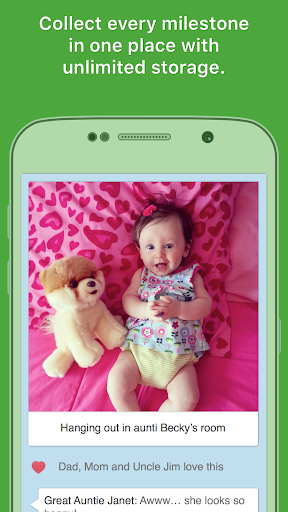

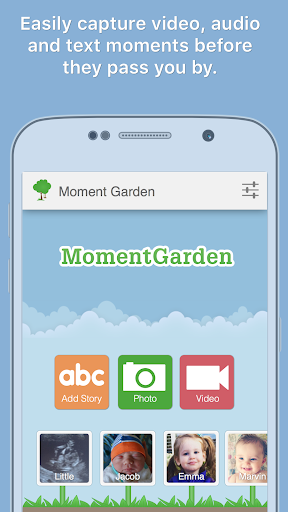
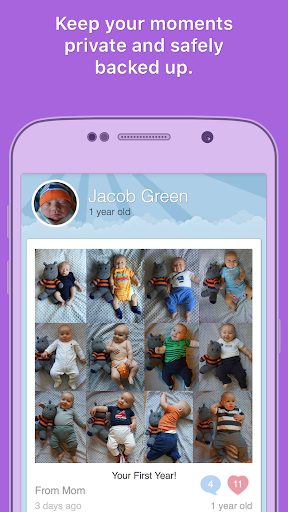
Moment Garden helps you save and relive your baby’s special moments and privately share them with your closest family and friends. With a single click, you can even turn your child’s memories into a Moment Book, a beautifully printed photo book - that baby book you never had time to finish! Don't risk losing any stories, pictures, videos or funny things your children say: start building your Moment Garden today!
Since 2010, we've helped over 100,000 people tell their child's story and connect with their families.
Moment Garden is simple to use, private and centered around your child. Only the people you invite can view or add memories to your child's garden. When you add new memories, your family and friends will receive the latest pictures or stories right in their inbox. Grandparents LOVE seeing the moments in their email. This will absolutely make their day!
Pregnant? Start saving the ultrasound photos and pregnancy stories as you begin your new adventure! You will love looking back on them after your baby is born!
Fun Features:
★ Turn your Moment Garden into a beautiful, printed photo book with a couple clicks! (Moment Books)
★ Print prints, cards, framed pictures, magnets, mugs and much more from the Moment Garden website.
★ Save stories, photos or videos quickly and easily, anywhere you go with your child
★ Privately share your moments with just your closest family & friends
★ Emails reminding you of moments that happened a year ago (Moment Memories)
★ Receive creative moment and milestone suggestions based on your child’s age
★ Full images and videos are saved and backed up. Safe and secure!
★ Complimentary website with a beautiful timeline of all your child's moments for you and your family to enjoy
★ Simple enough for your entire family to use. Even great-grandparents can enjoy Moment Garden!
★ Stay connected with those who matter most in your child’s life
Some things parents use Moment Garden to save:
- Milestones and "firsts"
- Weight and height as your child grows up
- Daily or weekly recurring staged photos (like with a stuffed animal)
- The hilarious quotes your kids say
- Best of the best moments you want in your printed memory book
- Personalized baby journal or keepsake
- Pregnancy tracker to watch your tummy grow
Most importantly, Moment Garden is your space, so have fun and be creative!
As seen on BBC, CoolMomPicks and Better Homes and Gardens.
Mostra altro

1. Scarica il programma di installazione di MEmu e completa l'installazione

2. Avvia il Memu e apri il Google Play sulla homepage

3. Cerca Moment Garden Baby Photo Book in Google Play
Install
4. Scarica e installa Moment Garden Baby Photo Book
5. Al termine dell'installazione, fai clic sull'icona per avviar

6. Divertiti giocando a Moment Garden Baby Photo Book su PC con MEmu
MEmu App Player è il miglior emulatore Android gratuito, utilizzato da 50 milioni di persone per ottenere un'esperienza di gioco Android superba. La tecnilogia di virtualizzazione MEmu ti permette di giocare a migliaia di giochi Android con semplicità sul tuo computer, anche i giochi con la grafica più esigente.
Schermo più grande con una grafica migliore; Lunga durata, senza limitazione di batteria o dati mobili.
Supporto completo per mappa di tastiera per un controllo preciso di tastiera e mouse o gamepad.
Multipli account di gioco o attività su un singolo PC contemporaneamente con il gestore di multi istanza.
Use Moment Garden Baby Photo Book on PC by following steps: