
PanoCut: Carousel & Grid Maker
Aggiornata
Versione corrente
6.5.4
Offerta da

Non devi più preoccuparti dei sovraccarichi durante l'utilizzo di PanoCut: Carousel & Grid Maker sul tuo cellulare, liberati dal piccolo schermo e goditi dell'App su uno schermo molto più grande. D'ora in poi, sperimenta la tua App a schermo intero con tastiera e mouse. MEmu ti offre tutte le sorprendenti funzioni che ti aspettavi: installazione rapida e impostazione semplice, controlli intuitivi, niente più limitazioni di batteria, dati mobili e chiamate fastidiose. Il MEmu 9 nuovo di zecca è la prima scelta per utilizzare PanoCut: Carousel & Grid Maker sul tuo computer. Codificato con il nostro assorbimento, il gestore multi-istanza consente di aprire 2 o più account contemporaneamente. E soprattutto, il nostro esclusivo motore di emulazione può sbloccare il pieno potenziale del tuo PC, rendendo tutto liscio e piacevole.
Mostra altro
Goditi un'esperienza straordinaria con PanoCut: Carousel & Grid Maker su PC con MEmu Play. È un potente emulatore Android gratuito che ti offre migliaia di app Android per la versione desktop. Divertiti a connetterti con gli amici e a perfezionare il tuo lavoro con maggiore efficienza! PanoCut — the all-in-one photo editor and image splitter for creating stunning Instagram posts.
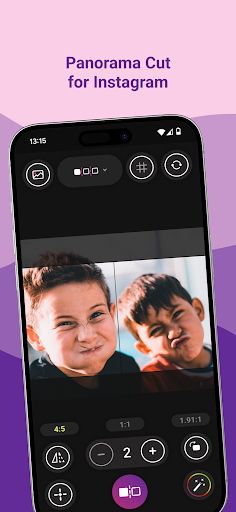
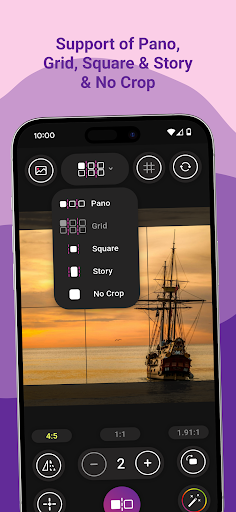
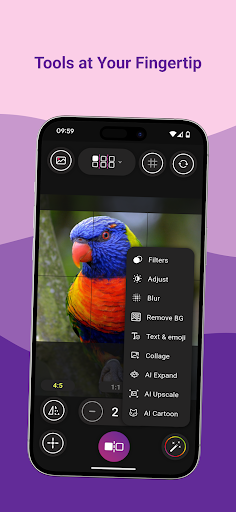

PanoCut — the all-in-one photo editor and image splitter for creating stunning Instagram posts.
Turn any photo into perfectly split grids, seamless panoramas, swipeable carousels, and eye-catching stories — all in just a few taps. Whether you want to design your Instagram feed, create a photo collage, or split a panorama into swipeable slides, PanoCut gives you everything you need.
Photo Splitter & Grid Cutter
Split any photo into 2 to 10 perfectly aligned pieces. Create square photo grids for your Instagram feed or swipeable carousel posts that keep your followers engaged. No crop needed — PanoCut preserves every detail of your image with a no crop photo tool that fits any aspect ratio.
Panorama Maker
Got a beautiful wide landscape? Split your panorama into seamless swipeable slides that flow perfectly when your followers swipe left. PanoCut is the easiest panorama splitter for Instagram — just choose your photo, align, and split.
Carousel Creator
Create scroll-stopping carousel posts for Instagram. Combine multiple images or split a single photo into a stunning swipeable post. Perfect for showcasing travel photos, product shots, and creative storytelling.
Stories & Reels Ready
Crop and resize any photo to the perfect story size. No more awkward cropping or white borders — PanoCut makes your Instagram stories look polished and professional.
AI-Powered Photo Enhancer
Take your photos to the next level with powerful AI tools:
- AI Upscale — enhance photo resolution and sharpen details instantly
- AI Cartoon — transform your photos into fun cartoon-style artwork
- AI Expand — extend your image beyond its original borders
- Background Remover — remove backgrounds from any photo with one tap
- Object Remover — erase unwanted objects cleanly from your pictures
Photo Editor & Retouch Tools
PanoCut is more than a grid maker. It is a complete photo editor with everything you need to make your photos shine:
- Filters — choose from dozens of stunning photo filters
- Adjust — fine-tune brightness, contrast, saturation, and sharpness
- Blur — add beautiful blur effects and depth to your photos
- Paint — draw and sketch directly on your images
- Stickers — add fun stickers to personalize your posts
- Text — add text with custom fonts, colors, and styles
- Crop — crop photos to any size or aspect ratio
Why Creators Choose PanoCut
- Split photos into grids and panoramas in seconds
- No crop square photo maker for Instagram
- AI photo enhancer and image upscaler
- Collage maker with seamless layouts
- All-in-one photo editor with filters, stickers, text, and retouch tools
- Lightweight, fast, and easy to use
- Works offline — no internet needed for basic editing
Whether you are a content creator, influencer, photographer, or just love sharing beautiful posts, PanoCut is the photo splitter and editor you have been looking for. Create your perfect Instagram feed today.
Mostra altro

1. Scarica il programma di installazione di MEmu e completa l'installazione

2. Avvia il Memu e apri il Google Play sulla homepage

3. Cerca PanoCut: Carousel & Grid Maker in Google Play
Install
4. Scarica e installa PanoCut: Carousel & Grid Maker
5. Al termine dell'installazione, fai clic sull'icona per avviar

6. Divertiti giocando a PanoCut: Carousel & Grid Maker su PC con MEmu
MEmu App Player è il miglior emulatore Android gratuito, utilizzato da 50 milioni di persone per ottenere un'esperienza di gioco Android superba. La tecnilogia di virtualizzazione MEmu ti permette di giocare a migliaia di giochi Android con semplicità sul tuo computer, anche i giochi con la grafica più esigente.
Schermo più grande con una grafica migliore; Lunga durata, senza limitazione di batteria o dati mobili.
Supporto completo per mappa di tastiera per un controllo preciso di tastiera e mouse o gamepad.
Multipli account di gioco o attività su un singolo PC contemporaneamente con il gestore di multi istanza.
Use PanoCut: Carousel & Grid Maker on PC by following steps: