prompt mine: Create with AI
Aggiornata
Versione corrente
4.3.2
Offerta da

Non devi più preoccuparti dei sovraccarichi durante l'utilizzo di prompt mine: Create with AI sul tuo cellulare, liberati dal piccolo schermo e goditi dell'App su uno schermo molto più grande. D'ora in poi, sperimenta la tua App a schermo intero con tastiera e mouse. MEmu ti offre tutte le sorprendenti funzioni che ti aspettavi: installazione rapida e impostazione semplice, controlli intuitivi, niente più limitazioni di batteria, dati mobili e chiamate fastidiose. Il MEmu 9 nuovo di zecca è la prima scelta per utilizzare prompt mine: Create with AI sul tuo computer. Codificato con il nostro assorbimento, il gestore multi-istanza consente di aprire 2 o più account contemporaneamente. E soprattutto, il nostro esclusivo motore di emulazione può sbloccare il pieno potenziale del tuo PC, rendendo tutto liscio e piacevole.
Mostra altro
Goditi un'esperienza straordinaria con prompt mine: Create with AI su PC con MEmu Play. È un potente emulatore Android gratuito che ti offre migliaia di app Android per la versione desktop. Divertiti a connetterti con gli amici e a perfezionare il tuo lavoro con maggiore efficienza! prompt mine is an all-in-one app for finding proven AI prompts and using them to create amazing videos, text, and images with models like Nano Banana Pro.
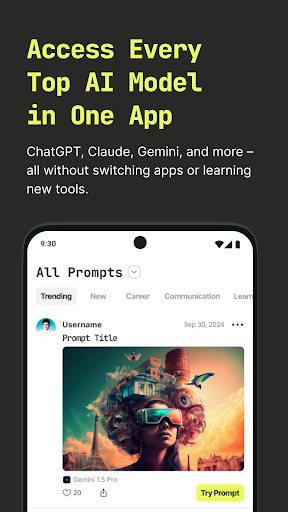
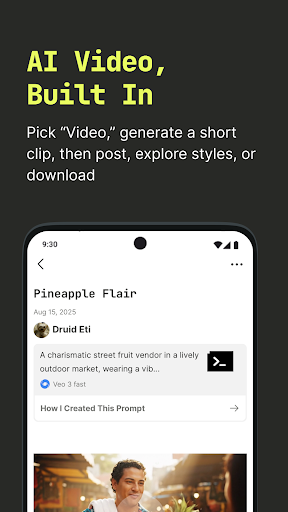
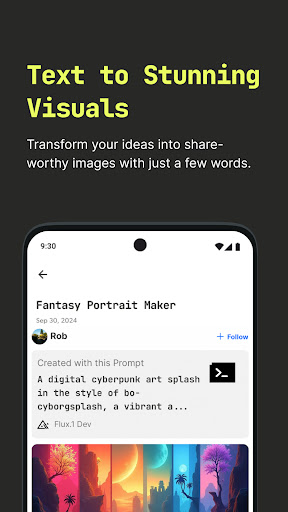
prompt mine is an all-in-one app for finding proven AI prompts and using them to create amazing videos, text, and images with models like Nano Banana Pro.
Make AI videos, images, and text in one place. Generate short videos with text-to-video using multiple models – including Veo 3 and Veo 3 Fast – create art with an AI art generator, and discover high-performing LLM prompts you can try instantly.
prompt mine is your creative command center for LLMs and media. Explore a constantly evolving library of prompt ideas for video GPT-4, Claude, Gemini AI, DeepSeek, and more. Test, remix, and publish your own results. Image generation and editing now get a major upgrade with Gemini 2.5 Flash Image (“Nano Banana”).
WHY CREATORS CHOOSE PROMPT MINE
– With model choice (Veo 3.1 AI video generator, Veo 3.1 Fast) for different speed and style needs
– AI art and text creation side by side, plus upgraded image editing with Nano Banana
– Cross-model insights to see which prompts perform best
– Prompt generator for fresh prompt ideas
– Community showcase to learn and publish
– Privacy-first with optional login and full data control
Key Pointers:
– Helps users save prompts, explore prompts, and share prompts in one organized space
– Simplifies Prompt Engineering for beginners and advanced users
– Includes an AI Prompt Generator that acts as a smart prompt assistant
– Offers ready-to-use prompt ideas and a flexible prompt generator
– Supports LLM and private LLM workflows
– Features an AI image to prompt generator for visual creators
– Comes with an AI writing assistant for everyday writing and content
– Encourages creativity with AI creator art generator tools
COMING SOON (BETA)
– Agentic workflows: chain tasks, auto-iterate, and run goal-driven flows with less manual effort. Rolling out gradually; join the in-app waitlist.
PROMPTS FOR EVERY PASSION
– Career growth
– Creative writing
– Finance
– Learning and study aids
– Tech and automation
– …and more
HOW IT WORKS
> Browse proven prompts by goal or model
> Preview real results from the community
> Run prompts with your preferred model... for free!
> Save, remix, and publish your creations
> Build an AI portfolio and grow your reach
FOR EVERY AI LEVEL
– Great for beginners, pros, and professionals using AI for real results
WHAT’S NEW
– AI video generation: turn text or images into short videos; choose from multiple models, including Veo 3.1 and Veo 3.1 Fast
– Free daily Gemini 3 Flash Image (“Nano Banana Pro”) generation: faster, smarter image creation and a big boost to editing quality
– Smarter prompt discovery: see what’s working now across models
– Creator profiles: save, remix, and showcase your best work
PRIVACY AND CONTROL
– Explore without connecting external AI accounts
– Optional login unlocks full features and sync
Download prompt mine and start creating. AI video, images, text—and the prompts that power them. Includes AI video generator, text-to-video with Veo 3 and Veo 3 Fast, AI art generator, upgraded image editing with Gemini 3 Flash Image (“Nano Banana Pro”), prompt generator, LLM prompts, prompt ideas, and AI chat.
Mostra altro

1. Scarica il programma di installazione di MEmu e completa l'installazione

2. Avvia il Memu e apri il Google Play sulla homepage

3. Cerca prompt mine: Create with AI in Google Play
Install
4. Scarica e installa prompt mine: Create with AI
5. Al termine dell'installazione, fai clic sull'icona per avviar

6. Divertiti giocando a prompt mine: Create with AI su PC con MEmu
MEmu App Player è il miglior emulatore Android gratuito, utilizzato da 50 milioni di persone per ottenere un'esperienza di gioco Android superba. La tecnilogia di virtualizzazione MEmu ti permette di giocare a migliaia di giochi Android con semplicità sul tuo computer, anche i giochi con la grafica più esigente.
Schermo più grande con una grafica migliore; Lunga durata, senza limitazione di batteria o dati mobili.
Supporto completo per mappa di tastiera per un controllo preciso di tastiera e mouse o gamepad.
Multipli account di gioco o attività su un singolo PC contemporaneamente con il gestore di multi istanza.
Use prompt mine: Create with AI on PC by following steps: