
Reedy. Intelligent reader
Aggiornata
Versione corrente
3.4.1
Offerta da

Non devi più preoccuparti dei sovraccarichi durante l'utilizzo di Reedy. Intelligent reader sul tuo cellulare, liberati dal piccolo schermo e goditi dell'App su uno schermo molto più grande. D'ora in poi, sperimenta la tua App a schermo intero con tastiera e mouse. MEmu ti offre tutte le sorprendenti funzioni che ti aspettavi: installazione rapida e impostazione semplice, controlli intuitivi, niente più limitazioni di batteria, dati mobili e chiamate fastidiose. Il MEmu 9 nuovo di zecca è la prima scelta per utilizzare Reedy. Intelligent reader sul tuo computer. Codificato con il nostro assorbimento, il gestore multi-istanza consente di aprire 2 o più account contemporaneamente. E soprattutto, il nostro esclusivo motore di emulazione può sbloccare il pieno potenziale del tuo PC, rendendo tutto liscio e piacevole.
Mostra altro
Scarica Reedy. Intelligent reader su PC con MEmu Android Emulator. Divertiti giocando sul grande schermo. Read e-books, articles, any texts and web pages fast and comfortably.
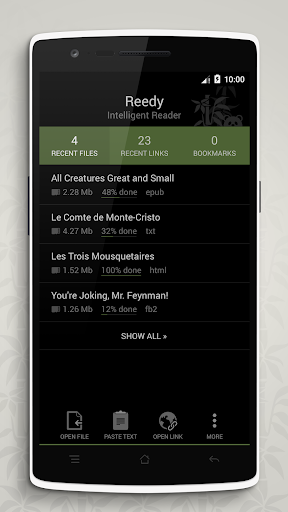
Read e-books, articles, any texts and web pages fast and comfortably.
Switch easily between regular reading, speed reading (up to 3000 words per minute!), and text-to-speech.
★ Reedy opens files, web links and any text received from other apps
★ Supported formats: epub / fb2 / html / txt; including books in zip-archives
FEATURES
✔ 3 reading modes: regular, speed reading, text-to-speech voice reading;
✔ Styled text, images, tables, links, footnotes: all the elements can be displayed right in the reader;
✔ Extraction of the main content from web pages;
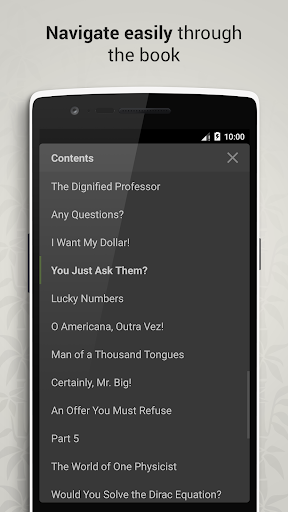
✔ Easy and intuitive navigation through the book. Table of Contents with auto creation even for plain text files;
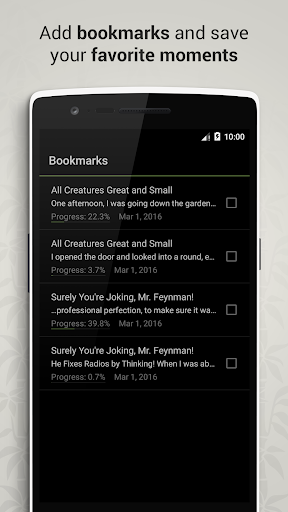
✔ Convenient and informative bookmarks;
✔ Ability to select, copy and share any text from the document. Intelligent sharing of quotes – customize the text to share, attach the book title and/or author name in one tap;
✔ Locking of the screen orientation in the reader;
✔ Customizable text size – use the pinch-to-zoom multi-touch gesture;
✔ Light/day and dark/night themes;
✔ Automatic book encoding detection;
✔ Quick lists of recent files, web documents and bookmarks;
✔ Clean, simple and intuitive interface.
SPEED READING
Increase your reading speed in 1.5-2 times straight away! If you wish you could read 3 or even 4 times faster than usual without the slightest loss of meaning.
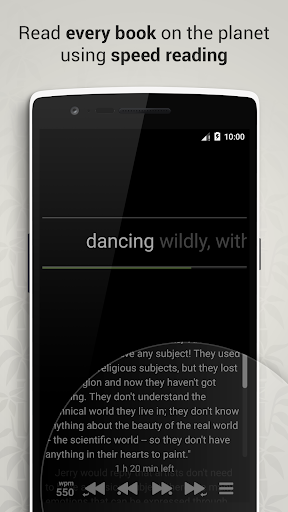
Reedy uses a technique called RSVP (Rapid Serial Visual Presentation) allowing you to read with any comfortable speed. Words are shown fast one after another on the same place of the screen which increases the speed of perception of every single word. With RSVP you can read being entirely absorbed into a book.
Look straight at the displayed word and try to perceive it without subvocal articulation. Also, don’t forget to blink. This recommendation can be applied not only to reading :) You should never let your eyes’ surface get dry.
Increase the speed when you get used to and think you’re ready.
✔ Touch the screen to play or pause;
✔ The speed of reading is up to 3000 words per minute with a possible gradual acceleration;
✔ Progress bar and time left till the end of a book;
✔ Quick preview of the full text (including text formatting, images, tables, etc.) during a pause in the speed reader;
✔ Smart slowing – reducing the speed at punctuation marks and complicated words;
✔ Focus mode – the focus point is shifted closer to the beginning of a word;
✔ Navigation through the sentences and paragraphs;
✔ Switch easily between the regular reading and the speed reading;
✔ Use volume buttons to control the speed reader:
— Press any volume button once to stop or proceed the reading. Press and hold to navigate through sentences;
— Or just use volume buttons for quick speed adjusting.
HOW TO BEGIN THE READING
✔ Open a file from your device or sd-card using built-in file manager.
Formats: FB2, EPUB (no DRM) / KEPUB, TXT, HTML + reading books in ZIP-archives.
✔ Send a web page from your favorite web browser, Pocket, Feedly, Evernote;
✔ Use Reedy for opening books from another apps and clouds (Google Drive, Dropbox, etc.);
✔ Copy any text or link and paste it into the reader.
Also you can simply share it with Reedy.
CONTACTS
Extension for Chrome:
http://snip.li/p-reedy-chrome
Join us:
https://twitter.com/ReedyReader
https://facebook.com/reedy.reader
Web-site:
https://reedy-reader.com
E-Mail:
azadev.team@gmail.com
★ ★ ★ ★ ★
Languages: English, Spanish, German, Portuguese, Dutch, Russian
Help with translations: https://goo.gl/4uRwYD
If you’ve met any difficulties in some file or web document, please let us know by e-mailing at azagroup.team@gmail.com, and don’t forget to attach the problem document.
Mostra altro

1. Scarica il programma di installazione di MEmu e completa l'installazione

2. Avvia il Memu e apri il Google Play sulla homepage

3. Cerca Reedy. Intelligent reader in Google Play
Install
4. Scarica e installa Reedy. Intelligent reader
5. Al termine dell'installazione, fai clic sull'icona per avviar

6. Divertiti giocando a Reedy. Intelligent reader su PC con MEmu
MEmu App Player è il miglior emulatore Android gratuito, utilizzato da 50 milioni di persone per ottenere un'esperienza di gioco Android superba. La tecnilogia di virtualizzazione MEmu ti permette di giocare a migliaia di giochi Android con semplicità sul tuo computer, anche i giochi con la grafica più esigente.
Schermo più grande con una grafica migliore; Lunga durata, senza limitazione di batteria o dati mobili.
Supporto completo per mappa di tastiera per un controllo preciso di tastiera e mouse o gamepad.
Multipli account di gioco o attività su un singolo PC contemporaneamente con il gestore di multi istanza.
Use Reedy. Intelligent reader on PC by following steps: