Schmick: Chat, Thought, Anon
Aggiornata
Versione corrente
2.0.9+13
Offerta da

Non devi più preoccuparti dei sovraccarichi durante l'utilizzo di Schmick: Chat, Thought, Anon sul tuo cellulare, liberati dal piccolo schermo e goditi dell'App su uno schermo molto più grande. D'ora in poi, sperimenta la tua App a schermo intero con tastiera e mouse. MEmu ti offre tutte le sorprendenti funzioni che ti aspettavi: installazione rapida e impostazione semplice, controlli intuitivi, niente più limitazioni di batteria, dati mobili e chiamate fastidiose. Il MEmu 9 nuovo di zecca è la prima scelta per utilizzare Schmick: Chat, Thought, Anon sul tuo computer. Codificato con il nostro assorbimento, il gestore multi-istanza consente di aprire 2 o più account contemporaneamente. E soprattutto, il nostro esclusivo motore di emulazione può sbloccare il pieno potenziale del tuo PC, rendendo tutto liscio e piacevole.
Mostra altro
Goditi un'esperienza straordinaria con Schmick: Chat, Thought, Anon su PC con MEmu Play. È un potente emulatore Android gratuito che ti offre migliaia di app Android per la versione desktop. Divertiti a connetterti con gli amici e a perfezionare il tuo lavoro con maggiore efficienza! Welcome to Schmick - Where Your Voice is Always Heard!
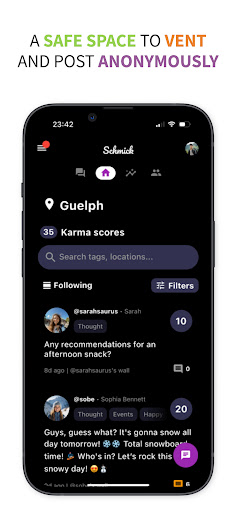
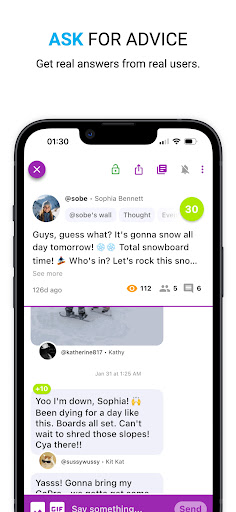
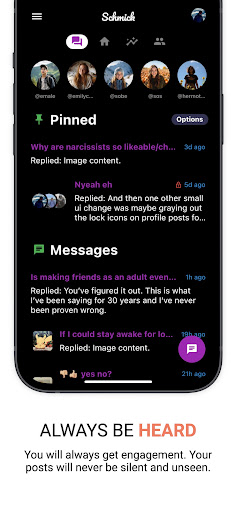
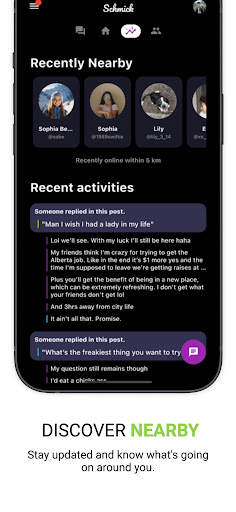
Welcome to Schmick - Where Your Voice is Always Heard!
Tired of mindless scrolling? Dive into Schmick, the social networking app that puts YOU in control. Genuine connections blossom on your personalized profiles and interactive walls. Ask questions, share opinions, and vent in a safe space where your voice is always heard.
Express Yourself Freely:
Create a Captivating Profile: Showcase your style and interests. Attract like-minded friends with customizable profiles.
Post on Friends' Walls: Share updates, memes, and thoughts. Engage in meaningful conversations without getting lost in a sea of content.
Private Posts: Elevate your conversations instantly! Switch to secret DMs for private exchanges and maintain the privacy you deserve.
Tag & Connect: Effortlessly grow your social circle by tagging friends in your posts. Building connections has never been this easy.
Go Anonymous: Share freely without revealing your identity. Experience social media without boundaries.
Experience Social Media, Reimagined:
Ditch the Feed: Take control with Walls & DMs. Foster meaningful connections beyond algorithms.
Privacy First: Share openly or keep it private – the power is in your hands. Feel secure knowing your data is protected.
Discover New Friends: Tagging makes connecting effortless. Build a thriving community and explore diverse voices.
Embrace Diverse Voices: Anonymous posting encourages open expression and inclusivity. Join a community that celebrates authenticity.
Get Your Voice Heard:
Ask Questions and Share Opinions: Engage with others by asking questions and sharing your opinions. Schmick ensures your voice is always heard.
Safe Space to Vent: Vent your thoughts and feelings in a safe and supportive environment. Connect with others who understand and share your experiences.
Join the Schmick Revolution Today:
Create Your Profile: Be seen, be heard, be YOU! Customize your space and let your personality shine.
Connect with Friends: Build deeper bonds, share authentic moments, and make every interaction count.
Explore Endless Possibilities: Discover a new way to socialize and be part of the Schmick community!
Download Schmick now and redefine your social networking experience!
Mostra altro

1. Scarica il programma di installazione di MEmu e completa l'installazione

2. Avvia il Memu e apri il Google Play sulla homepage

3. Cerca Schmick: Chat, Thought, Anon in Google Play
Install
4. Scarica e installa Schmick: Chat, Thought, Anon
5. Al termine dell'installazione, fai clic sull'icona per avviar

6. Divertiti giocando a Schmick: Chat, Thought, Anon su PC con MEmu
MEmu App Player è il miglior emulatore Android gratuito, utilizzato da 50 milioni di persone per ottenere un'esperienza di gioco Android superba. La tecnilogia di virtualizzazione MEmu ti permette di giocare a migliaia di giochi Android con semplicità sul tuo computer, anche i giochi con la grafica più esigente.
Schermo più grande con una grafica migliore; Lunga durata, senza limitazione di batteria o dati mobili.
Supporto completo per mappa di tastiera per un controllo preciso di tastiera e mouse o gamepad.
Multipli account di gioco o attività su un singolo PC contemporaneamente con il gestore di multi istanza.
Use Schmick: Chat, Thought, Anon on PC by following steps: