Sesame Search & Shortcuts
Aggiornata
Versione corrente
3.7.0
Offerta da

Non devi più preoccuparti dei sovraccarichi durante l'utilizzo di Sesame Search & Shortcuts sul tuo cellulare, liberati dal piccolo schermo e goditi dell'App su uno schermo molto più grande. D'ora in poi, sperimenta la tua App a schermo intero con tastiera e mouse. MEmu ti offre tutte le sorprendenti funzioni che ti aspettavi: installazione rapida e impostazione semplice, controlli intuitivi, niente più limitazioni di batteria, dati mobili e chiamate fastidiose. Il MEmu 9 nuovo di zecca è la prima scelta per utilizzare Sesame Search & Shortcuts sul tuo computer. Codificato con il nostro assorbimento, il gestore multi-istanza consente di aprire 2 o più account contemporaneamente. E soprattutto, il nostro esclusivo motore di emulazione può sbloccare il pieno potenziale del tuo PC, rendendo tutto liscio e piacevole.
Mostra altro
Scarica Sesame Search & Shortcuts su PC con MEmu Android Emulator. Divertiti giocando sul grande schermo. Sesame is a powerful universal search on Android.
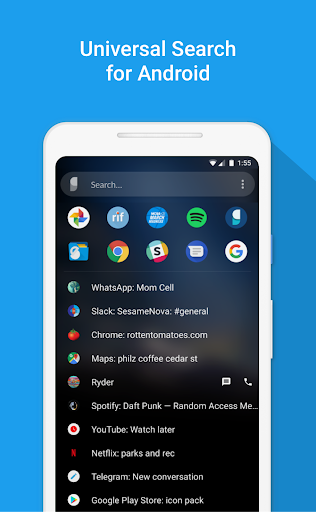
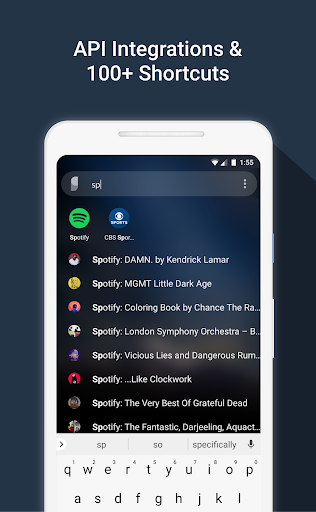
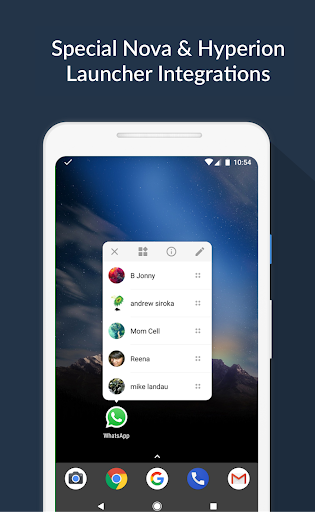
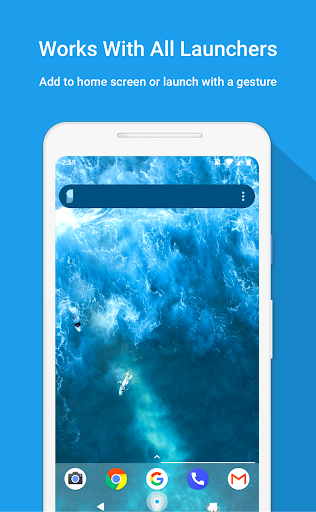
Sesame is a powerful universal search on Android. It integrates with your launcher, learns from you, and makes hundreds of personal shortcuts. With Sesame universal search, everything is 1 or 2 taps away!
"Sesame will change how you use your phone" - Android Unfiltered
"A must have app" - TechRadar
See our Nova Launcher partnership: https://help.teslacoilapps.com/sesame
Features
• 100+ shortcuts added to your device
• Fully customizable search UI
• Learns from you
• Search with dozens of apps using Google Autosuggestions
• Fast Search that's designed to work in 1 or 2 taps. It matches the first letters of words. Typing “S” “B” will bring “Spotify: The Beatles” to the top. Since it learns from you, next time just “S” will do
• API integrations to Spotify, YouTube, Calendar, Maps, Slack, Reddit, Telegram and more
• Detects wallpaper colors and styles itself
• Search device files
• Powerful tools to make your own shortcuts
• Works with all launchers and has a special partnership with Nova & Hyperion Launchers
• We don't store or sell your data
• Unlimited free trial. Only pay if you decide it's worth it!
We Believe...
• Swiping, tapping, and waiting for screens to load is slow
• A universal search UI can fix this problem
• Android was always meant to be an open system
• The raw data to build the most powerful universal search is there, but no one has stitched it together into a smooth experience
• Respecting user data = long term success. Your data stays on your device. We don’t store it. We don't sell it. (see exceptions for bug fixing below)
• We make money by making a good product. Sesame is a 100% voluntary purchase
• In user centered development: www.reddit.com/r/sesame
List of Shortcuts
Preloaded shortcuts
• Contacts with one touch to call, text, or email
• Device files
• WhatsApp conversations (not group ones though)
• Settings (19 useful ones)
• Google Shortcuts (My flights, etc.)
• Yelp (42 common searches)
• Quick Search options for apps (control this in Preferences)
Android 7.1 app shortcuts
• Backported all the way to 5.0 devices
• NOTE: we can only access the "Dynamic" 7.1 shortcuts if you have Nova Launcher
Create your own shortcuts for hundreds of apps
Supports widget/launcher shortcuts
API integrations:
• Spotify: All albums, artists, and playlists in your Library
• Slack: your teams and channels
• Tasker: all your tasks. This let’s you build complex actions in Tasker and quick launch them easily.
• Reddit: your subreddits. Works for all Reddit apps.
• Telegram: you conversations
• YouTube: subscriptions, channels, watch later
• Calendar: upcoming events
• Maps: your places and saved maps
Access dozens of search engines!
• Search options and Google Autosuggestions appear as you type
• Tap an icon to launch your search
• This works for dozens of apps like Maps, Spotify, Netflix, Evernote, Chrome, DuckDuckGo and more
• Recent searches are saved as shortcuts for 21 days
• You can control all of this in Sesame Settings
Unlimited Trial + Reminder Message
• Sesame has a full featured unlimited trial
• After 14 days, if you are using the app but haven’t paid, you’ll see a brief message each time you use a shortcut
Data Usage
• Sesame needs data to make it's shortcuts, but none of this data leaves your device. We do not collect or sell your data
• Crash Reporting (Beta only): If you are a Beta tester, Sesame will collect crash data when an error occurs. We only use this to fix bugs. You can opt out of crash reporting in Sesame Settings > Debug data
Sesame Universal Search is made by Steve Blackwell and Phil Wall. We hope you like it. Let us know if there’s anything we can do to improve it :)
Email phil@sesame.ninja
Mostra altro

1. Scarica il programma di installazione di MEmu e completa l'installazione

2. Avvia il Memu e apri il Google Play sulla homepage

3. Cerca Sesame Search & Shortcuts in Google Play
Install
4. Scarica e installa Sesame Search & Shortcuts
5. Al termine dell'installazione, fai clic sull'icona per avviar

6. Divertiti giocando a Sesame Search & Shortcuts su PC con MEmu
MEmu App Player è il miglior emulatore Android gratuito, utilizzato da 50 milioni di persone per ottenere un'esperienza di gioco Android superba. La tecnilogia di virtualizzazione MEmu ti permette di giocare a migliaia di giochi Android con semplicità sul tuo computer, anche i giochi con la grafica più esigente.
Schermo più grande con una grafica migliore; Lunga durata, senza limitazione di batteria o dati mobili.
Supporto completo per mappa di tastiera per un controllo preciso di tastiera e mouse o gamepad.
Multipli account di gioco o attività su un singolo PC contemporaneamente con il gestore di multi istanza.
Use Sesame Search & Shortcuts on PC by following steps: